How to Customize Resume With AI for Any Job in Minutes

Yes, AI can customize your resume for a specific job in seconds to minutes. It extracts keywords from a job posting, surfaces your matching experience, and reorders your bullets to fit what the employer is scanning for. Purpose-built tools like Robin do this in about 10 seconds; a manual ChatGPT workflow usually takes around 15 minutes per application. Either way, the deliverable should be an ATS-friendly PDF that puts your most relevant achievements at the top, though you’ll still want to verify every detail before you hit send.
TL;DR:
- AI tools accurately reorder and rephrase your resume to improve ATS recognition and highlight relevant experience, often in under 15 seconds.
- They work from a single, structured source of truth, emphasizing editing over invention and requiring your review to ensure authenticity.
- Proper formatting, clear headings, and keyword placement are crucial to passing ATS checks, which reject about 75% of resumes due to formatting errors.
- Manual fact-checking remains necessary to verify AI-generated claims, avoid keyword stuffing, and maintain your voice authenticity.
- Combining AI suggestions with human judgment results in more credible, personalized resumes and cover letters that better match job requirements.
Table of Contents
- How AI Tailors a Resume: What Actually Changes
- Step-by-Step Workflow to Tailor Your Resume Fast
- What to Check on the ATS Front After AI Edits
- Common AI Pitfalls and How to Verify Your Resume Fast
- Combining Human Judgment With AI Suggestions
- Keeping Your Resume’s Voice Intact While Using AI
- Personalizing Cover Letters Alongside Your Resume
- Where AI Helps Most, and Where You Still Need to Check the Work
- Generate a Tailored Resume With JobAlign in Minutes
- Sources
How AI Tailors a Resume: What Actually Changes
Good AI tailoring works from a single source of truth. The tool parses your master resume into structured fields, things like work history, individual bullets, skills, and your summary, so it can make targeted edits instead of touching the whole document at once. Then it parses the job description on the other side, pulling out keywords, ranking which requirements matter most, and noting the exact phrasing the employer uses.
Here’s the part people miss: tailoring is editing, not inventing. A tool like Canva’s AI resume builder generates suggestions from your existing resume text and the job posting, and you’re expected to review and regenerate until the phrasing lands right. Robin’s platform treats the process the same way, producing a side-by-side diff so you can see exactly what changed and why. Neither adds a job you never held or a metric you never hit; both surface what’s already there and phrase it the way the employer would recognize it.
What AI actually does during a tailoring pass:
- Rewrites bullets to mirror the employer’s terminology (their “stakeholder management” instead of your “client relations”)
- Reorders sections and bullets so the most job-relevant experience sits near the top
- Strips tables, images, and text boxes that confuse ATS parsers
- Standardizes section headings so scanning software recognizes them
- Flags gaps between your existing skills and the posting’s requirements
This distinction matters because recruiters skim in seconds and ATS software scans for structure. An edit that stays grounded in your real history keeps both audiences honest. A rewrite that drifts into invention risks a mismatch in the interview, when someone asks about a “led a cross-functional team of 12” line that was never true.
Pro Tip: Before you accept any AI-suggested bullet, read it out loud. If it doesn’t sound like something you’d say describing your own work, it’s probably drifted too far from your voice, or your facts.
Step-by-Step Workflow to Tailor Your Resume Fast
You don’t need a new process for every job posting. You need one repeatable sequence, run five different times with five different job descriptions.
- Build one canonical source. Upload your master resume or sync your LinkedIn profile so the tool has a complete, accurate baseline to pull from. Every tailored version should trace back to this single document, not a patchwork of old drafts.
- Import the job posting. Paste the URL or the full text so the tool can extract required skills, priority phrases, and the seniority level implied by the language.
- Generate suggested edits and review them as a diff. Treat this like tracked changes in a Word document: accept what’s grounded in your real experience, reject or rewrite what isn’t.
- Adjust keyword placement and formatting. Make sure job-specific terms land naturally in your skills section and relevant bullets, not crammed into a sentence where they read like a list.
- Run an ATS preview, do a final factual check, and export. Confirm dates, titles, and any metric before you save the PDF.
A few habits make this faster on the second and third pass:
- Keep a running list of the five or six keyword variations you see across similar postings (e.g., “project management” vs. “program management”)
- Save each tailored version in a job-specific folder named for the company and role, not “resume_final_v3”
- Re-run the ATS preview after any manual edit, since a single moved bullet can break the parsing structure
The JobAlign step-by-step optimization guide walks through this same sequence with screenshots if you want to see it applied to a real posting.
What to Check on the ATS Front After AI Edits
AI edits are only useful if the file that comes out the other end actually parses correctly. That’s a separate check from whether the content reads well to a human.
Roughly 75% of resumes get rejected by ATS software before a recruiter even sees them, usually over formatting, not qualifications. That number should change how you think about the export step: it’s not a formality, it’s where most rejections happen.
Run through this before you submit anything:
- Standard headings only. Use Summary, Experience, Education, and Skills. ATS software maps to these labels; a creative header like “My Journey” won’t parse the same way.
- Save as a clean PDF or DOCX. Avoid embedded objects, image-based headers, or complex tables that scanning software can’t read.
- Place keywords where they’re true. Work exact role keywords into your skills section and relevant bullets, but only where they honestly apply.
- Use simple, common fonts. Stick with something like Calibri or Arial, and keep bullet and date formatting consistent across every section.
- Preview the parse. Most tailoring tools, including JobAlign’s ATS-optimized templates, let you see exactly what fields the software extracted. If a date or title looks garbled in the preview, a recruiter’s ATS will see the same garble.
Common AI Pitfalls and How to Verify Your Resume Fast
AI tailoring tools are fast, which is exactly why they need a verification habit attached. Two failure modes show up most often.
Hallucinated claims. AI can invent a metric or a project detail that sounds plausible but never happened, especially when it’s trying to “improve” a bullet that felt thin. Cross-check every generated claim against your actual work history before you accept it.
Keyword stuffing. Cramming a job posting’s exact phrases into every line makes a resume read robotic to a human reviewer and can flag as manipulation to some ATS filters. Natural phrasing, using the right words in the right places, works better than density for its own sake.
There’s a privacy angle too. Any tool that syncs your LinkedIn profile or stores your resume is handling personal data, so it’s worth a quick look at how that data gets used. Google’s privacy policy is a reasonable model of what a clear, specific privacy page should disclose before you connect an account.
- Spot-check three bullets against your original resume or LinkedIn history
- Confirm at least one metric or number against your own records
- Verify every date range, since a wrong end date is a common AI slip
- Run a final ATS parse preview before export
Pro Tip: Set a 90-second timer for verification after every AI pass. It sounds arbitrary, but it forces you to check facts instead of just admiring the new phrasing.
Combining Human Judgment With AI Suggestions
The best tailored resumes come from a handoff, not a hand-off-and-forget. Let AI do the first pass: extracting keywords, drafting rephrased bullets, flagging gaps between your background and the posting. Then step in for the calls that require judgment rather than pattern-matching.

Seniority framing is one of those calls. AI tends to phrase everything at a similar confidence level, which can undersell a decade of leadership or oversell six months of exposure to a tool. You know which one applies. Metric framing is another: if AI suggests “improved efficiency by 30%,” you need to confirm that number exists somewhere, or adjust it to something you can actually defend in an interview.
A practical split works well: accept AI’s structural suggestions (reordering, keyword placement, formatting fixes) at face value, since those are mechanical improvements. Slow down on anything that changes the substance of a claim, a number, a scope, a title. That’s the line between speeding up your workflow and outsourcing your credibility.
If you’re applying to a senior or executive role, it’s also worth knowing that certified resume professionals exist for exactly this kind of nuance. The PARWCC’s CPRW credential represents a formal standard for resume writing expertise, useful context if you’re weighing whether a high-stakes application needs a human expert’s eyes in addition to AI’s speed.
Keeping Your Resume’s Voice Intact While Using AI
A resume that reads like it was generated by software is almost as risky as one full of typos. Recruiters read hundreds of these, and generic AI phrasing, “leveraged synergies to drive results,” is a pattern they notice fast.
The fix isn’t avoiding AI. It’s giving it better raw material and editing its output with your own ear. Start with a master resume written in your actual voice, specific verbs, real numbers, the way you’d describe the work to a colleague, not a thesaurus-driven version of it. AI tailoring tools work from what you give them, so a bland master resume produces bland tailored versions no matter how good the tool is.
When you review AI suggestions, read them against a simple test: would you say this in an interview? If a rewritten bullet uses a word you’d never actually use, swap it back. Keep sentence rhythm varied the way you’d naturally speak, some short, punchy accomplishments, some longer ones with context. AI tends to smooth everything into the same length and cadence, which is efficient but forgettable.
One more thing worth doing: keep your original master resume as the reference copy every time. If a tailored version starts drifting into phrasing that doesn’t sound like you, that’s the copy to check against, not the last tailored version you generated. Voice erodes fastest when each new draft edits the previous draft instead of the source.
Personalizing Cover Letters Alongside Your Resume
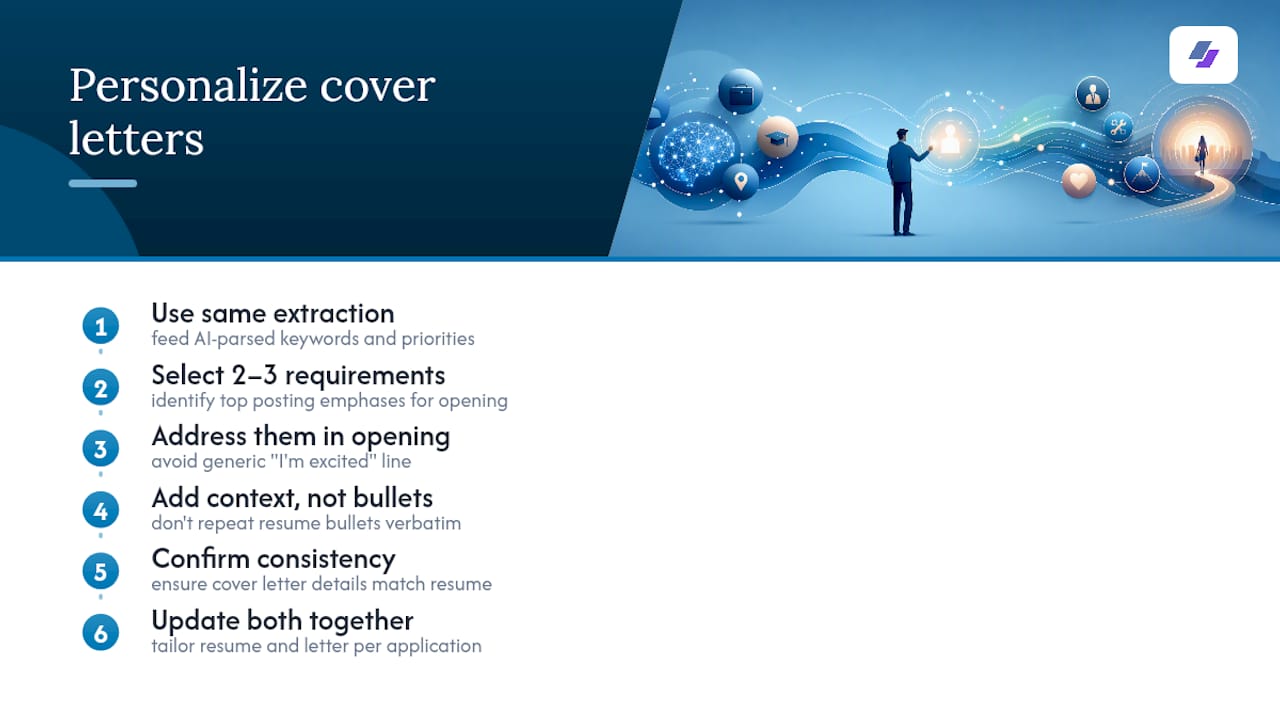
A tailored resume paired with a generic cover letter undercuts the whole effort. If you’re using AI to extract keywords and priorities from a job posting for your resume, that same extraction should feed your cover letter.
The fastest approach: once AI has parsed the job description for your resume tailoring, ask it to identify the two or three requirements the posting emphasizes most, then build your cover letter’s opening around addressing those directly instead of a generic “I’m excited to apply” line. Specificity is what separates a cover letter that gets read from one that gets skimmed and discarded.
Keep the same accuracy discipline you apply to your resume. AI can draft a cover letter paragraph about a project you led, but you need to confirm the details match what’s actually on your resume, mismatched claims between the two documents are a fast way to lose credibility with a recruiter who’s cross-referencing both. Avoid letting AI repeat resume bullets verbatim in the cover letter; the letter should add context, motivation, and specifics the resume format doesn’t allow room for.
Update both documents together for every application, not the resume first and the letter as an afterthought. A cover letter written a week before it’s mentioning the wrong team name is a real problem, and it happens more than job seekers expect when the two documents are tailored on separate schedules.
Where AI Helps Most, and Where You Still Need to Check the Work
AI is genuinely excellent at surfacing achievements you’d forget to mention and rephrasing them to match an employer’s language, at scale, across a dozen applications a week. That’s the repetitive part nobody wants to do manually, and it’s where automation earns its keep.
Where human judgment still matters: verifying that every fact holds up, deciding how to frame seniority, and catching a metric that sounds a little too polished to be true. My honest recommendation is simple. Automate the tailoring pass, then spend 60 to 90 seconds checking the core facts before you export.
— Johan
Generate a Tailored Resume With JobAlign in Minutes
You’ve seen the workflow: parse the job, extract keywords, edit from real experience, verify, export. JobAlign built its platform around exactly that sequence, minus the copy-pasting between five different browser tabs. Sync your LinkedIn profile once, and JobAlign extracts your structured work history, then matches it against each job description you paste in, proposing ATS-first edits instead of a generic rewrite.
Given that roughly 75% of resumes never make it past ATS screening, JobAlign’s approach targets that exact failure point, reporting an 87% ATS success rate for resumes generated through its templates. Per-posting personalization means you’re not stretching one watered-down resume across ten different roles.
Upload your LinkedIn profile or master resume and generate your first tailored resume to see how it handles your next job posting.
Sources
- AI Resume Tailoring — Tailor Your Resume to Any Job in 10 Seconds | Robin
- AI Resume Builder: Create Professional Job Resume Fast | Canva
- Professional Resume Writer Certification (CPRW) — PARWCC
- Policies