3 Steps to Tailor Project Manager Resume Keywords by Seniority

Prioritize these clusters: planning and scope, risk management, stakeholder communication, named tools (Jira, MS Project, Smartsheet), and certifications (PMP, CSM). Place them in three spots: your profile summary, a labeled Skills row, and the first two bullets of your current role. Mirror the exact phrasing from the job description, and pick 8 to 15 role-matched terms rather than dumping every keyword you know into one document.
TL;DR:
- Including exact job description phrases such as Agile methodology and Scrum framework in your resume improves ATS matching and recruiter understanding.
- Highlighting specific tools like Jira, MS Project, or Smartsheet with concrete examples demonstrates hands-on experience and boosts ranking.
- Incorporating measurable outcomes and artifacts, such as reducing delays by a certain percentage or managing a defined budget, adds credibility to your claims.
- Tailoring keywords and phrasing for each application, especially in the profile summary and first two role bullets, significantly increases callback chances.
- Using a simple Skills row with labeled categories and avoiding complex formatting ensures keywords are reliably parsed by ATS systems.
Table of Contents
- What Are the Best Project Manager Resume Keywords?
- How to Place Keywords So They Actually Count
- Which Keywords Fit Your Seniority Level?
- Which Tools and Certifications Belong on Your Resume?
- What Keyword Mistakes Quietly Sink Resumes?
- A Simple Three-Step Workflow for Tailoring Every Resume
- How Do You Tailor Keywords to a Specific Job Description?
- What Soft Skills Keywords Actually Matter for Project Managers?
- What Does Effective Keyword Integration Actually Look Like?
- Do Project Management Keywords Change by Industry?
- How Do You Know Your Keywords Still Match Current ATS Behavior?
- What Really Moves a Resume From ATS Pass to Recruiter Callback
- Let Jobalign Handle the Keyword Matching for You
- Sources
- FAQ
What Are the Best Project Manager Resume Keywords?
The strongest project manager resume keywords fall into six buckets: core craft terms, named methodologies, process artifacts, tools, measurable outcomes, and (as of 2026) AI-adjacent tokens. ATS software and human recruiters both scan for the same signal: does this resume mirror the language of the job posting, backed by proof? A resume that says “led cross-functional teams” without naming a methodology or tool reads as vague to both a parser and a hiring manager.
Foundational craft keywords belong in almost every PM resume, regardless of industry:
- Project planning and scope management
- Budget management and cost control
- Resource allocation
- Timeline management and scheduling
- Cross-functional team leadership
- Stakeholder management
- Vendor management
- Change management
- Quality assurance
- Process improvement
Methodologies and frameworks need exact naming. Recruiters searching an applicant tracking system type the literal term, and Agile Alliance documentation confirms that terms like Agile, Scrum, Kanban, and SAFe function as distinct, searchable tokens, not interchangeable synonyms. Include:
- Agile methodology
- Scrum framework
- Kanban
- Waterfall methodology
- SAFe (Scaled Agile Framework)
- Lean Six Sigma
- Hybrid project management
Write both the full term and its acronym the first time it appears. “Scaled Agile Framework (SAFe)” catches both a parser searching for the spelled-out phrase and one scanning for the abbreviation.
Artifacts and process tokens prove you have actually run projects, not just attended meetings about them:
- RAID log (risks, assumptions, issues, dependencies)
- Work breakdown structure (WBS)
- Gantt chart
- Earned value management (EVM)
- Sprint backlog
- Critical path analysis
- Risk register
- Project charter
- Status reporting
These terms carry weight because they signal a specific, repeatable process rather than a general claim. A resume line reading “maintained a RAID log to track 40+ open risks across three vendor teams” tells an ATS and a recruiter the same thing at once.
Tools and platforms need to be named precisely, because parsing software matches on exact strings. TechieCV’s project manager keyword research shows these terms parse reliably across major ATS platforms:
- Jira
- Microsoft Project (MS Project)
- Smartsheet
- Confluence
- Asana
- Monday.com
- Trello
- Basecamp
- Microsoft Excel (advanced functions)
- Tableau or Power BI (for reporting)
Don’t just list a tool. Show it doing something. “Built sprint dashboards in Jira” beats “Jira” sitting alone in a Skills row.
Metrics and outcome phrasing turn a list of duties into evidence. Recruiters skim for numbers, and ATS ranking algorithms increasingly weight quantified bullets higher than adjective-heavy ones. Useful phrasing patterns:
- “Reduced project delivery time by [X]%”
- “Managed a $[X] budget across [N] concurrent projects”
- “Improved on-time delivery rate to [X]%”
- “Cut scope creep incidents by [X]% through structured change control”
- “Led a team of [N] across [N] departments”
AI and technical tokens matter more every year, particularly for technical PM and AI PM roles. As of 2026, hiring teams in tech increasingly look for:
- LLM (large language model) project experience
- Prompt engineering oversight
- RAG (retrieval-augmented generation) pipeline coordination
- AI tool integration and rollout management
- Data governance for AI initiatives
If your role touched any of these, name them explicitly. A generic “led digital transformation” tells a screener nothing an algorithm can match against a job posting asking for “LLM implementation experience.”
How to Place Keywords So They Actually Count
Keyword placement matters as much as keyword choice. An ATS Verification analysis of project manager keywords and TechieCV’s placement research both point to the same conclusion: certain zones of a resume carry more parsing weight, and certain formatting choices make or break whether your keywords get read at all.
Here’s the placement order that matters most:
- Job title line. If the posting says “Senior Project Manager” and your title was “Senior PM,” write “Senior Project Manager (PM)” so both phrasings register.
- Profile summary. This is the first block a parser indexes and the first thing a recruiter’s eye hits. Pack it with two or three of your highest-priority keyword clusters in a natural sentence, not a comma-separated dump.
- Skills row. Build 6 to 8 labeled categories (Planning, Schedule, Budget, Risk, Reporting, Tools, Methodologies) with 4 to 7 literal tokens under each, landing around 22 to 36 total entries for a balanced file.
- First two bullets of your current role. These get read closest and weighted most by parsing algorithms. Lead with your strongest keyword-and-metric combination here.
- Remaining experience bullets. Spread secondary keywords across earlier roles rather than repeating the same three terms five times.
Exact-phrase matching decides more outcomes than people assume. If a job description says “Agile methodology” and your resume says only “Agile,” some parsers score that as a partial match rather than a full one. Copy the JD’s phrasing directly, then write the acronym alongside it on first use.
Formatting rules matter just as much as word choice. Skip tables, text boxes, columns, and embedded graphics. Many ATS platforms still can’t parse content inside these elements reliably, which means keywords sitting inside a fancy two-column template can be invisible to the software scanning it. Use a simple labeled Skills row instead: “Tools: Jira, MS Project, Smartsheet, Confluence” reads clean to both a machine and a human.
Here’s what keyword insertion looks like in practice:
Before: “Responsible for managing project timelines and communicating with stakeholders.”
After: “Managed project timelines for a $2.4M initiative using MS Project, reducing schedule slippage by 18% through weekly stakeholder communication and a structured RAID log.”
The second version names a tool, a metric, an artifact, and a scope. That’s four extra keyword matches inside one sentence, and it reads as a stronger claim to a human reviewer too.
Pro Tip: Keep a running document of every job description you apply to, and highlight the exact phrasing each one uses for your top five skills. Patterns emerge fast, and they tell you which version of a keyword to lead with.
Which Keywords Fit Your Seniority Level?
Keyword choice should shift with experience level. Recruiters and ATS scoring models both penalize mismatches, whether that’s a junior candidate claiming portfolio-level ownership or a senior PM’s resume reading like an entry-level task list. ATS-focused keyword research recommends selecting 8 to 15 role-matched terms per application rather than listing every keyword you’ve ever encountered.
Junior / associate PM (0 to 2 years):
- Sprint planning support
- Meeting coordination and minutes
- Ticket tracking (Jira, Trello)
- Documentation and status updates
- Junior stakeholder liaison
- Example bullet: “Coordinated sprint planning for a 6-person engineering team in Jira, tracking 40+ tickets per cycle.”
Mid-level PM (2 to 6 years):
- Project ownership end-to-end
- Budget tracking and forecasting
- Vendor coordination
- Risk mitigation planning
- Cross-functional delivery
- Example bullet: “Owned delivery of three concurrent product launches, managing a $500K budget and cutting delay incidents by 22%.”
Senior / program-level PM (6+ years):
- Program management
- PMO (Project Management Office) leadership
- Portfolio management
- Executive reporting and dashboards
- Organizational change leadership
- Example bullet: “Directed a portfolio of 12 projects across three business units, reporting monthly to the executive committee.”
Technical / AI PM:
- System design collaboration
- LLM implementation oversight
- Prompt engineering coordination
- Technical roadmap ownership
- Data pipeline governance
A rough distribution rule: junior resumes lean on tactical tool and process tokens, mid-level resumes balance ownership language with metrics, and senior resumes shift toward portfolio, program, and executive-facing terms. Claiming “portfolio management” with two years of experience raises a flag; recruiters read that as overclaiming, not ambition.
Which Tools and Certifications Belong on Your Resume?
Certifications carry real weight in project management hiring. PMI’s salary survey research and a related PMI press release on certification value both find that certification holders, particularly those with PMP, report measurable career and earning advantages compared to non-certified peers.
Priority certifications, listed with issuer and year:
- PMP (Project Management Professional), PMI, [year earned]
- CAPM (Certified Associate in Project Management), PMI, [year earned]
- CSM (Certified Scrum Master), Scrum Alliance, [year earned]
- PRINCE2 Practitioner, [year earned]
By the numbers: Certification holders surveyed by PMI report a consistent hiring and earning edge tied to holding credentials like PMP, which is one reason certifications belong near the top of a resume, not buried at the bottom.
Place certifications in a dedicated line under your name or summary, and list any in-progress credential as “PMP Candidate, expected [month/year]” rather than omitting it. For tools, name the ones you’ve actually used inside a bullet, not just in a list: “Built resource forecasts in Smartsheet across 4 teams” proves usage. A tool sitting alone in a Skills row proves nothing beyond exposure. Omit a certification or tool entirely if you can’t speak to it in an interview.
What Keyword Mistakes Quietly Sink Resumes?
Keyword stuffing backfires because it reads as noise to recruiters and, increasingly, to smarter ATS ranking models that flag unnatural repetition. Piling ten synonyms for “leadership” into a Skills row without a single bullet proving leadership impact accomplishes nothing.
Empty buzzwords are the other trap. Words like “dynamic,” “results-driven,” and “detail-oriented” carry zero ATS weight because they aren’t job-specific keywords, and they carry zero recruiter weight because everyone writes them. Replace every buzzword with a named skill, tool, or metric.
Listing a tool in your Skills row without ever showing it in context is a claim without proof, and keyword research on tool usage confirms that recruiters trust tools mentioned inside quantified bullets far more than tools sitting in an isolated list.
Quick audit checklist:
- Does every certification and tool appear in at least one bullet, not just a list?
- Did you remove generic adjectives with no measurable backing?
- Does your Skills row use simple labeled text, not columns or graphics?
- Did you mirror the JD’s exact phrasing for your top five terms?
- Does each bullet include a metric, a tool, or an artifact?
- Would a stranger understand what you actually did from the bullet alone?
Pro Tip: Read your resume out loud. Any sentence that sounds like it could belong to literally anyone in project management needs a name, a number, or a tool added to it.
A Simple Three-Step Workflow for Tailoring Every Resume
Manually rewriting a resume for every application is tedious, which is exactly why most job seekers stop doing it after the third submission and start firing off the same generic file everywhere. A repeatable workflow fixes that.
- Extract JD tokens. Copy the exact keywords, tools, and phrasing from the job posting, especially repeated terms and anything in a “requirements” section.
- Generate a tailored resume. Match your real experience against those tokens, rewriting bullets to include the metric, artifact, and tool combination covered above.
- Validate with ATS logic. Check that your Skills row, summary, and top bullets contain the highest-priority terms in the exact phrasing the posting uses.
Some resume generators build this workflow directly into their system, syncing with your LinkedIn profile to pull real experience, then producing keyword lists and bullet rewrites tailored to each job description you paste in, with a separate tailored resume for every application.
How Do You Tailor Keywords to a Specific Job Description?
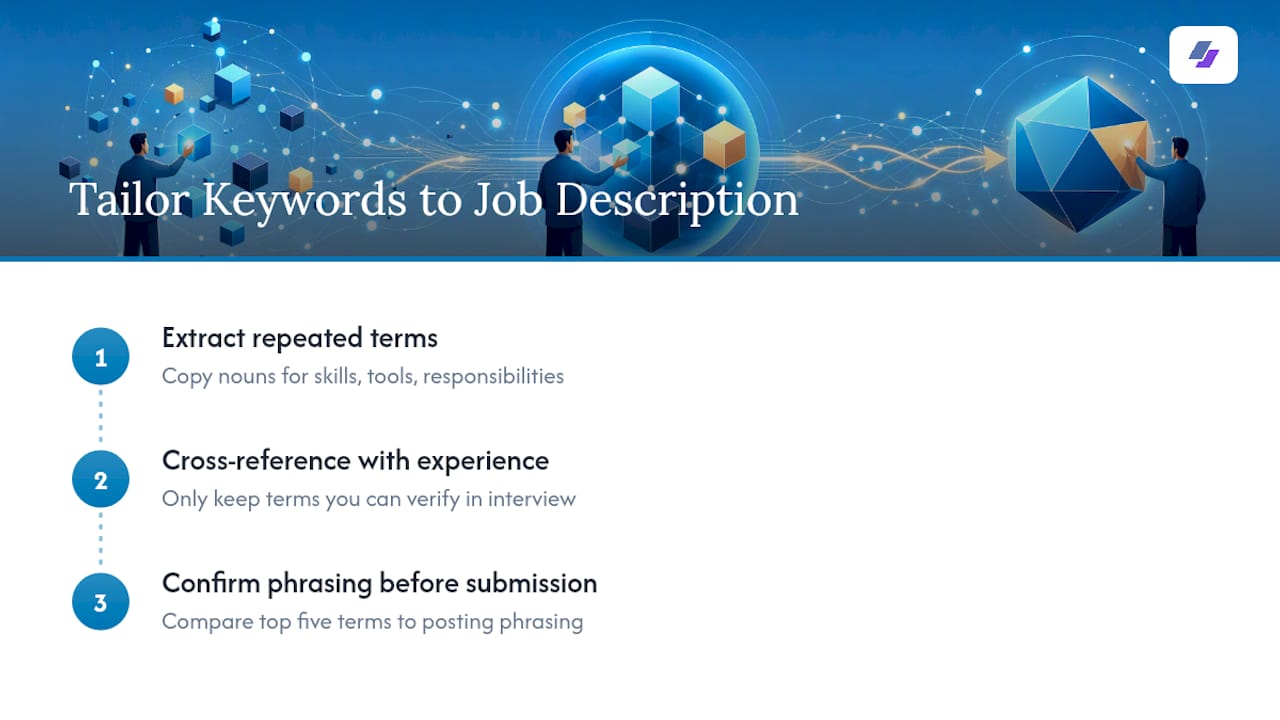
Start by pulling the posting apart, not skimming it. Copy every noun that describes a skill, tool, or responsibility into a scratch document, and note which ones repeat. A term appearing in both the “responsibilities” and “requirements” sections is almost always a priority match for that employer’s ATS configuration.
Next, cross-reference those terms against your actual experience. Don’t force a keyword onto your resume if you can’t back it up in an interview. Indeed’s guidance on matching resume keywords to job postings recommends building a shortlist of terms you can honestly claim, then working those into your summary, Skills row, and bullets in the posting’s own phrasing.
Finally, check your top five terms against the posting one more time before submitting. Did you use “stakeholder management” when the posting says “stakeholder engagement”? Small mismatches like that are exactly what separates a resume that clears the parse from one that quietly disappears into a database no one opens.
What Soft Skills Keywords Actually Matter for Project Managers?
Soft skills only carry weight on a resume when they’re tied to a specific, provable action. “Strong communicator” is a claim. “Facilitated weekly stakeholder syncs across 3 departments to resolve scope disputes” is evidence of the same skill.
The soft skills that consistently matter most for PM roles:
- Leadership, shown through team size and decision authority
- Communication, shown through stakeholder count, reporting cadence, or presentation context
- Problem-solving, shown through a specific obstacle and its resolution
- Negotiation, shown through vendor or budget outcomes
- Conflict resolution, shown through a team or client scenario
Recruiters read past generic soft skill labels almost automatically, because every resume claims the same five traits. What catches attention is a soft skill embedded inside a hard result: “Resolved a vendor delivery dispute that had stalled a $1.2M project for three weeks” demonstrates negotiation and problem-solving without ever using either word.
What Does Effective Keyword Integration Actually Look Like?
A keyword list only helps if it survives contact with a real sentence. Here’s the difference between a resume that lists skills and one that proves them.
List-only version: “Skills: Agile, Scrum, Jira, stakeholder management, risk management.”
Integrated version: “Ran Scrum ceremonies for a 9-person Agile team in Jira, cutting sprint carryover by 30% while managing risk across two external vendor dependencies.”
The second version contains every keyword from the first, plus a metric, a team size, and a specific risk scenario. It reads as a real accomplishment rather than a checklist, and it gives an ATS more surrounding context to confirm the keyword match is genuine rather than inserted for scanning purposes. Aim to integrate your top keywords into bullets this way at least twice each across your resume, once in a recent role and once in an earlier one if the experience supports it.
Do Project Management Keywords Change by Industry?
Yes, and the shift matters more than most job seekers assume. A construction PM resume, an IT PM resume, and a healthcare PM resume should not share an identical keyword list, even when the underlying PM skill set overlaps heavily.
IT and software: Agile, Scrum, sprint planning, backlog grooming, DevOps coordination, release management, Jira, technical roadmap.
Construction: Procurement management, permit compliance, site scheduling, subcontractor coordination, safety compliance (OSHA), budget reconciliation.
Healthcare: Regulatory compliance, HIPAA-aligned processes, clinical workflow coordination, vendor credentialing, patient safety initiatives.
Marketing and digital: Campaign management, cross-channel coordination, budget allocation, marketing resume keywords like content calendar management, performance reporting, and marketing manager resume keywords tied to demand generation or lifecycle campaigns.
The core PM vocabulary (planning, risk, stakeholder communication) stays constant across every industry. What changes is the specific vocabulary layered on top, which is exactly why copying a generic project manager job description keyword list without adjusting for your target industry leaves easy matches on the table.
How Do You Know Your Keywords Still Match Current ATS Behavior?
ATS platforms update their parsing logic regularly, and keyword strategies that worked two years ago can quietly lose effectiveness without any obvious warning sign. The most reliable validation method is still the simplest one: read the actual job posting you’re applying to and check your resume against it line by line, rather than relying on a static keyword list you built once and reused for a year.
A second validation step is testing your resume’s plain-text version. Copy your resume into a basic text editor and see what survives. If your Skills row, certifications, or metrics disappear or scramble, whatever formatting caused that will likely cause the same failure inside a real ATS.
Third, watch for repetition patterns in postings across your target companies. If five job descriptions in your field all use “cross-functional stakeholder alignment” instead of “stakeholder management,” that’s current market language, and it’s worth adjusting your default phrasing to match. Keyword relevance isn’t fixed. It shifts with hiring language, and the resumes that keep clearing screens are the ones getting re-checked against fresh postings rather than reused unchanged for months at a time.
What Really Moves a Resume From ATS Pass to Recruiter Callback
The honest answer is less glamorous than most advice suggests: quantify everything you can, name the artifact and tool behind every claim, and mirror the job posting’s own language instead of your favorite synonym for it. Most PM resumes fail not because they lack keywords, but because those keywords sit in a Skills row with no bullet ever proving them out.
Tailor every single submission. It takes longer than reusing one resume for twenty applications, but a resume built around one job description consistently outperforms a generic one built around none.
— Johan
Let Jobalign Handle the Keyword Matching for You
Everything covered above, extracting JD tokens, matching them to real experience, and formatting a Skills row that actually parses, is exactly what Jobalign automates every time you apply. It syncs with your LinkedIn profile, reads the job description you’re targeting, and generates a tailored resume with the right keywords already placed in your summary, Skills row, and bullets, without you rebuilding the document from scratch each time.
This fits job seekers applying to multiple postings a week just as well as it fits someone submitting one carefully targeted application. Each credit covers one job posting with up to 12 generations, so every submission can be its own tailored version instead of a recycled generic file. Start with a free ATS resume built from your LinkedIn profile, or go straight to the pricing page to see the Solo, Starter, Pro, and Ultimate credit packs if you’re ready to tailor a resume for every posting right away.
Sources
- ATS Verification — ATS Keywords for Project Managers (2026)
- TechieCV — Project Manager Resume Skills & ATS Keywords (2026)
- PMI — Project management salary survey
- Agile Alliance — Agile 101
FAQ
What Are the 7 Essential Skills for Project Managers?
The core skills recruiters look for are leadership, communication, risk management, budget management, stakeholder management, problem-solving, and time management. On a resume, each of these needs a specific action or metric attached rather than standing alone as a label.
What Are Some Key Keywords in Project Management?
Priority keywords include Agile, Scrum, risk management, stakeholder communication, budget management, RAID log, Gantt chart, and named tools like Jira and MS Project. Certifications like PMP and CSM also function as high-value keywords when listed with issuer and year.
What Are Project Management Buzzwords to Avoid?
Vague terms like “dynamic leader,” “results-driven,” and “detail-oriented” carry little weight because they’re generic and unprovable. Replace them with named tools, artifacts, or metrics, such as swapping “results-driven” for “reduced delivery delays by 18% using structured risk tracking.”
How Many Keywords Should a Project Manager Resume Include?
Most guidance points to selecting 8 to 15 role-matched keywords per application rather than listing every term you know, based on ATS keyword research for project management roles. A balanced Skills row typically lands around 22 to 36 total entries spread across 6 to 8 labeled categories.
Can a Tool Like Jobalign Help Me Find the Right Keywords?
Yes. Jobalign syncs with your LinkedIn profile and analyzes the job description you’re applying to, then generates a tailored resume with matched keywords already placed in your summary, Skills row, and bullets. Current plans and pricing are listed on the Jobalign pricing page.