Job Seekers: Tailor One Resume to 10 Jobs With ATS Safe AI Prompts

The best use of AI for resumes is as an editor and tailoring assistant, not a ghostwriter. Draft your own honest content first, then use AI to match it against a job description, sharpen weak bullets, and surface the right keywords. Skip straight to letting AI write your story from scratch and you risk generic phrasing, invented details, and a resume that sounds like everyone else’s. This precise workflow is often integrated into LinkedIn sync tools designed to automate the process without losing your own voice.
TL;DR:
- Using AI as a resume editor and tailor is more effective than asking it to generate your story from scratch, to avoid generic phrasing and invented details.
- Start with comprehensive source material and a relevant job description to produce targeted, specific bullets in formats like PAR or STAR, then verify all claims manually.
- Optimize resumes for ATS by using simple, linear formatting, integrating keywords into relevant sections, and avoiding tables, graphics, or text boxes.
- Craft prompts with specific instructions—such as tone, length, and keywords—to improve AI output quality and avoid overly buzzword-heavy or vague results.
- Employ AI tools that analyze job descriptions and automatically adapt your master resume into ATS-friendly, keyword-rich variants for multiple applications.
Table of Contents
- How to Use AI for Resumes Without Losing Your Voice
- How to Optimize Resumes for ATS When Using AI
- Prompt Templates That Actually Improve Your Resume
- The Risks of Leaning Too Hard on AI-Generated Resumes
- What to Check Before You Upload Your Resume to an AI Tool
- Tailoring One Resume to Ten Job Postings Without Losing Accuracy
- How JobAlign Fits Into This Workflow
- Where to Read More on AI and Resume Writing
- What Job Seekers Get Wrong About AI and Resumes
- Try AI-powered solutions for faster, more accurate tailored resumes
- Sources
How to Use AI for Resumes Without Losing Your Voice
Good AI resume writing starts with raw material, not a blank prompt box. If you feed a chatbot nothing but “write me a resume,” you get filler. Feed it your actual career details and a real job posting, and the output gets dramatically more useful. Here’s the sequence that works.
-
Gather your source material first. Pull together a master resume, your LinkedIn export, old performance reviews, and any project notes with real numbers attached. This is the raw data AI needs to work with, and it’s also the step most people skip, which is exactly why their AI-generated bullets read as vague.
-
Paste in the job description. Ask the AI to pull out the top skills, tools, and phrases the employer repeats. This single step does more for your match rate than any generic resume tip, because it tells you precisely what the ATS and the recruiter are both scanning for.
-
Generate bullet rewrites using PAR or STAR. Ask the AI to restructure your raw bullets into Problem/Action/Result or Situation/Task/Action/Result format, with a number attached wherever possible. “Managed a team” becomes “Led a 6-person support team that cut average ticket resolution time by 30%.”
-
Iterate for specificity. First drafts from AI tend to run long and vague. Push back: ask for tighter phrasing, a harder number, or a stronger verb. Two or three rounds usually beats the first output by a wide margin.
-
Verify everything by hand. This is the step that separates a strong AI-assisted resume from an embarrassing one. Check every date, every percentage, every team size the AI suggested or reworded. MIT’s Career Advising and Professional Development office frames this correctly: AI works best as a coach that prompts you with questions about impact and outcomes, not as an author inventing your career narrative for you.
-
Save role-specific versions and track them. Name your files by company and role, not “resume_final_v3.” Note which version you used for which application, so when interviews start coming in, you know exactly which resume got you there.
Pro Tip: Keep a “brag document” open while you work: a running list of numbers, wins, and specific outcomes from your current and past jobs. You have to supply that.
The order matters here. AI resume writing that starts with the job description and works backward toward your experience produces sharper, more targeted results than AI that starts from your resume and tries to generalize it for every job.
How to Optimize Resumes for ATS When Using AI
Applicant tracking systems don’t reject resumes because they’re badly written. They reject them because they can’t parse the formatting or find the right words in the right places. AI can help fix both problems, but only if you tell it to.
Start with structure. ATS software reads resumes top to bottom, left to right, looking for standard section labels like “Work Experience,” “Education,” and “Skills.” Tables, text boxes, columns, and graphics confuse that parsing logic, sometimes badly enough that entire sections vanish from what the system actually reads. Ask AI to rebuild your resume around plain, linear sections instead of a two-column template, and use a common font like Calibri or Arial rather than anything decorative.
Keyword placement matters more than keyword volume. Stuffing “project management” into your skills list ten times does nothing if the word never shows up in an actual accomplishment. Harvard’s career services guidance makes a similar point: resume optimization works best when keywords sit inside real context, not bolted on as a list. That means working the job description’s language into your summary, your skills section, and your bullet points, in the exact places where a human recruiter would also expect to see them.
A few formatting rules hold up across almost every ATS:
- Use standard headings (“Work Experience,” not “Where I’ve Made an Impact”).
- Avoid text boxes, tables, headers/footers, and embedded graphics for anything that carries real content.
- Save as a PDF only when the application explicitly allows it; many portals still parse Word documents more reliably, and some ask for plain text pasted directly into a field.
- Spell out acronyms at least once (“Search Engine Optimization (SEO)”) so both the ATS and a human reader catch the match.
- Keep contact information in the body of the document, not in a header or footer some parsers skip.
Quick check: Many resumes get filtered out by ATS software before a recruiter ever sees them, largely due to formatting mismatches and missing keywords, which is precisely the gap a keyword-and-formatting pass with AI is designed to close. Once you’ve rebuilt a version this way, test it. Paste your draft into an ATS-simulator tool or run it back through your AI assistant with a prompt like “score this resume against this job description and flag missing keywords.” Treat the first score as a baseline, not a verdict, and iterate until the match improves.
Prompt Templates That Actually Improve Your Resume
Generic prompts produce generic resumes. The quality of what AI gives you back depends almost entirely on how specific your prompt is, according to MIT’s guidance on AI and resume writing, which recommends including the exact job title, key skills, and tone you’re going for rather than a vague request. Below are prompts built around that principle, organized by the task they solve.
For pulling ATS keywords from a job posting:
- “Here is a job description. List the top 10 keywords and phrases an ATS would likely scan for, ranked by how often they appear or how central they seem to the role.”
For rewriting a single bullet with PAR or STAR:
- “Rewrite this bullet using the PAR framework (Problem, Action, Result). Keep it to one line, include a number if one is plausible, and don’t invent a statistic I haven’t given you: [paste bullet].”
For surfacing accomplishments you forgot about:
- “Act as a career coach interviewing me for a resume. Ask me follow-up questions about scale, budget, team size, and outcomes for this project before suggesting any wording: [paste project description].”
For locking tone and length:
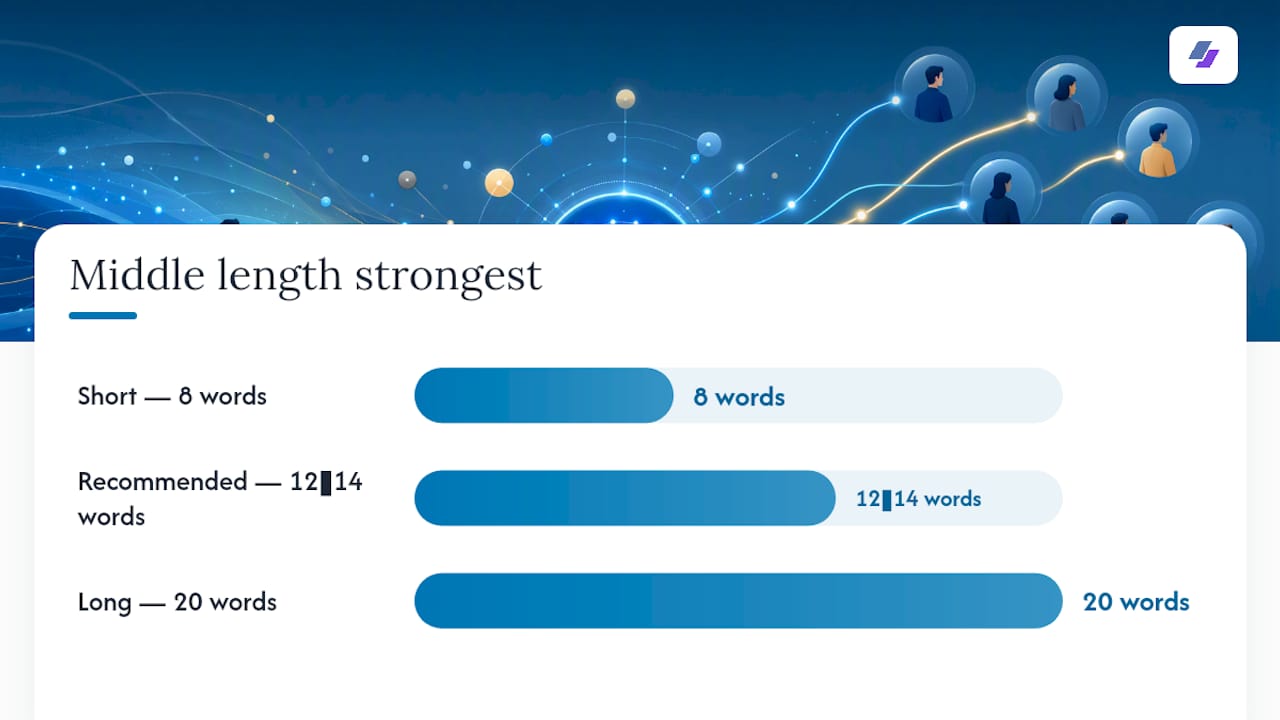
- “Keep my voice. Write in first person implied (no ‘I’), limit each bullet to 12 to 14 words, and avoid corporate buzzwords like ‘synergy’ or ‘leverage.’”
That last prompt matters more than it looks. Setting an explicit system-style instruction up front, covering tone, length, and vocabulary, prevents the kind of overly broad, buzzword-heavy output that makes AI-written resumes easy to spot at a glance.
Pro Tip: Ask the AI to give you three versions of the same bullet at different lengths (8 words, 14 words, 20 words). You’ll almost always find the strongest phrasing sitting in the middle option, not the longest one.
Treat these prompts as a starting template, not a script. The details you paste in, real numbers, real project names, real outcomes, are what turn a decent draft into a resume that sounds like you.
The Risks of Leaning Too Hard on AI-Generated Resumes
AI can hallucinate. Ask it to “polish” a bullet and it may quietly add a percentage, a team size, or a tool you never used, simply because that pattern sounds plausible for the role. Career guidance from ALIS warns explicitly that AI-generated content requires human editing because the tool can produce generic text or outright errors that only a careful read catches.
A few checks catch most of the damage before it ships:
- Verify every date, number, and team size AI suggests against your actual records, not your memory of them.
- Read the finished resume aloud. Phrasing that sounds stiff or overly formal on the page usually sounds worse out loud, and that’s your cue to rewrite it.
- Watch for language that mirrors the job posting too closely. Copying phrases verbatim from the ad can look like keyword stuffing to a recruiter who’s reading both documents side by side.
- If you’re applying for a writing, editorial, or communications role, keep AI further in the background. A resume that reads as fully AI-generated undercuts your case for a job where your own prose is the product.
- Prepare a short verbal answer for any AI-suggested claim on your resume. If an interviewer asks about that “30% reduction in ticket volume,” you need a real story ready, not a scramble.
The pattern behind all of these: AI is fast at generating plausible-sounding text and bad at knowing what’s true about your career. That division of labor, AI drafts, you verify, is the whole model. Skip the verification half and you’ve just automated your own resume mistakes.
What to Check Before You Upload Your Resume to an AI Tool
Your resume carries your full name, address, employment history, and sometimes salary details. Before pasting any of that into a third-party AI tool, take two minutes to check what happens to it.
Career services guidance from Harvard recommends checking whether a tool stores or trains on your input data, and opting out where that setting exists. Not every AI platform makes this easy to find, and that alone is worth treating as a warning sign.
A short checklist covers most of the risk:
- Confirm whether the tool uses your uploads to train its models, and look for an opt-out toggle before you paste anything sensitive.
- Redact anything you don’t need to include, like a home address or a former salary, especially if the tool doesn’t clearly explain its retention policy.
- Favor tools with a plainly written privacy policy over ones that bury data practices in dense legal text.
- Check whether data is encrypted at rest and whether the company offers enterprise-grade controls, which usually signal a more serious approach to security.
- When in doubt, test with a stripped-down version of your resume first, one with dates and skills but no address or phone number, before uploading the full document.
None of this means avoid AI tools. It means treat your resume the way you’d treat any document with your personal details in it: check the settings once, then work with confidence.
Tailoring One Resume to Ten Job Postings Without Losing Accuracy
Applying to multiple roles a week only works if you’re not rebuilding your resume from scratch every time. The fix is a master resume with modular fields, built once and reused as raw material for every variant that follows.
-
Build a master resume with everything in it. Every role, every bullet, every metric you’ve ever used, organized by job, not trimmed down. This is your source document, not something you’d ever send to an employer as is.
-
Extract 8 to 12 keywords per job posting. Paste the JD into your AI tool and ask for the skills, tools, and phrases that show up most and matter most. Map those against what’s already sitting in your master resume.
-
Rewrite your top 3 to 5 bullets per application. You don’t need to touch the whole resume for every posting, just the handful of bullets most relevant to that specific role. Ask AI to reweight them toward the keywords you just extracted, then edit by hand for accuracy.
-
Log every version you send. A simple spreadsheet with company, role, resume file name, and outcome tells you which variants are actually landing interviews. Over a few weeks, that log becomes more useful than any single piece of resume advice, because it’s specific to what’s working for you.
Pro Tip: Color-code your master resume by keyword theme (leadership, technical, customer-facing) so you can scan it fast and pull the right bullets for each new posting instead of rereading the whole document every time.
This is where a tool built around the workflow saves real time. Mapping a job description’s language against your history is exactly the kind of repetitive, detail-heavy task that gets tedious after the fifth application. JobAlign’s step-by-step approach to tailoring a resume for each posting automates the matching step while keeping you in control of what gets saved.
How JobAlign Fits Into This Workflow
Certain platforms aim to turn one accurate career history into resumes that actually pass ATS filters for each job you apply to by syncing with LinkedIn profiles to pull experience, skills, and history into a master resume automatically, skipping the manual data-entry step.
These platforms analyze the job posting you’re applying to, extract relevant keywords, and generate an ATS-compatible PDF using templates designed around standard, parser-friendly formatting. Such platforms may state high ATS pass rates for resumes generated through their tools, which is notable given the significant share of resumes that get filtered out industry-wide before a recruiter sees them.
If you want to see the keyword logic in action before generating a full resume, JobAlign’s ATS keyword reference breaks down where specific terms belong in a resume and why placement matters as much as the words themselves. For readers who want a second, more candid pass on wording after the fact, a partner tool like ResumeRoast offers blunt AI feedback that can catch the phrasing issues a first draft misses.
Where to Read More on AI and Resume Writing
For deeper detail beyond what’s covered here, MIT’s Career Advising and Professional Development office and Harvard FAS career services both publish practical, university-level guidance on using AI responsibly in a job search.
What Job Seekers Get Wrong About AI and Resumes
The mistake I see most often isn’t people using AI for resumes. It’s people expecting AI to know things it can’t know, your actual impact, your real numbers, the context behind a project that mattered. AI is genuinely good at restructuring, at spotting missing keywords, at turning a flat sentence into a sharper one. It’s bad at knowing whether you led a team of four or fourteen.
The conventional advice tells people to “use AI to write a resume,” full stop, as if the tool and the task were the same thing. That framing sets people up to skip verification, which is the one step that actually protects them in an interview. The better instinct is narrower: use AI to interrogate your own experience, extract the right keywords from a posting, and tighten your phrasing. Then check every claim by hand before it goes out.
If you take one thing from this, prioritize the verification habit over the prompt engineering. A mediocre prompt with a careful human edit beats a brilliant prompt nobody double-checked.
— Johan
Try AI-powered solutions for faster, more accurate tailored resumes
Rewriting bullets by hand for every application, then double-checking formatting against ATS quirks, eats hours you don’t have during an active job search. Certain services reduce that time by pulling your work history from LinkedIn and generating new ATS-ready resumes for each posting, matching keywords and maintaining clean formatting without rebuilding anything from scratch.
If you’ve been following the master-resume-and-keyword-mapping approach in this article, some tools are designed to run that process automatically every time you apply, catering to job seekers sending out multiple applications a week who need accuracy and speed without sacrificing either one.
Generate your first resume for free with JobAlign’s LinkedIn resume builder and see how the keyword matching holds up against a real job posting you’re applying to right now.
Sources
- AI uses for resume writing – Career Advising & Professional Development | MIT
- AI for Resumes and Cover Letters – Harvard FAS
- The pros and cons of using AI to write your cover letter and resumé — ALIS