Create an Industry-Specific Resume Fast in 2026

An industry-specific resume is a targeted document that aligns your skills, experience, and formatting to the exact demands of a particular field and role. Generic resumes fail because 75% of resumes never reach a human recruiter. They get filtered out by Applicant Tracking Systems before anyone reads a single word. The good news is you can create industry-specific resume fast without sacrificing quality. You just need the right structure, the right keywords, and the right tools working together.
What are the essential components of an industry-specific resume?
An ATS-friendly resume follows a predictable structure. That predictability is a feature, not a limitation. ATS filters in 2026 prefer standard section names and simple formatting without complex graphics or tables. Anything that breaks that pattern risks getting misread or discarded.
Your resume must include these core sections, labeled exactly as shown:
- Contact Information: Full name, phone, email, LinkedIn URL, and city or state.
- Professional Summary: Two to three sentences targeting your specific role and industry.
- Work Experience: Reverse chronological order with quantified results for each role.
- Skills: A dedicated section with industry-relevant hard and soft skills.
- Education: Degree, institution, and graduation year.
- Certifications: Any licenses or credentials required or valued in your target field.
Font choice matters more than most job seekers realize. Stick to clean, machine-readable fonts like Calibri, Arial, or Georgia at 10–12 point size. Avoid tables, text boxes, columns, and images. These elements break ATS parsing and cause your content to appear garbled or incomplete.
Pro Tip: Entry to mid-level job seekers should keep their resume to one page. Senior professionals with ten or more years of experience can use two pages, but every line must earn its place.

How can you identify and incorporate industry-specific keywords quickly?
Keywords are the bridge between your resume and the ATS scoring grid. The fastest source for the right keywords is the job posting itself. Read it carefully and note the exact phrases used for required skills, tools, and qualifications.
Here is a repeatable four-step process for keyword integration:
- Copy the job description into a text document. Highlight every skill, tool, certification, and responsibility mentioned more than once. Repeated terms signal priority.
- Map those terms to your actual experience. Only include keywords that reflect work you have genuinely done. Fabricated skills collapse in interviews.
- Place keywords in context. Weave them into your bullet points and summary rather than listing them in isolation. Keyword stuffing is counterproductive; relevance and context matter more than quantity.
- Adjust terminology by industry. A technology resume uses “Agile,” “CI/CD,” and “Python.” A healthcare resume uses “patient outcomes,” “EHR systems,” and “HIPAA compliance.” A finance resume uses “financial modeling,” “GAAP,” and “variance analysis.” Each field has its own vocabulary, and using the right one signals insider knowledge.
AI-powered resume builders accelerate this process by scanning job descriptions and surfacing the highest-priority terms you may have missed. They compare your existing content against the posting and flag gaps in real time.
Pro Tip: Write a fresh two to three sentence professional summary for every application. Mention the job title, your top relevant skill, and one quantified result. This section is the first thing both ATS and recruiters read.
What tools and methods speed up resume tailoring for different industries?
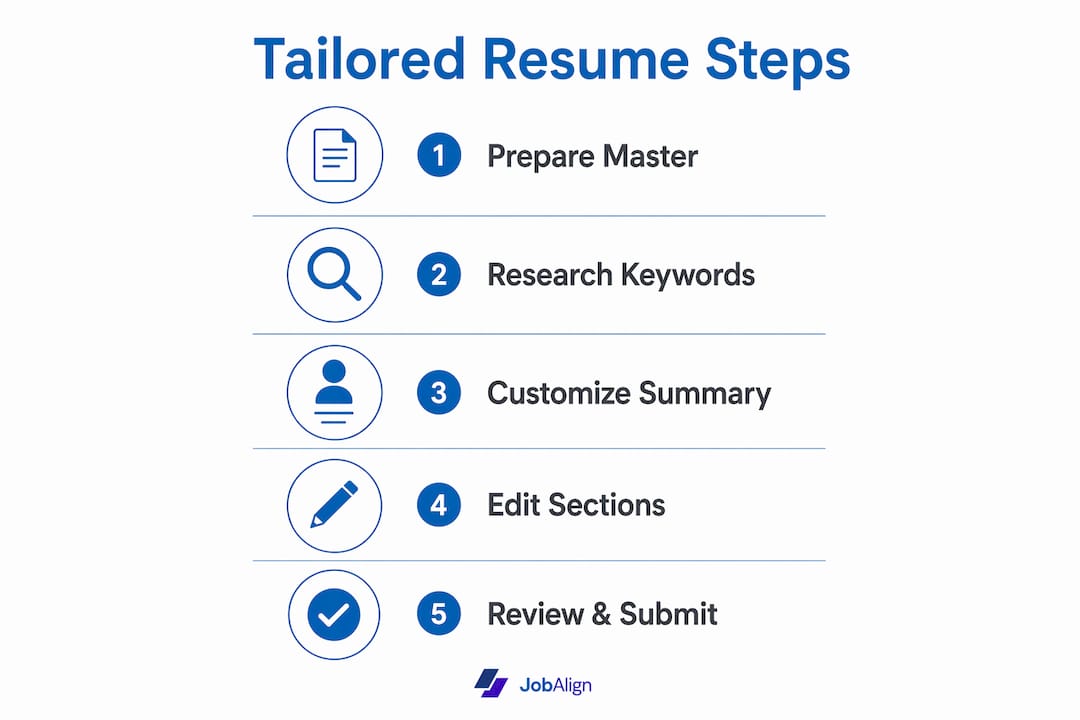
The fastest way to craft a job-specific resume is to combine a strong master resume with targeted editing tools. You do not start from scratch each time. You maintain one complete document with all your experience, then pull from it selectively.
Exporting your LinkedIn profile into a resume format gives you a solid first draft in minutes. LinkedIn-to-resume export features save time but require customization for ATS compliance. The raw export rarely uses the right section headers or formatting, so treat it as raw material, not a finished product.
Here is how manual and automated methods compare across key factors:
| Factor | Manual tailoring | AI-assisted tailoring |
|---|---|---|
| Time per application | 60–120 minutes | 5–15 minutes |
| Keyword accuracy | Depends on your research | Analyzed against job posting |
| ATS formatting check | Self-reviewed | Automated validation |
| Consistency across versions | Prone to drift | Maintained by the tool |
| Best for | Highly specialized roles | High-volume applications |
ATS resume creators analyze job descriptions and provide real-time feedback on resume improvement. That feedback loop is what makes AI-assisted tailoring so much faster than manual methods for most job seekers. HR teams are increasingly relying on AI in hiring to screen candidates at scale, which means your resume must be machine-readable before it can be human-readable.
Professional templates that adapt layouts and fonts to specific industries help you create a polished result fast. Good templates let you rearrange sections and customize designs to highlight the qualifications that matter most for your target role.
Step-by-step process to build your tailored resume fast
A structured workflow removes the guesswork and cuts your creation time significantly. Follow these six steps in order.
- Gather your career content. Collect every job title, employer, date range, key responsibility, and measurable achievement. Pull certifications, education, and relevant projects. This is your raw material.
- Select an industry-appropriate template. Choose an ATS-optimized layout that matches your field. Technology roles favor clean, minimal designs. Creative fields allow slightly more visual structure, but ATS compatibility still comes first.
- Apply targeted keywords and phrases. Use the four-step keyword process from the previous section. Place the most critical terms in your summary, your first work experience bullet, and your skills section. ATS systems weight early placement more heavily.
- Format for ATS compatibility. Use standard section headers. Remove all tables, graphics, and text boxes. Save the file as a .docx or .pdf depending on the employer’s instructions. ATS-friendly formatting is the single biggest factor in whether your resume gets parsed correctly.
- Use an AI tool to check alignment. Run your resume through an AI-powered builder or checker. AI-powered builders analyze job descriptions and provide real-time feedback for improvement. Address any flagged gaps before submitting.
- Proofread and do a final check. Read the resume aloud to catch awkward phrasing. Verify that your contact information is correct. Confirm the file name includes your name and the target role, such as “JaneDoe_DataAnalyst.pdf.”
Each step takes less time than you expect once you have your master resume ready. Most job seekers can complete steps two through six in under 20 minutes with the right tools.
Common pitfalls that slow you down and hurt your results
Speed without quality control produces resumes that look rushed and read as generic. These are the mistakes that most often undermine fast resume creation:
- Sending the same resume to every job. A generic resume signals low effort. Recruiters and ATS systems both penalize it.
- Overloading the skills section with irrelevant keywords. Padding your resume with terms you cannot speak to in an interview creates problems later.
- Using complex formatting. Multi-column layouts, decorative headers, and embedded graphics cause ATS parsing failures. The system reads your resume as a jumble of characters.
- Skipping measurable achievements. “Managed a team” tells a recruiter nothing. “Managed a team of eight and reduced project delivery time by 20%” tells them everything.
- Ignoring length guidelines. A two-page resume for an entry-level role signals poor judgment. A one-page resume for a 20-year career signals important gaps.
- Neglecting certifications. In fields like healthcare, finance, and technology, missing a required credential is an automatic disqualification.
Rushing resume creation risks mistakes that reduce effectiveness despite customization. The fix is a personal checklist you run through before every submission.
Pro Tip: Set a personal rule: never submit a resume within five minutes of finishing it. Step away, return with fresh eyes, and read it one more time. That single habit catches more errors than any spell-checker.
Key Takeaways
The fastest path to a strong industry-specific resume combines a complete master document, targeted keyword research from the job posting, ATS-compliant formatting, and an AI tool to validate alignment before submission.
| Point | Details |
|---|---|
| ATS formatting is non-negotiable | Use standard headers, clean fonts, and no graphics to pass automated filters. |
| Keywords come from the job posting | Copy exact phrases from the description and place them in context, not as a list. |
| LinkedIn export is a starting point | Export your profile for a fast draft, then customize it for ATS compliance. |
| Length follows seniority | One page for entry to mid-level; two pages for senior roles with ten-plus years. |
| AI tools cut tailoring time | AI-powered builders analyze job descriptions and flag gaps in real time. |
What I’ve learned from watching job seekers get this wrong
Most job seekers treat resume tailoring as an afterthought. They write one solid resume, apply it everywhere, and wonder why they hear nothing back. I have seen this pattern repeat across every industry, from software engineering to nursing to financial analysis.
The uncomfortable truth is that a well-formatted generic resume almost always loses to a slightly rougher but precisely targeted one. ATS systems are not reading for quality. They are reading for match. If your resume does not contain the specific terms a system is scanning for, your qualifications are invisible regardless of how impressive they are.
What has changed since 2024 is the quality of AI assistance available. Early AI resume tools produced awkward rewrites that sounded nothing like the job seeker. Current tools, including Jobalign, produce targeted language that reads naturally and scores well against ATS filters. The human judgment still matters for selecting which experiences to highlight and how to frame achievements. But the mechanical work of keyword matching and formatting validation is now genuinely fast.
My advice is to build your master resume once, maintain it carefully, and let the tools handle the repetitive customization work. Spend your saved time on the cover letter and interview preparation. That is where human judgment still wins decisively.
— Johan
How Jobalign helps you build tailored resumes in minutes
Jobalign connects directly to your LinkedIn profile and extracts your experience, skills, and education automatically. From there, it generates a custom resume for each job you apply to, complete with ATS-friendly formatting and role-specific keyword suggestions. You do not need to rebuild your resume from scratch for every application. Jobalign handles the alignment work so you can focus on applying. The platform reports an 87% ATS pass rate for resumes it generates. If you want to see how it works with your own profile, the LinkedIn resume export takes under two minutes to complete.
FAQ
What is an industry-specific resume?
An industry-specific resume is a targeted document that uses the terminology, formatting, and section emphasis preferred by a particular field. It aligns your skills and experience to the exact requirements of your target role and passes ATS filters by using the right keywords in the right places.
How long should an industry-specific resume be?
Entry to mid-level job seekers should use one page. Senior professionals with ten or more years of relevant experience can use two pages, provided every line adds value.
What keywords should I put on my resume?
Pull keywords directly from the job posting you are applying to. Focus on skills, tools, certifications, and job titles mentioned more than once. Place them naturally in your summary, experience bullets, and skills section rather than listing them in isolation.
Does formatting really affect ATS results?
Yes. ATS systems in 2026 reject resumes with complex graphics, tables, and non-standard section headers because they cannot parse the content correctly. A clean, simple layout is the single most reliable way to pass automated screening.
How fast can I realistically tailor a resume for a new job?
With a complete master resume and an AI-powered tool, most job seekers can produce a tailored, ATS-ready resume in 5–15 minutes per application. Manual tailoring without tools typically takes 60–120 minutes.