Resume vs CV: What's the Real Difference and Which Do You Need?

Resume vs CV: What’s the Real Difference and Which Do You Need?
A resume is a short, targeted marketing document, usually one to two pages, built to win a specific job. A CV is a comprehensive, multi-page record of your entire academic and professional history. In the U.S., that distinction matters: send the wrong one and you can look either underqualified or wildly out of step with the role.
If the job posting names a specific document, follow it. If it doesn’t, use a resume for industry, government, and nonprofit jobs, and a CV for academic, research, or medical positions. Either way, the smartest move is the same one career coaches have pushed for years:
- Build a living CV first, then pull tailored resumes out of it for each application.
- Update that CV every time you publish, present, or get promoted.
- Never send a five-page CV to a hiring manager who asked for a resume.
Key Takeaways
A resume is a tailored, one-to-two-page marketing document for most jobs, while a CV is a comprehensive academic record that grows with your career.
| Point | Details |
|---|---|
| Know the core split | Resumes market you for one role; CVs document your entire academic or research career. |
| Match length to purpose | Keep resumes to one or two pages; let CVs run as long as the achievements require. |
| Follow posting instructions first | When a job or program names a specific document, send exactly that, not a substitute. |
| Tailor every resume you send | Mirror the job description’s language and quantify achievements instead of listing duties. |
| Use automation as a starting point | Jobalign can generate a tailored, ATS-optimized resume from your LinkedIn profile, though a quick human review before submitting still helps. |
Table of Contents
- Resume vs CV: The Differences at a Glance
- When to Use a Resume and When to Use a CV
- What Goes on a Resume vs What Goes on a CV
- How to Tailor a Resume for the Job (and for ATS)
- Where Automated Resume Tools Fit Into This Workflow
- How Resumes and CVs Got Their Names
- Myths About Resumes and CVs That Won’t Die
- LinkedIn and Online Profiles Changed Both Documents
- Keep One Master Document, Not a Dozen Versions
- A Faster Way to Turn Your CV Into a Tailored Resume
- Sources
Resume vs CV: The Differences at a Glance
The two documents differ in purpose, length, and audience, and mixing them up is one of the fastest ways to get screened out before a human ever reads your work.
A resume exists to get you an interview. It’s short, achievement-focused, and rewritten for each application. A CV exists to document a career, particularly an academic or research one, in full: every degree, publication, grant, and teaching assignment you’ve accumulated. The UC Davis Career Center puts resumes at one to two pages, while CVs commonly run multiple pages and grow longer with seniority.
- Purpose: resume markets your fit for one role; CV documents your full career.
- Length: resume stays under two pages; CV grows without a fixed ceiling.
- Audience: resume for hiring managers and ATS software; CV for academic search committees, grant reviewers, and journal editors.
- When requested: resume for most private-sector, public-sector, and nonprofit jobs; CV for professorships, postdocs, fellowships, and international academic roles.
Here’s where it gets confusing: in much of Europe and elsewhere, “CV” is simply the generic word for any application document, resume included, according to Indeed’s guidance on international usage. If an online application portal in the U.S. labels a field “CV” but caps the upload at two pages, treat it as a resume request and ignore the label.
When to Use a Resume and When to Use a CV
The type of role you’re chasing usually settles the question before you even open a template.
Most private-sector jobs, government positions, and nonprofit roles call for a resume. Academic jobs, postdoctoral positions, research grants, medical faculty roles, and many international academic postings call for a CV instead. Graduate school applications and fellowship committees also tend to expect CV-style documents rather than resumes, since they want the full research and publication trail, not a condensed pitch.
- Read the posting closely. If it mentions publications, teaching experience, grants, or research interests, that’s a strong signal a CV is expected.
- Check the application portal’s field labels, but don’t trust them blindly, since some platforms use “CV” as a catch-all term regardless of what they actually want.
- When it’s genuinely unclear, ask. University career offices, including Cornell’s Graduate School, specifically advise contacting the employer or admissions office rather than guessing.
- Default to a resume for anything industry-facing, and a CV for anything academic-facing, when no other signal exists.
Pro Tip: Keep both documents current at once. A CV is easy to trim into a resume; a resume is much harder to expand into a credible academic CV on short notice.
What Goes on a Resume vs What Goes on a CV
Length guidance only helps once you know what actually belongs on each document. A resume that reads like a diary and a CV that reads like a highlight reel are both going to work against you.
A resume typically includes:
- Contact header with name, phone, email, and city/state
- Optional summary or objective line (skip it if it just repeats your job title)
- Work experience written as achievements with metrics, not duty lists
- Condensed education section (school, degree, graduation year)
- Skills section relevant to the target role
- Optional sections: certifications, relevant projects, volunteer work
The UC Davis Career Center frames resumes as focused on recent relevant experience, not your entire career.
A CV typically includes:
- Header with contact information
- Education, listed in full with dissertation or thesis titles where relevant
- Research experience and lab or fieldwork history
- Publications, cited consistently in APA or MLA format
- Presentations, conference talks, and posters
- Grants, fellowships, and awards
- Teaching experience and course list
- Professional memberships and references
The UNC Writing Center treats a CV as a living document that expands every time you publish or teach a new course, which means there’s no fixed page count to hit.
One detail trips people up constantly: a publication list belongs on a CV, never squeezed into a resume, and a metric-driven bullet like “increased retention 22%” belongs on a resume, not buried in CV prose. Move content in the direction the document’s purpose demands, not the direction that’s easiest to copy and paste.
How to Tailor a Resume for the Job (and for ATS)
Career advisors are blunt about this: a resume that lists duties instead of results gets ignored, and one that isn’t tailored per application often never reaches a human at all, according to SNHU’s career guidance.
- Start with the job description, not your old resume. Pull out required skills and repeated phrases, and mirror that language wherever it’s truthfully accurate to your background.
- Convert every duty into an achievement. Lead with an action verb, state the result, and attach a number when you have one. “Managed social accounts” becomes “Grew Instagram engagement 34% in six months.”
- Format for machines, not just people. Use standard section headings like “Work Experience” and “Education,” submit as a PDF or DOCX depending on what the application requests, and skip images, tables, or text boxes that scanning software can’t parse.
- Trim aggressively. Cut roles older than 10 to 15 years unless directly relevant, and put your strongest, most quantified bullet first under each job, not buried third or fourth.
A large share of resumes never reach a human reviewer because applicant tracking systems filter them out first, which is exactly why keyword placement in context, not keyword stuffing, matters more than most job seekers assume, per Forbes’ resume guidance.
Pro Tip: Keep one master CV as your source of truth, then generate a fresh, tailored resume from it for every application instead of editing the same file over and over. Our ATS tailoring guide walks through the keyword extraction step in more detail.
Where Automated Resume Tools Fit Into This Workflow
Manual tailoring works, but it’s slow when you’re applying to a dozen roles in a month, and that’s the gap automated ATS-aware tools were built to close.
An automated resume generator earns its keep when you’re applying broadly and need multiple accurate, keyword-matched versions fast, pulled straight from a LinkedIn profile or master CV. It’s less useful when you’re crafting a single, highly specialized academic CV that needs a human’s judgment on which of forty publications to feature. Jobalign syncs directly with a LinkedIn profile, extracts relevant experience, and optimizes keywords against a specific job posting, with a reported 87% ATS pass rate for resumes generated this way.
Maintain a master CV as your permanent record, generate a tailored resume with an ATS-aware tool for each application, then spend five minutes doing a human pass for tone and accuracy before you hit submit.
That last step still matters. Automation handles the keyword matching faster than any person can; it doesn’t yet know whether a phrase sounds like you.
How Resumes and CVs Got Their Names
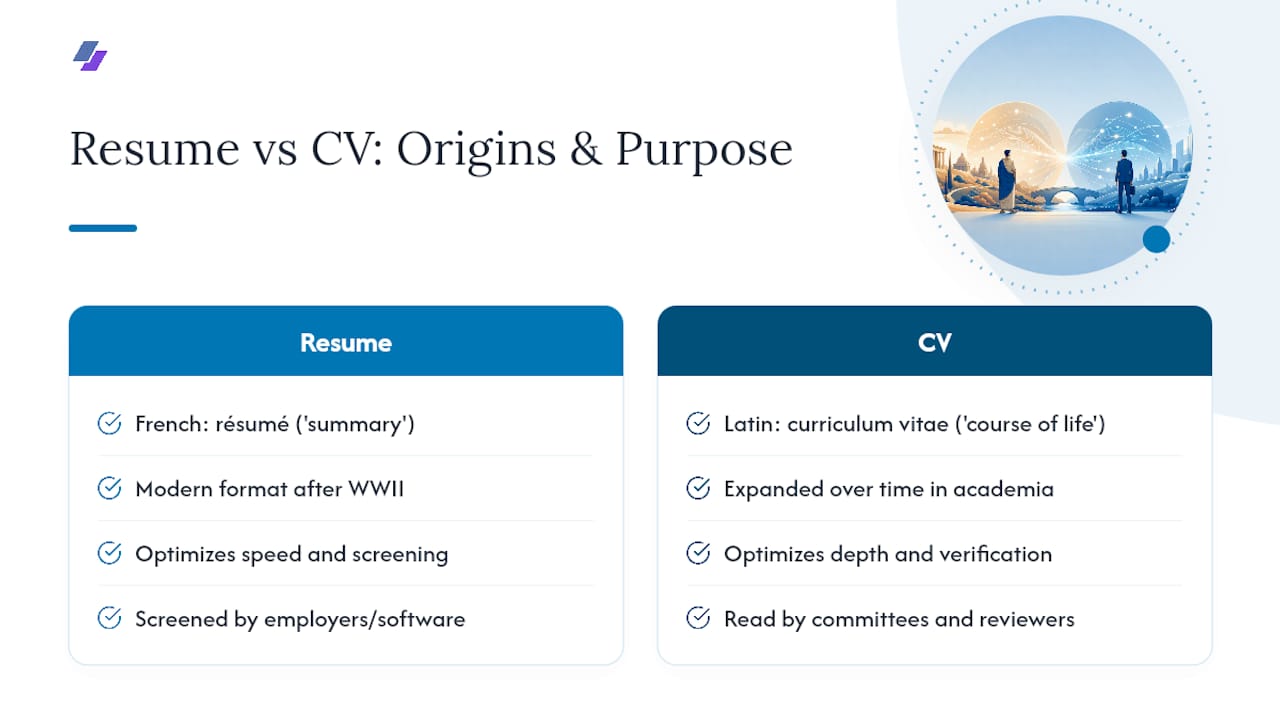
The word “resume” comes from the French résumé, meaning “summary,” and the word “curriculum vitae” is Latin for “course of life.” Both terms describe exactly what they still do today, just with centuries of drift in between.
Job application documents as we recognize them didn’t really exist until the early 20th century. Before that, hiring happened through personal introductions, guild records, or handwritten letters of reference. The modern resume format, with sections for experience and education, took shape after World War II, as U.S. companies scaled up hiring and needed a standardized way to screen large numbers of applicants quickly.
Academia moved differently. Universities and research institutions kept building out the CV format because their hiring and tenure processes depend on a complete, verifiable record: every publication, every grant, every course taught. That model never needed to shrink, because the audience, tenure committees and grant reviewers, wants exhaustive detail rather than a pitch.
The two documents diverged for a simple reason: industry hiring optimizes for speed and screening, while academic hiring optimizes for depth and verification. That split has only widened with digital hiring tools, since resumes now get parsed by software built to reward brevity and keyword clarity, while CVs remain built for human reviewers who read every line.
Myths About Resumes and CVs That Won’t Die
A few persistent myths cause real damage during a job search, and most of them trace back to advice that made sense decades ago but hasn’t aged well.
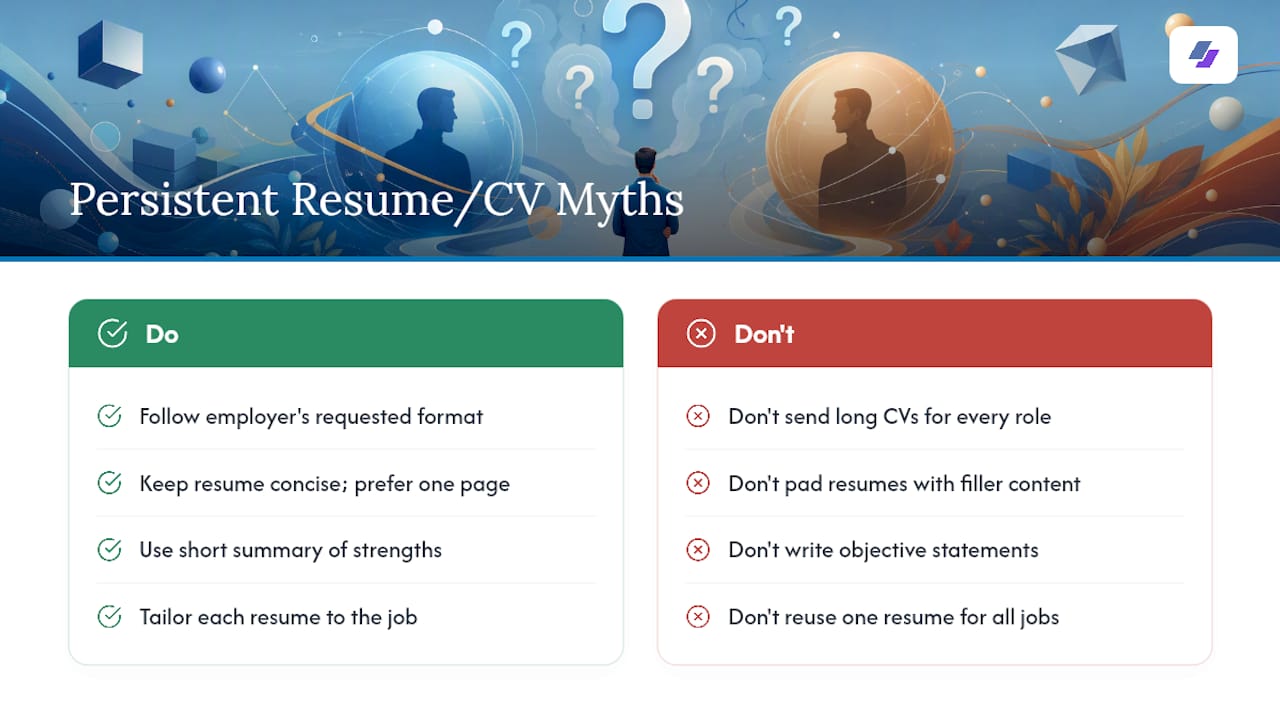
Myth: A CV looks more impressive, so use it for everything. Sending a five-page CV for a marketing coordinator role signals you didn’t research the role’s expectations. Hiring managers reading dozens of applications want the two-page resume they asked for.
Myth: Longer resumes show more experience. Recruiters skim, and ATS software doesn’t reward length. A tightly written one-page resume built around quantified wins outperforms a padded two-pager every time.
Myth: A resume needs an objective statement. Objective statements went out of fashion years ago because they describe what you want, not what you offer. A short summary of relevant strengths does more work in the same space.
Myth: CVs and resumes are interchangeable terms everywhere. They aren’t in the U.S., but they often are elsewhere, which is why international job seekers get tripped up constantly, as Indeed notes.
Myth: One resume works for every application. This is the costliest myth of all. A resume built for one job description and reused everywhere else almost always underperforms a version tailored to each posting’s language and requirements.
LinkedIn and Online Profiles Changed Both Documents
Digital profiles didn’t replace resumes or CVs. They changed how both get built and verified.
Recruiters routinely cross-check a resume against a LinkedIn profile before scheduling an interview, so consistency between the two now matters as much as the content of either one alone. A resume that claims a title or date range that doesn’t match LinkedIn raises a flag before a conversation even starts.
For academics, digital repositories like Google Scholar and ORCID now function alongside the CV, giving reviewers a way to verify publication counts and citation history instantly rather than trusting a static document. That hasn’t shortened the academic CV. It’s made accuracy on it more important, since discrepancies are easier to catch than they used to be.
The practical upside is real: LinkedIn holds most of the raw material a resume needs, work history, skills, education, in one structured place, which means the fastest path to a decent first draft is often exporting that data instead of typing it from memory. A LinkedIn-to-resume export can turn an outdated profile into an ATS-ready starting point in a couple of minutes, though it still benefits from a tailoring pass afterward for any specific role.
Keep One Master Document, Not a Dozen Versions
Here’s the habit that actually works: keep a living CV, even if you never plan to apply for an academic job, and treat it as your permanent record of everything you’ve done professionally.
Update it quarterly, or right after anything worth remembering, a publication, a certification, a promotion, a big project. Then, when a job posting comes up, pull from that CV to assemble a resume tailored specifically to that role’s language and requirements. Skip the temptation to just tweak your last resume slightly. Tailoring the substance matters far more than cosmetic formatting changes.
A simple cadence works for almost everyone: update the master CV every few months, and produce one freshly tailored resume per application, never a recycled one.
— Johan
A Faster Way to Turn Your CV Into a Tailored Resume
Once you understand the difference between a resume and a CV, the next problem is usually time: writing a fresh, tailored resume for every application is exactly the kind of repetitive work that eats an evening, which can be simplified with tailored recruitment solutions. Jobalign solves that specific bottleneck. It syncs directly with your LinkedIn profile, reads the job description you’re applying to, and generates an ATS-optimized resume built around that role’s actual keywords, without you starting from a blank page each time.
If you’re weighing whether automation fits your search, start with the free LinkedIn resume builder to see a generated draft in about two minutes, then compare it against a posting you actually want. A generated draft still deserves a five-minute human read before you hit submit, but it gives you a strong, keyword-matched starting point instead of a blank document. Check pricing once you’re ready to tailor a version for every posting.
Sources
For deeper guidance, check the UC Davis Career Center on resume fundamentals, the UNC Writing Center for CV structure and publication citation formats, and SNHU’s career resources for broader career-advice context. University career centers and admissions offices remain the most reliable sources for department-specific CV expectations.
- Resume vs CV - Career Center - UC Davis
- Difference Between Curriculum Vitae and Resume | SNHU
- Curricula Vitae (CVs) versus Resumes – The Writing Center
- Difference between resume vs CV | Indeed