Resume Workflow for Contract Professionals: Get More Interviews

The fastest way to win more interviews as a contract professional is a two-document system: one master resume that records every project you have ever delivered, plus a lean edit for each application that customizes your headline, summary, and top three bullets. Build the master once, maintain it quarterly, and spend 10–15 minutes tailoring it per role. That is the entire workflow. CareerOneStop confirms this approach reduces application time while preserving strong, targeted proof for each job.
Here are three things you can do in the next 10 minutes to start:
- Open a blank document and label it “Master Resume — [Your Name].” Add your three most recent projects with client context, your role, and one measurable result each.
- Pull up one target job posting and underline every repeated skill or tool in the description.
- Compare those underlined terms to your master resume. Note which bullets already match and which need a one-line reframe.
Two signals worth knowing before you go further: career resources consistently recommend the master resume method as the baseline for anyone managing multiple contract roles, and recruiters expect you to lead with a tailored headline and summary, not a generic objective statement.
Table of Contents
- What does a repeatable resume workflow for contract professionals look like?
- Which resume format works best for contract roles?
- How do you make short-term contracts look like a strength, not a red flag?
- What do ATS filters and research actually say about contractor resumes?
- Key Takeaways
- What recruiters actually notice in the first 20 seconds
- JobAlign cuts the lean edit from 15 minutes to under 5
- Useful sources
What does a repeatable resume workflow for contract professionals look like?
A solid contractor resume process has five steps. Each one has a clear time budget so you know exactly what you are committing to.

Step 1: Build the master resume (90 minutes, once)
Record every project you have delivered. For each entry, capture:
- Project name and client context (industry, company size, NDA flag if applicable)
- The problem you were hired to solve
- Your specific actions and the tools or technologies you used
- The result, with a metric where possible (revenue impact, time saved, users reached, error rate reduced)
- Date range and portfolio or GitHub link if the work is shareable
Do not worry about length here. The master resume is your private database, not a submission document. It can run five pages.
Step 2: Maintain the master resume (quarterly + monthly)
A quarterly deep update means adding every new project, refreshing metrics, and updating your skills list. A monthly quick check means capturing one thing: any new tool, certification, or measurable result while the details are still fresh. Set a recurring calendar reminder for both. Resume drift, where you forget the specifics of a project six months later, is the most common reason contractor resumes go stale.
Pro Tip: Immediately after a contract ends, spend 15 minutes writing a “project close” note in your master doc. Include the final metric, the tech stack, and one sentence on what you would do differently. You will thank yourself at the next application.
Step 3: Run the lean edit per application (10–15 minutes)

Tailor in this order: headline first, then the 1–3 line summary, then reorder your top projects so the most relevant one appears first, then rewrite the top three bullets for that project to mirror the job description’s repeated language. Do not rewrite the whole resume. Change only what a recruiter will read in the first 20 seconds.
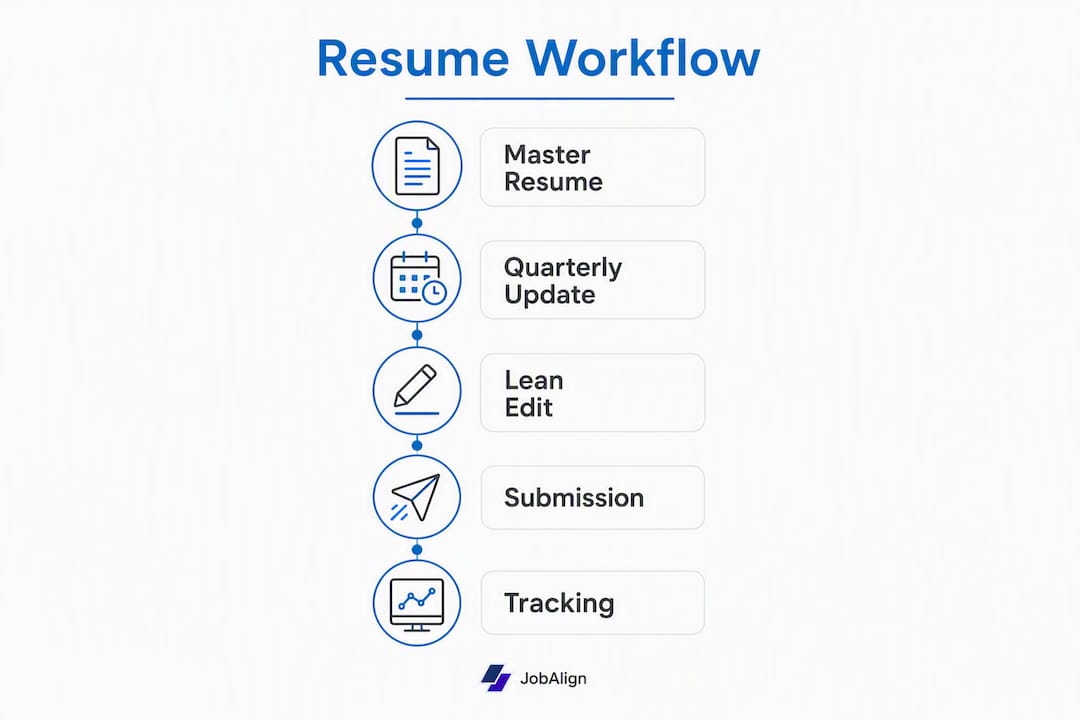
Step 4: Version control and file naming (5 minutes)
Keep three file types:
MasterResume_YourName.docx— your private database, never submitted[Function]_[Industry]_YourName.docx— a specialist version for a recurring niche (e.g.,UXDesign_Fintech_JaneDoe.docx)[CompanyName]_[Date]_YourName.pdf— the submission file, exported as PDF for each application
Step 5: Track submissions (2 minutes per application)
Log each application in a simple spreadsheet with five columns: company, role, date applied, source (job board or referral), and tailoring notes (which projects you featured). This takes two minutes and saves you from sending the same resume twice or losing track of follow-up timing.
Pre-submission checklist:
- [ ] Headline matches the job title or closest functional equivalent
- [ ] Summary mentions the top two skills from the job description
- [ ] Most relevant project appears first
- [ ] Top three bullets contain exact keywords from the posting
- [ ] File exported as PDF with a clean, single-column layout
- [ ] No tables, text boxes, or graphics that could break ATS parsing
Scope line shortcut: Under any umbrella entry that groups multiple short gigs, add one sentence: “Scope: [X] clients across [industry], delivering [function] on [tool/platform].” This single line answers the recruiter’s first question and cuts your per-application edit time significantly.
Which resume format works best for contract roles?
The format you choose signals something to every hiring manager before they read a single bullet. Pick the wrong one and your career looks fragmented even when it is not.
| Format | Best use case | Signal it sends | Ideal length |
|---|---|---|---|
| Hybrid (recommended) | Most contract professionals with 3+ engagements | Specialization + delivery track record | 1–2 pages |
| Umbrella / grouped | High-volume freelancers, same function across clients | Repeatable expertise, not job-hopping | 1 page |
| Single-role chronological | One long engagement (6+ months) or a pivot to permanent | Depth and commitment | 1–2 pages |
A hybrid format leads with a strong skills or summary section, then lists projects in reverse chronological order under a grouped employer line. It highlights specialization rather than frequent exits, which is exactly what a hiring manager scanning for pattern needs to see.
Before (scattered project list):
March 2024 – Redesigned checkout flow, Acme Corp
June 2024 – Built onboarding screens, Beta Inc
Sept 2024 – Created design system, Gamma LLC
After (umbrella entry with outcome bullets):
Contract UX Designer | Independent Consultant | Jan 2024 – Present
Scope: 4 fintech clients, delivering end-to-end UX for web and mobile products.

• Redesigned checkout flow for Acme Corp, reducing cart abandonment by 18%.
• Built onboarding screens for Beta Inc, cutting time-to-first-action from 4 min to 90 sec.
• Created a reusable design system for Gamma LLC, adopted across 3 product teams.
The difference is not cosmetic. The grouped entry answers three recruiter questions at once: what you do, how consistently you do it, and what it produces.
Sample headlines and summaries by function:
- UX: “Contract UX Designer | Fintech & SaaS | Checkout, Onboarding, Design Systems”
- Marketing: “Independent Marketing Consultant | B2B SaaS | Demand Gen & Content Strategy”
- Dev: “Contract Full-Stack Developer | React / Node.js | API Integration & Performance”
- Product: “Contract Product Manager | 0-to-1 Products | Roadmap, Discovery, GTM”
“Where an NDA prevents naming a client, describe the company by size and sector instead: ‘Series B fintech, 200-person team.’ You preserve confidentiality and still give the recruiter the context they need to assess fit.” — Story.CV
If you want ATS-ready templates you can adapt in five minutes, JobAlign’s template library is organized by job type and already formatted for clean ATS parsing.
How do you make short-term contracts look like a strength, not a red flag?
Short tenures trigger a reflex in hiring managers. Your job is to interrupt that reflex before it forms, and the way you do that is through deliberate labeling, smart grouping, and outcome-first bullets.
Labeling your employer line
Choose the label that matches your legal setup and adds the most credibility:
- Use your business name if you have one (“Doe Consulting LLC”)
- Use “Independent Consultant” or “Contract [Function]” if you work directly with clients
- List the staffing agency as employer and the end client in the bullet if you are on agency payroll (“Placed at [Client] via [Agency]”)
Add the end client’s name when it is a recognizable brand. A line that reads “Contract Data Analyst | Placed at Google via Apex Group” carries more weight than the agency name alone.
Grouping rules
Group contracts under one umbrella entry when they share at least two of these: same function, same industry, same core tech stack, or overlapping time periods. List a client separately when the engagement was long (4+ months), the brand name adds credibility, or the scope was significantly different from your other work.
Four filters to decide what to include
- Relevance: Does this project use the skills the target role requires?
- Recency: Is it within the last five years? (Beyond that, summarize or cut.)
- Impact: Can you state a result, even a scope-based one?
- Demonstrability: Is there a portfolio link, published work, or a reference who can confirm it?
If a contract fails two or more filters, leave it in the master resume and cut it from the submission version.
Phrasing templates that answer problem → action → result:
- Marketing: “Inherited a stalled content program with 2% email open rates; rebuilt editorial calendar and A/B testing cadence, lifting opens to 28% in 60 days.”
- Dev: “Diagnosed recurring API timeout errors affecting 12% of transactions; refactored retry logic and added circuit breakers, reducing failures to under 0.3%.”
- Product: “Joined post-pivot team with no defined roadmap; ran discovery sprints with 15 users and shipped an MVP in 6 weeks.”
Recruiter-facing reframes to reduce perceived risk:
- “Engagement: contract to scale product launch” (not “Freelancer”)
- “Contract UX Designer” (not “Gig worker”)
- “Independent Marketing Consultant, 2021–Present” (not a list of one-month gigs)
- “Selected clients include…” (signals you chose the work, not that you could not find permanent employment)
What do ATS filters and research actually say about contractor resumes?
ATS systems prioritize exact keyword placement and simple structure. Place your most critical keywords in three locations: the headline, the first two lines of your summary, and the top bullet of your most relevant project. That is where ATS scoring grids weight most heavily.
ATS checklist for contract professionals:
| Check | What to do |
|---|---|
| File type | Export as PDF unless the posting specifies DOCX |
| Layout | Single column, no tables, no text boxes, no graphics |
| Keyword placement | Headline + summary + top bullet of lead project |
| Date format | Consistent: “Jan 2024 – Mar 2024” throughout |
| Section headers | Standard labels: Experience, Skills, Education |
| Font | Clean sans-serif (Calibri, Arial, or similar); 10–12pt body |
Stat to know: JobAlign’s platform data indicates that approximately 75% of resumes are rejected by ATS before a human reads them; JobAlign’s tailoring process claims an 87% ATS pass rate for users who apply its per-application keyword matching.
Maintenance schedule
A quarterly deep edit covers: new projects added with full PAR (problem, action, result) bullets; skills list updated with new tools; outdated or irrelevant contracts moved to an archive section. A monthly quick check covers: one new metric captured, one new tool added to the skills list, one portfolio link verified as live.
Tool map for the full workflow:
| Workflow step | Tool category | Example |
|---|---|---|
| Master resume storage | Cloud doc | Google Docs or Microsoft Word Online |
| Version naming | File system | Descriptive naming convention (see Step 4 above) |
| Keyword matching | AI resume tailor | JobAlign’s per-application generator |
| ATS test | ATS simulator | JobAlign’s built-in ATS optimization |
| Template | ATS-ready format | JobAlign template library |
JobAlign fits into the workflow at two specific points: first, when you import your LinkedIn profile to seed the master resume (LinkedIn sync pulls your project history in minutes), and second, when you run the lean edit (the per-application generator matches your experience to the job description and outputs a keyword-optimized PDF). For contract professionals applying to multiple roles per week, that automation removes the most time-consuming part of the process.
For a deeper look at keyword placement strategy, JobAlign’s ATS keyword guide covers exactly where to place terms for maximum scoring impact.
Key Takeaways
A contract professional’s resume workflow comes down to one master document, a disciplined maintenance rhythm, and a fast lean edit per application — that combination beats both the ATS filter and the hiring manager’s 20-second scan.
| Point | Details |
|---|---|
| Master resume first | Build one comprehensive document recording every project before tailoring anything. |
| Lean edit per role | Customize only headline, summary, and top three bullets — takes 10–15 minutes per application. |
| Quarterly maintenance | Deep-update the master resume every quarter; run a quick check monthly to capture fresh metrics. |
| ATS keyword placement | Put critical keywords in the headline, summary, and lead bullet — that is where ATS scoring weights most. |
| JobAlign accelerates the process | LinkedIn sync seeds the master resume; per-application tailoring handles the lean edit and ATS optimization automatically. |
What recruiters actually notice in the first 20 seconds
Most contract professionals spend their editing time in the wrong place. They polish the middle of the resume while the top third, the only part a recruiter reads in the first pass, stays generic.
Here is what gets attention fast: a headline that names your function and a niche (“Contract Product Manager | B2B SaaS | 0-to-1 Launches”), a top bullet with a real number, and a portfolio link or GitHub URL that is live and clickable. Those three elements decide whether the resume goes into the “call” pile or the “maybe later” folder that never gets revisited.
Dos:
- Lead every bullet with a past-tense action verb tied to an outcome (“Reduced,” “Built,” “Launched,” “Recovered”)
- Use the exact job title from the posting in your headline when it matches your actual work
- Include a one-line scope statement under umbrella entries so a recruiter can orient quickly
- Test your PDF by copying and pasting it into a plain text editor — if the text scrambles, an ATS will too
Don’ts:
- Do not list duties. “Responsible for managing social media accounts” tells a recruiter nothing. “Grew LinkedIn following from 800 to 14,000 in 5 months through a weekly long-form content series” tells them everything.
- Do not use a functional resume that buries dates. Recruiters distrust it, and ATS systems often misparse it.
- Do not submit the same resume twice in a row without checking the job description for new keywords.
One thing I see consistently: contract professionals undersell the scope of their work because they assume the client’s name carries the weight. It does not. A line that reads “Delivered UX redesign for a Series B fintech” is stronger than “Worked with [Unknown Startup]” and just as strong as a famous brand name for most hiring managers. Describe the context, not just the logo.
JobAlign cuts the lean edit from 15 minutes to under 5
Contract professionals applying to multiple roles per week lose hours to manual tailoring. JobAlign removes that bottleneck by syncing directly with your LinkedIn profile to pull your full project history, then generating a keyword-matched, ATS-optimized PDF for each specific job posting.
The workflow maps exactly: LinkedIn sync handles the master resume import, the per-application generator runs the lean edit against the job description, and the built-in ATS optimization checks keyword placement before you download. Three steps that used to take an hour now take minutes. Try JobAlign’s free LinkedIn resume generator to create your first tailored resume and see how your contract history reads through an ATS lens. When you are ready to tailor a version for every application, the full platform works with one-time credit packs, one credit per job posting, with no complicated setup required.
Useful sources
Resources that back this guide and help you go deeper on templates, ATS rules, and contractor-specific phrasing:
- JobAlign ATS Resume Guide — Detailed checklist covering keyword placement, file type rules, and formatting standards. Start here if your resumes are not passing ATS filters.
- JobAlign Resume Workflow Guide — Step-by-step companion to this article with template-driven walkthroughs for tech and non-tech contract roles.
- Resume Customization Strategies — Covers tailoring methods and keyword strategies in depth; useful alongside the lean-edit step.
- — Practical framing advice on project-based bullets, NDA-safe phrasing, and portfolio links for contractors.
- Bergman Brothers — Resume Best Practices for Contract Workers — Staffing-agency perspective on what hiring managers look for in contractor submissions.
- Indeed — Freelancing Resume Advice — Covers transferable capability framing and the lean-edit tailoring order; useful for professionals moving between contract and permanent roles.