Avoid a 15 Point ATS Drop: Two Column Resume Rules for 2026
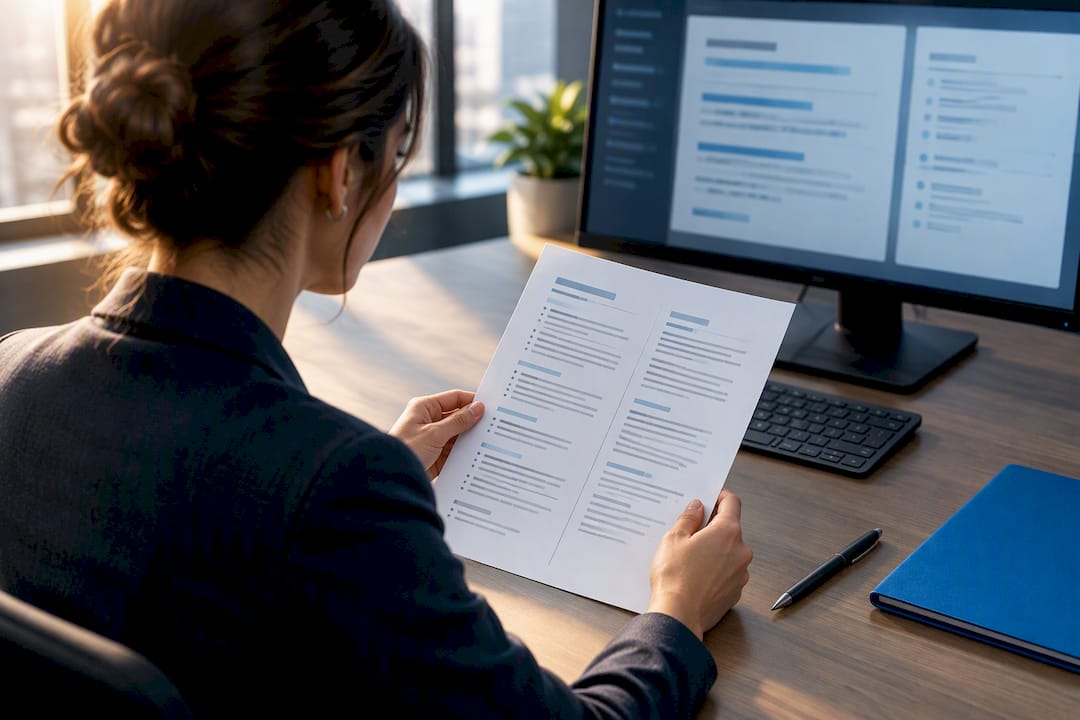
A two-column resume can pass ATS software, but only when you build it correctly, and even then, single-column is the safer default when you don’t know which system is on the other end. The real variable isn’t the number of columns. It’s construction method: native document columns behave very differently from tables or text boxes when a parser opens the file. If you’re applying broadly or blind, run the two-version strategy we’ll walk through below rather than betting everything on one layout.
TL;DR:
- Using native columns instead of tables significantly reduces the risk of ATS parsing errors, especially on legacy platforms like Taleo and older Workday systems.
- Portals generally have higher risks for two-column resumes unless they specify a preferred format, so preparing both single- and two-column versions is advisable when applying broadly.
- Testing resumes by pasting them into plain text editors and reviewing portal previews can catch layout issues that could cause information to be scrambled or lost during ATS screening.
- Modern ATS systems like Greenhouse and Lever handle native columns better, but structural issues still arise with tables or text boxes, impacting the accuracy of extraction.
- When submitting, choosing a simple, selectable-text PDF aligned with portal preferences and avoiding headers, footers, and decorative fonts improves parsing success.
Table of Contents
- When a Two-Column Resume Makes Sense
- How ATS Software Actually Reads Your Resume
- How to Build an ATS-Safe Two-Column Resume
- Testing Your Resume Before You Submit It
- Single-Column Layouts That Still Look Modern
- Export and Template Checklist: DOCX, PDF, and Fonts
- How JobAlign Builds ATS-Safe Resumes for You
- Author Perspective: Practical Formatting Rules I Follow
- Generate an ATS-Safe Resume Without Guessing at Formatting
- Sources
- FAQ
When a Two-Column Resume Makes Sense
Not every application carries the same parsing risk, and that changes how much you should worry about a two-column layout.
A design-forward resume earns its place when a human opens the file first. Portfolio submissions, networking handoffs, and referrals you email directly to a hiring manager all skip the ATS step entirely, at least at first contact. Recruiters who ask for a resume by email are looking at it with their own eyes, not feeding it through a parser.
The calculation flips once you’re submitting through a corporate careers portal. Large employers running legacy platforms carry the most risk for a two-column layout, and you often can’t tell which system you’re up against until the file is already submitted.
-
Design-first, lower risk: portfolio sites, LinkedIn attachments, direct email to a recruiter, referral handoffs
-
Portal-first, higher risk: enterprise career sites, staffing agency uploads, any application where you’re told to “attach your resume” with no human contact first
-
When unsure: default to the two-version approach rather than guessing which category you’re in
If you’re applying to fifteen companies in a week, you probably don’t have time to research each one’s ATS vendor. That’s exactly the situation the ATS Resume Guide is built to solve, but the short version is simple: assume the portal is unforgiving unless you have a reason to think otherwise.
How ATS Software Actually Reads Your Resume
An ATS parser doesn’t “see” your resume the way a person does. It extracts text as a single linear stream, reading left to right and top to bottom, the same way it would read a plain paragraph. Layout containers, tables, text boxes, and floating frames, all interrupt that stream and force the parser to guess at the correct order.
That guess is where things go wrong. About 75% of mid-to-large companies use an ATS for initial resume screening, so this isn’t an edge case affecting a handful of employers. It’s the default filter most job seekers are walking through.
Controlled testing puts real numbers behind the risk. Parsing accuracy tends to be higher for single-column resumes compared to two-column resumes, and that gap widens fast once the two-column layout uses tables instead of native columns.
The 15-point drop that should change how you build. In one 2026 parsing benchmark, two-column layouts were the only structure to trigger a critical reading-order scramble flag, with scores dropping from 100 to 85. No other layout type in that test drew the same flag, which tells you the problem is specific to how columns get extracted, not a general formatting penalty.
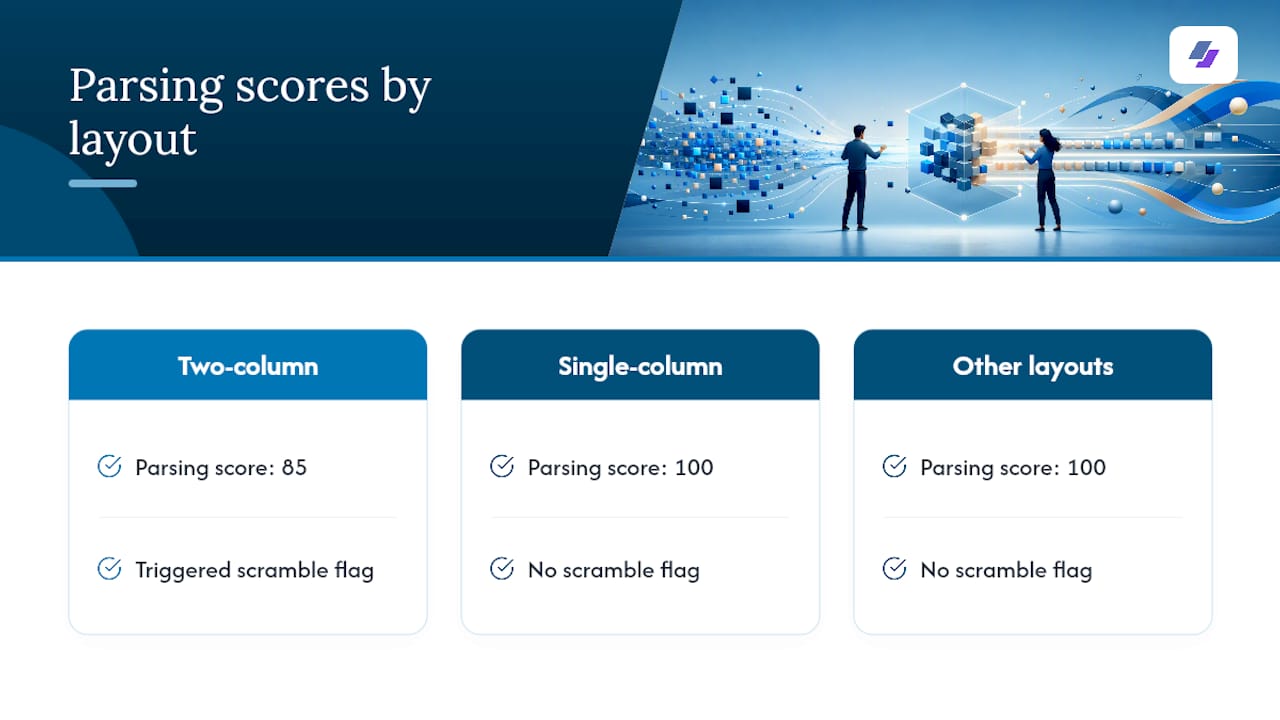
The pattern shows up consistently by platform. Legacy enterprise systems like Taleo, along with some older Workday and iCIMS configurations, are the most likely to scramble a two-column resume, while modern applicant tracking engines like Greenhouse, Lever, and BambooHR tend to handle native columns with more tolerance. The symptoms when parsing fails are predictable: job titles get detached from their dates, sidebar skills lists vanish entirely, and work history entries reassemble out of order.
How to Build an ATS-Safe Two-Column Resume
If you’re set on a two-column look, the construction method is everything. Follow these rules in order, and don’t skip the ones that feel optional.
- Build with native columns, not tables. Use your word processor’s actual column feature (Layout → Columns in Word, or Format → Columns in Google Docs) instead of inserting a table or text boxes to fake the layout.
- Keep critical content in the main column. Work experience, dates, job titles, and your core keywords belong in the primary reading column, never buried in a sidebar the parser might skip.
- Write contact information as plain text. Skip icon-only phone or email labels. A parser can’t read a phone icon, and if that’s the only marker, your contact info disappears.
- Use standard section headings and date formats. “Work Experience” and “Education” parse more reliably than creative alternatives, and consistent date formatting (Month Year) avoids confusing the extraction logic.
- Match your export format to the portal’s guidance. If the application doesn’t specify, a selectable-text PDF is generally safer than DOCX for preserving formatting, but check for stated preferences first.
This construction discipline matters more than the column count itself. As one parsing analysis put it, the core issue is the construction method, not the number of columns on the page. A native two-column layout and a table dressed up to look like one can produce wildly different results from the same ATS.
Pro Tip: If you’re not sure whether your template uses native columns or a table, select all the text in one “column” and drag it. Native columns let text reflow naturally. A table will show you cell borders the moment you click inside it.
Testing Your Resume Before You Submit It
Building the resume is half the job. Verifying it parses correctly is the half most job seekers skip, and it’s the fastest way to catch a problem before it costs you an interview.
- Run the plain-text paste test. Copy your entire resume and paste it into Notepad or TextEdit with formatting stripped. If your reading order looks scrambled there, an ATS will see it the same way.
- Use the portal preview when it’s offered. Many application systems show you a parsed preview of your resume before you hit submit. Check that job titles stay attached to their dates and that your skills section isn’t missing.
- Try a third-party parsing checker, but read the results skeptically. These tools are useful for catching obvious errors, though their scoring systems vary and shouldn’t be treated as a pass or fail grade.
- Fix and retest immediately if something looks wrong. Convert the resume to a single-column, ATS-safe version, or move sidebar content inline, then run the same test again.
Both checks together, a plain-text paste and a portal preview inspection, reliably surface most reading-order problems before they become a rejection you never get an explanation for. Skipping this step is how a well-designed resume quietly disappears into a system that couldn’t read it.
Single-Column Layouts That Still Look Modern
You don’t have to choose between a resume that looks current and one that parses cleanly. Several single-column techniques mimic the visual density of a two-column design without the structural risk.
- Use a compact skills band near the top. A single line or short block listing your core skills right under your summary reads visually similar to a sidebar, without putting that content in a separate container.
- Right-align micro-details within the same text flow. Dates, locations, or short tags can sit to the right of a line while remaining part of one continuous column, which most word processors handle with a simple tab stop or right-aligned text field.
- Move secondary content below your summary. Certifications, languages, or interests that aren’t critical keywords can sit lower on the page instead of competing for sidebar space.
These fixes echo what ATS-focused testing has already confirmed: a resume can look organized and be easy to scan without ever asking the parser to reconstruct a broken reading order. If you want ready-made structures that already follow these rules, the ATS-optimized resume templates built around single flowing columns are a faster starting point than building from scratch.
Export and Template Checklist: DOCX, PDF, and Fonts
Your file format and font choices carry almost as much weight as your layout decisions.
- Check the portal’s stated preference first. Some systems explicitly ask for DOCX because their parser handles it better; others prefer PDF. When no guidance is given, a selectable-text PDF is usually the safer bet.
- Never submit a rasterized PDF from a design tool. Files exported from Canva or similar visual design software sometimes save text as an image, which means an ATS reads nothing at all, not even a scrambled version.
- Stick to standard fonts. Calibri, Arial, Georgia, and similar system fonts render predictably across parsers. Decorative or script fonts risk garbled character recognition.
- Keep critical information out of headers and footers. Some parsers skip header and footer regions entirely, so your name or contact details shouldn’t live there exclusively.
Pro Tip: Before you trust any template, open it and try clicking into what looks like a column. If you land inside a table cell or a text box, that template is a parsing risk no matter how good it looks on screen.
How JobAlign Builds ATS-Safe Resumes for You
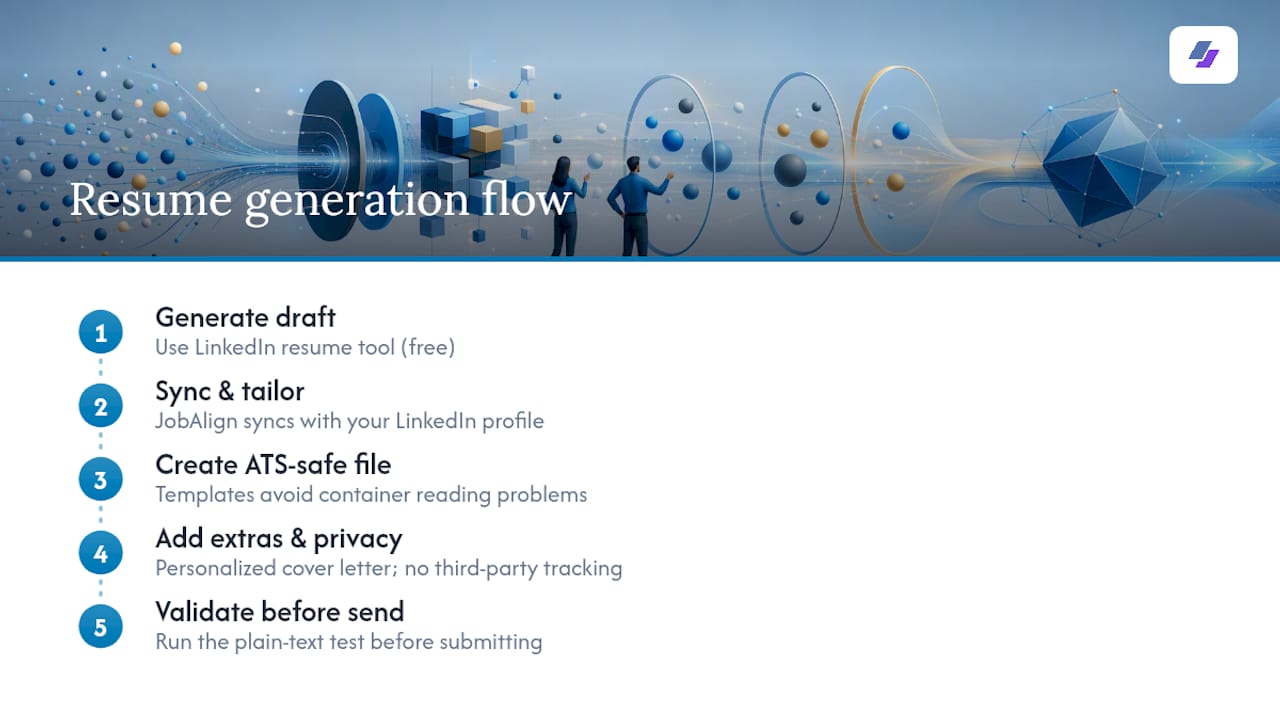
Building and testing a resume by hand takes real time, which is exactly the gap JobAlign is designed to close. It syncs directly with your LinkedIn profile, pulls your experience and skills automatically, and generates resumes using templates built to avoid the fragile tables and text boxes that trip up parsers.
JobAlign’s proprietary matching technology is built around one goal: getting your resume past the filter, not just looking good on screen. The company reports an 87% ATS pass rate for resumes generated through its platform, a claim it makes about its own optimization process rather than an independent benchmark.
The practical move: generate a resume through JobAlign, then still run the plain-text paste and portal preview tests covered earlier. Verification habits don’t disappear just because the layout was built with parsing in mind from the start. For technical roles specifically, the software engineer resume keyword guide shows how keyword placement interacts with layout choices.
Author Perspective: Practical Formatting Rules I Follow
My working rule is simple: default to single-column for any portal you can’t identify, and save the two-column design for resumes you’re handing to a person directly. If you’re applying to a startup with a public Greenhouse or Lever listing, a well-built native-column resume is usually fine. Everything else gets the safer treatment first.
The mistake I see most often isn’t choosing two columns. It’s choosing them and never testing whether the parser agrees with your design choice. Build for the machine first. Polish for the human second.
— Johan
Generate an ATS-Safe Resume Without Guessing at Formatting
Every rule in this guide, native columns instead of tables, plain-text contact info, standard headings, still takes real effort to apply by hand across a dozen applications a week. JobAlign removes that manual work by syncing with your LinkedIn profile and generating a tailored resume for each job in minutes, built on templates designed to avoid the container problems that scramble reading order.
You can start with the free LinkedIn resume tool to generate your first ATS-optimized file at no cost, then buy one-time credit packs (listed on the pricing page) for one tailored resume per job posting as you apply to more roles. Users can receive a personalized cover letter with their resume, and their data is kept private with no third-party tracking. Generate your first resume today and run the plain-text test on it before you submit anything.
Sources
Keep these on hand when you want to re-check a parsing claim or rerun your own tests before applying:
- One Column vs Two Column Resume: ATS Compatibility Tested (2026) | VantageResume
- Two-Column Resumes and ATS: When It Breaks and Safer Alternatives - ResumeSolving
- Are Two-Column Resumes ATS-Friendly? (2026 Test) | ATS Verification
FAQ
Is a Two-Column Resume ATS Friendly?
It can be, but only when built with native document columns rather than tables or text boxes, and even then, results vary by which ATS the employer uses. Testing shows single-column resumes parse more reliably overall, so treat two-column as a calculated risk rather than a safe default.
Can You Provide an ATS-Friendly Two-Column Resume Template?
The safest approach is a template built with native word-processor columns, standard headings, and plain-text contact details, which is exactly how JobAlign’s ATS-optimized templates are structured. Always run the plain-text paste test on any template before trusting it with a real application.
Can ATS Systems Read Columns?
Some modern systems like Greenhouse and Lever read native columns reasonably well, while legacy platforms such as Taleo and some older Workday or iCIMS setups frequently scramble them. The extraction method matters more than the visual layout, since parsers read left to right and top to bottom regardless of how the page looks.
Is a Two-Page Resume ATS Friendly?
Length itself doesn’t cause parsing failures. What matters is whether each page uses clean, linear formatting rather than tables, columns, or graphics that disrupt the reading order the parser depends on.
How Do I Know if My Resume Failed ATS Parsing?
Paste it into a plain-text editor and check whether your job titles stay attached to their dates and your skills section still appears in full. If the portal offers a parsed preview before submission, use it as a second check before you finalize the file.