Project-Based Resume: What It Is and How to Write One

A project-based resume organizes your work history around specific projects you completed and the measurable results you delivered, rather than listing job titles in reverse chronological order. Think of it as a portfolio in resume form. Three situations where it gives you a real edge:
- Students and early-career candidates who have class projects, capstone work, or internship deliverables but limited full-time experience.
- Freelancers and contractors whose career is a series of client engagements rather than a single employer thread.
- Career changers and nontraditional applicants whose most relevant work happened outside their official job title.
The sections below walk you through templates, copy-paste examples, placement options, and ATS formatting tips so you can build one today.
Table of Contents
- Why does a project-based resume work better for some job seekers?
- When should you use a project-based resume?
- Where should you place project entries on your resume?
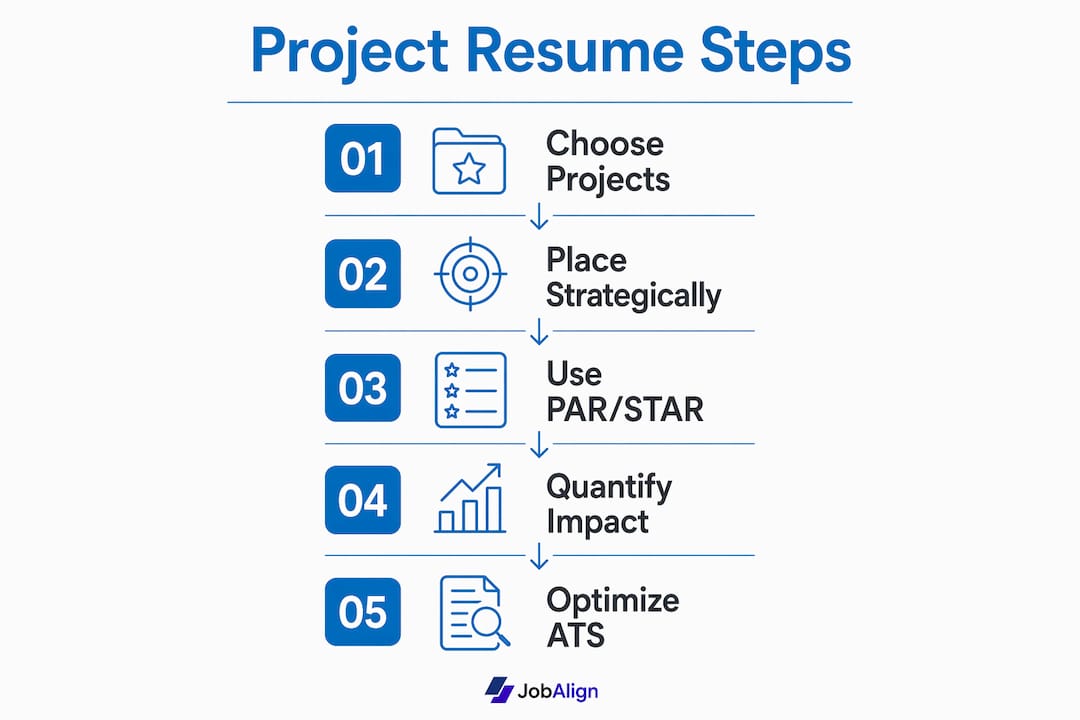
- How do you write a single project entry using PAR/STAR?
- Three sample project entries you can copy and tailor
- How do you format a project resume to pass ATS?
- How do freelancers and traditional employees present projects differently?
- What mistakes weaken a project-based resume?
- How does ATS score project entries, and can a resume generator help?
- Final checklist before you hit send
- Key Takeaways
- The case for leading with your two strongest projects
- How JobAlign helps you tailor project resumes faster
- Authoritative sources and further reading
Why does a project-based resume work better for some job seekers?
Projects are proof. A skills list tells a hiring manager you know Python or Agile; a project entry shows you used Python to cut a data pipeline’s runtime by 40%. That difference matters because recruiters spend seconds on an initial scan, and a concrete outcome stops the scroll in a way that a bullet reading “proficient in data analysis” never will.
The benefits of project resumes over a generic skills list are practical and immediate:
- Demonstrates applied skill rather than claimed ability, giving interviewers a ready-made discussion point.
- Shortcuts screening by showing scope, team size, and budget at a glance, which is exactly what a hiring manager needs to gauge fit.
- Provides interview evidence you can expand on with specifics, making behavioral questions easier to answer.
- Signals ATS keywords naturally when you name tools, methodologies, and outcomes that match the job posting.
PMI frames the professional summary on a project-focused resume the same way it frames a project charter: define the type of projects you lead, the environments where you thrive, and the specific value you deliver. That framing applies to every project entry, not just the summary.
What hiring managers actually scan for: scope (how large was the project?), team size (did you lead or contribute?), budget ownership (did you control resources?), and outcomes (what changed because of your work?). If your project bullets answer those four questions, you pass the first cut.
When should you use a project-based resume?
Not every job seeker needs a dedicated Projects section. Use this quick if/then checklist to decide:
- If you have three or more relevant projects that demonstrate core skills → add a standalone Projects section near the top of your resume.
- If your projects were completed inside an employer role → integrate them under Work Experience with a “Relevant Projects” subheading rather than pulling them out.
- If you are a student, career changer, or freelancer → favor a project-first layout where projects appear before or alongside experience.
- If you have only one or two relevant projects → embed them in the appropriate section (Work Experience or Education) rather than creating a thin standalone section.
- If your projects are older than five years and not directly relevant → skip them or mention them briefly; recency and role alignment matter more than volume.
The guiding rule is relevance first, recency second. A two-year-old project that maps directly to the job description beats a recent project that has nothing to do with the role you want.
Where should you place project entries on your resume?
Placement options include three main locations, and the right one depends on your background and how central the projects are to your candidacy.

Dedicated Projects section
Best for students, freelancers, and career changers. Place it immediately after your professional summary or after a short skills block so it is the first substantive content a recruiter reads.
Example entry:
E-Commerce Checkout Redesign | UX Designer | Jan 2025 – Apr 2025
Under Work Experience
Best for traditional employees whose projects were part of a paid role. Add a “Relevant Projects” subheading inside the employer block, indented below the standard bullets.
Example entry:
Relevant Projects: Led migration of legacy CRM to Salesforce (Q3 2024), reducing data entry time by 30%.
Under Education
Best for recent graduates listing capstone, thesis, or course projects. Place it as a sub-item under the degree entry.
Example entry:
Capstone: Predictive Inventory Model | Python, Tableau | Reduced simulated overstock by 22%.
A few formatting rules that apply across all three placements: list the most relevant project first regardless of date, keep date formats consistent (Month YYYY or Q# YYYY throughout), and use the same heading style for every project entry so ATS parsers read them cleanly.
How do you write a single project entry using PAR/STAR?
Lead with the outcome, not the task. That one shift separates a strong project bullet from a weak one. Rutgers–Newark Career Services recommends including the project name, your role, the actions you took, the tools you used, and measurable metrics such as percentages, revenue, or time saved.
PAR/STAR broken down:
- Problem/Situation — What challenge or context prompted the project?
- Action — What did you specifically do? Use strong action verbs (built, led, reduced, designed, automated).
- Result — What measurable outcome did your work produce?
Copy-ready template:
[Project Title] | [Your Role] | [Start Date – End Date]
Tools/Methods: [List 3–5 tools or methodologies]
Team: [Size] | Budget: [Range, if relevant]

• [Action verb] + [what you did] + [scope/context], resulting in [metric].
• [Action verb] + [what you did] + [scope/context], reducing/increasing [metric] by [X%].
• [Action verb] + [deliverable] that [outcome], adopted by [audience/stakeholder].
Fields to include for each project:
- Project title and your specific role
- Start and end dates (or duration)
- Tools, platforms, and methodologies used
- Team size and budget ownership (when relevant)
- Quantified outcomes: percentages, dollar amounts, time saved, users affected
- Links to portfolio, GitHub, or live deliverables (when applicable)
Pro Tip: If your numbers are under NDA, use ranges (“reduced processing time by 25–35%”), relative impact (“cut costs by roughly one-third”), or qualitative markers (“highest-rated feature in Q4 user survey”). Hiring managers understand confidentiality; vague duties do not get the same benefit of the doubt.

Three sample project entries you can copy and tailor
These examples follow the PAR/STAR template and cover three common roles. Swap in your own numbers and tools.
Example 1: Software Developer / Engineering
API Performance Optimization | Backend Developer | Mar 2025 – Jun 2025
Tools: Python, Redis, AWS Lambda | Team: 4 engineers
- Identified bottlenecks in a high-traffic REST API serving 500,000 daily requests and redesigned caching logic using Redis, cutting average response time by 62%.
- Automated deployment pipeline with AWS Lambda, reducing manual release steps from 14 to 3 and eliminating a recurring 90-minute weekly task.
- Documented new architecture for a team of 4, enabling two junior developers to onboard independently within one week.
For more developer project examples and ATS keyword guidance, JobAlign’s developer resume page shows how these bullets translate into ATS-ready formatting.
Example 2: Product / UX
Mobile Onboarding Redesign | Product Designer | Sep 2024 – Dec 2024
Tools: Figma, Hotjar, Mixpanel | Team: Cross-functional (PM, 2 engineers, QA)
- Audited 12 onboarding screens using Hotjar session recordings and identified three drop-off points causing a 38% abandonment rate.
- Redesigned flow to five screens with progressive disclosure, increasing 7-day retention by 21% in an A/B test with 4,200 users.
- Delivered annotated Figma prototype and a handoff spec that reduced engineering clarification requests by half.
Example 3: Student / Research Capstone
Predictive Demand Forecasting Model | Data Analyst (Capstone) | Jan 2025 – May 2025
Tools: Python (scikit-learn), Tableau, Excel | Team: 3 students
- Built a machine learning model on three years of retail sales data to forecast weekly demand across 200 SKUs.
- Achieved a mean absolute percentage error of 8.4%, outperforming the baseline moving-average model by 31%.
- Presented findings to a panel of five industry judges; model adopted as a case study by the university’s business analytics program.
How do you format a project resume to pass ATS?
Approximately 75% of resumes are rejected by ATS before a human ever reads them. Project-based resumes face an additional risk: if project entries use non-standard headers or complex formatting, parsers skip them entirely.
ATS and formatting checklist:
- Length: One page for under ten years of experience; two pages maximum for senior roles. Three or more projects per page is usually the right density.
- File format: Submit as PDF unless the job posting specifically requests DOCX. Most modern ATS platforms parse both, but PDF preserves your formatting.
- Section headers: Use plain text labels (“Projects,” “Work Experience,” “Education”) with no icons, tables, or text boxes. ATS parsers read left-to-right, top-to-bottom.
- Keywords: Mirror the job posting’s exact language. If the posting says “Agile methodology,” write “Agile methodology,” not just “Agile.”
- Certification signals: Spell out PMP, CSM, or other credentials in full at least once, then use the abbreviation.
- Tools line: Add a “Tools & Methods” line inside each project entry so ATS picks up Jira, MS Project, Smartsheet, Asana, or whatever the role requires.
- Fonts: Stick to Arial, Calibri, or Georgia at 10–12pt. Decorative fonts break parsing.
- Avoid: Headers and footers for contact info, images, columns, and tables inside project entries.
For a deeper dive into ATS-ready formatting, JobAlign’s ATS guide covers keyword placement and file-format rules in detail.
How do freelancers and traditional employees present projects differently?
The core difference is attribution. A traditional employee’s projects belong to an employer’s outcomes; a freelancer’s projects are the entire career story.
Freelancers and contractors:
- Lead with a Projects section at the top, above Work Experience.
- List client type rather than client name when an NDA applies (e.g., “Fortune 500 retail client” instead of the brand name).
- Include contract duration, deliverable type, and a portfolio link for every engagement where one exists.
- Treat each client engagement as its own project entry with full PAR/STAR bullets.
Traditional employees:
- Integrate projects under the relevant employer block using a “Relevant Projects” subheading.
- Keep project bullets tighter (2–3 bullets) since the employer context already provides scope.
- Use projects to show outcomes that standard job-duty bullets miss, such as a cross-departmental initiative or a tool you built that the team still uses.
For guidance on presenting client work on a resume, JobAlign’s blog covers how to frame freelance engagements without naming protected clients.
Pro Tip: If you signed an NDA, you can still describe the project’s impact. Write “Developed a custom inventory dashboard for a mid-size logistics firm, reducing manual reporting time by 4 hours per week.” The client stays anonymous; the outcome stays visible.
What mistakes weaken a project-based resume?
Most project bullets fail for one of three reasons: no metrics, vague verbs, or missing role clarity. Here is what to cut or fix before you submit.
Common mistakes:
- Vague action verbs: “Helped with,” “worked on,” “was involved in” — replace with “built,” “led,” “reduced,” “designed,” “automated.”
- No metrics: “Improved performance” says nothing. “Reduced load time by 48%” says everything.
- Unclear role: If you were one of eight contributors, say so. “Contributed front-end components as part of an 8-person team” is honest and still strong.
- Inconsistent dates: Mixing “Jan 2025” with “2025” and “Q1 2025” in the same resume confuses both ATS and human readers.
- Overly long descriptions: Three to five bullets per project is the ceiling. More than that and the reader stops reading.
- Too many unrelated projects: Five projects that span five unrelated industries signal a lack of focus. Pick the two or three that match the role.
Red flags employers notice:
- Inflated claims with no supporting context (“Saved the company $2M” with no scope or team size).
- Unexplained timeline gaps between project dates.
- Deliverables described in abstract terms with no tangible output named.
The fix is almost always the same: convert a duty into an outcome. “Managed social media accounts” becomes “Grew Instagram following from 1,200 to 8,400 in six months by shifting to a weekly video series.”
How does ATS score project entries, and can a resume generator help?
ATS systems score resumes by matching text against a job description’s keyword list. For project entries, that means the system looks for exact tool names, methodology labels, and certification signals. Omitting “Agile” when the posting uses it repeatedly, or writing “project tracking software” instead of “Jira,” can drop your score below the threshold before a recruiter sees your name.
ATS checklist for project entries:
- Include exact keywords from the job posting inside project bullets, not just in a skills section.
- Name certifications (PMP, CSM, Six Sigma) in the project entry where they were applied.
- Use common method names: Agile, Waterfall, Scrum, Kanban, Lean.
- Name tools explicitly: Jira, MS Project, Smartsheet, Asana, Trello, Confluence.
- Keep section headers simple and standard so the parser assigns content to the right field.
Resume generators can speed up the keyword-matching step significantly. Useful automation tasks include:
- Extracting the job posting’s top keywords and flagging which ones are missing from your draft.
- Rephrasing duty-based bullets into PAR/STAR structure.
- Generating multiple tailored versions of the same resume for different postings.
JobAlign syncs with your LinkedIn profile, extracts relevant skills and experience, and generates tailored, keyword-optimized resumes. We recommend it as a time-saver for bulk applications, with one firm caveat: always review the output and edit for exact scope and truthfulness. A generator gives you a strong draft; you supply the accurate numbers.
Pro Tip: Run a simple ATS test before submitting: paste your resume text into a plain text editor. If the project entries lose their structure or key terms disappear, your formatting is too complex for most parsers. Fix the formatting, then resubmit.
Final checklist before you hit send
Run through this numbered list for every application. It takes under ten minutes and catches the errors that cost interviews.
- Read every project bullet aloud. If it sounds like a job description rather than an achievement, rewrite it with a metric.
- Verify all dates and numbers. Cross-check project dates against your calendar and confirm every percentage or dollar figure is accurate.
- Test every portfolio or GitHub link. Open each URL on your phone to confirm it loads and is mobile-friendly.
- Check file format. Save as PDF unless the posting requests DOCX. Name the file
FirstName-LastName-Resume.pdf, notResume_Final_v3.pdf. - Run the plain-text test. Paste your resume into Notepad or TextEdit. If the project section loses its structure, simplify the formatting.
- Match your LinkedIn. Confirm that project titles, dates, and outcomes on your resume align with your LinkedIn profile. Discrepancies raise flags in background checks.
- Tailor the file name and email subject line to the specific role (e.g.,
Jane-Smith-ProductDesigner-Resume.pdf).
Key Takeaways
A project-based resume works because it replaces claimed skills with demonstrated outcomes, giving hiring managers the scope, metrics, and context they need to make a fast decision.
| Point | Details |
|---|---|
| Definition and purpose | A project resume organizes experience around discrete projects and measurable results, not job titles. |
| When to use it | Use a standalone Projects section for students, freelancers, and career changers; integrate under Work Experience for traditional roles. |
| Core writing method | Apply PAR/STAR to every bullet: name the problem, your action, and a quantified result. |
| ATS priority | Mirror exact keywords, tool names, and certification labels from the job posting inside project entries. |
| JobAlign as a time-saver | JobAlign syncs with LinkedIn and generates keyword-optimized, tailored resumes; always edit output for accuracy before submitting. |
The case for leading with your two strongest projects
Most job seekers agonize over which projects to include. The better question is which two projects to put first, because those are the only ones most recruiters will read in full.
Pick the project that most closely mirrors the job description’s core responsibility, and the project that produced the largest or most credible measurable outcome. Those two go at the top of your Projects section or at the top of your Work Experience bullets, regardless of date. Everything else is supporting evidence.
There is a tendency in career advice to treat the project resume as a niche format for freelancers or recent grads. That framing undersells it. Any professional who has delivered a discrete, outcome-driven piece of work, whether inside a company or independently, has project material. The real barrier is not having the projects; it is knowing how to frame them so the outcome is the first thing a reader sees, not the last.
One more thing worth saying plainly: do not pad your project list to look more experienced. Three tight, well-quantified entries beat eight vague ones every time. Hiring managers notice the difference, and so does ATS.
How JobAlign helps you tailor project resumes faster
Writing one strong project resume takes time. Writing a tailored version for every application takes more time than most job seekers have. That is the specific problem JobAlign solves.
JobAlign syncs directly with your LinkedIn profile, extracts your relevant experience and skills, and generates a keyword-optimized resume matched to each job posting. For project-based resumes, that means:
- Keyword extraction: JobAlign identifies the exact terms from the job description that your project bullets need to include.
- Bulk tailoring: Generate a new, tailored version of your project resume for each application without rebuilding from scratch.
- PDF and DOCX export: Download in the format the employer requests, with ATS-safe formatting already applied.
JobAlign reports an 87% success rate for resumes generated through its platform, compared to the industry-wide reality that approximately 75% of resumes are filtered out before a human reads them. As with any generation tool, review the output carefully and edit every project bullet to reflect your actual scope and numbers. The tool handles the structure; you supply the truth.
Ready to put your projects in front of the right hiring managers? Build your tailored resume with JobAlign in under two minutes.
Authoritative sources and further reading
- PMI Blog: How to Build a Resume That Stands Out for Project Roles — PMI’s guidance on certification signals, keyword placement, and writing a project-charter-style professional summary.
- Rutgers–Newark Career Services — Resume guidance covering PAR/STAR structure, action verbs, and fields to include for project entries.
- Bowie State University Career Development Center — Student-oriented project resume template with sample bullets and formatting guidance.
- Indeed: How To Write a Project Resume — Definition, template, and placement options for project-focused resumes.
- Monster: How to List Projects on a Resume — Practical guide to placement options (Projects section, Work Experience, Education) with examples.
- Indeed: Guide to Listing Projects on a Resume — Alignment advice, formatting consistency, and action verb guidance for project descriptions.
- ProjectManager: Project Management Resume Templates — Templates for structuring lifecycle experience, budget ownership, and measurable outcome statements.
- JobAlign ATS Resume Guide — Keyword placement, file-format rules, and formatting tips for passing ATS filters.