Copy Paste ATS Contact Header and 2 Quick Tests to Verify

Your name, phone number, and email need to sit in the main body of your resume as plain, selectable text, not tucked into a header, footer, or text box. Use a standard phone format, a professional email address, and your city and state, then save the file as a text-based PDF or .docx. Once it’s saved, run a quick copy-paste test or an ATS checker to confirm every field is actually readable before you submit it anywhere.
TL;DR:
- Ensuring contact details are in plain text in the body of the resume improves ATS parsing accuracy and prevents them from being missed or misread.
- Using consistent formatting for phone numbers, full URLs, and placing contact info in the document body instead of headers or footers reduces parsing errors.
- Running a quick copy-paste test into a plain text editor and using ATS checkers can identify formatting issues before submitting applications.
- Automating the creation of ATS-safe headers through tools like JobAlign helps maintain uniform, correctly placed contact information across multiple resumes.
- Small errors, such as placing contact info in headers, inconsistent formats, or using shortened links, are common causes of ATS failure and should be avoided diligently.
Table of Contents
- Which Contact Details Should Be on Your Resume?
- What Formatting Rules Keep ATS Parsers Accurate?
- How Do You Build an ATS-Safe Contact Header?
- What Should You Check Before You Hit Submit?
- What Do Failing and Passing Headers Actually Look Like?
- How Do You Test Contact Details With an ATS Checker?
- Why Publishers and Tools Like JobAlign Take Contact Formatting Seriously
- Simple Habits That Keep Your Contact Info Reliable
- Let JobAlign Build Your ATS-Safe Header Automatically
- Sources
Which Contact Details Should Be on Your Resume?
An applicant tracking system pulls specific fields from your resume the moment you upload it, and contact information sits at the top of that extraction list alongside job titles and education. Get this wrong, and the system either files you under the wrong name or drops you from the candidate pool entirely, even if a recruiter never sees the error.
Here’s what actually belongs in that contact block, and what you can leave out:
- Full name. Use the name you go by professionally, spelled exactly as it appears on LinkedIn and other application materials.
- One phone number. A single line, formatted consistently, is easier for both software and humans to parse than two numbers stacked together.
- A professional email address. Ideally some version of firstname.lastname@email.com, not a nickname or a decade-old handle from high school.
- City and state. Skip the full street address. It’s largely obsolete for job applications and raises unnecessary privacy concerns without adding any value for the employer.
- LinkedIn or portfolio URL (optional). Include it only if the profile is current and relevant to the role, and always use the full URL.
Each field earns its place for a different reason. Your name and email let the ATS create or match a candidate record. Your phone number gives recruiters a fast way to follow up once a human finally opens your file. City and state help a recruiter figure out, at a glance, whether you’re local or need to relocate, which matters more than most job seekers assume. If you’re unsure which fields actually move the needle on a resume overall, this breakdown of resume sections ranked by importance is worth a look before you finalize your layout.
What Formatting Rules Keep ATS Parsers Accurate?
Placement matters as much as content. Put your name at the top of the document, then a single contact line directly below it, either centered or left aligned. Never place any of this inside a Word header or footer. Many parsers skip that region of the document entirely, which means a beautifully formatted header can still make you invisible to the system reading it.
The small formatting choices matter more than they seem to:
- Phone numbers: pick one format, like (123) 456-7890 or 123-456-7890, and stick with it. Dots and inconsistent spacing are a common way parsers misread or drop this field.
- Email address: no spaces, no unusual characters, no symbols beyond the standard @ and period. Send yourself a test message before you submit anything.
- URLs: always use the full address, such as linkedin.com/in/yourprofile, never a shortened link. Shortened URLs parse unreliably and look less credible to a recruiter skimming your header. For a closer look at how many links your resume can safely carry, see this guide on links in an ATS resume.
- Layout: stick to a single-column design with standard fonts like Arial, Calibri, or Helvetica, sized 10 to 12 points, with margins between 0.5 and 1 inch.
- File type: export as a text-based PDF or .docx, never an image-based PDF or a scanned document.
Pro Tip: Build your resume in a plain layout first, then apply design touches last. It’s much easier to catch a parsing problem in a simple document than to untangle one after you’ve added columns, icons, and graphics.
How Do You Build an ATS-Safe Contact Header?
A reliable header takes about five minutes to build once, and then you reuse it for every application. Here’s the sequence:
- Add your full name at the top. Simple bold text, 12 to 16 points, typed directly into the document body. Not the header or footer tool in your word processor.
- Add one contact line below your name. Format it like this: City, State | (123) 456-7890 | firstname.lastname@email.com | linkedin.com/in/yourprofile
- Verify everything works. Call your own phone number, click the LinkedIn link, and confirm your voicemail greeting sounds professional. Then save this as your master header.
- Paste that header into every tailored resume you build. Don’t retype it each time. Retyping introduces small errors, and a canonical version you copy and paste keeps every version consistent.
Watch for these variants, which look fine to the eye but often fail parsing: contact info placed in a header or footer, information split across a table with invisible borders, small icons standing in for the words “phone” or “email,” or a header stretched across three separate lines instead of one clean row. Fix each by moving the content into the body as plain text on a single line.
What Should You Check Before You Hit Submit?
A one-minute audit catches most of the problems that quietly tank an application. Select all the text in your resume, copy it, and paste it into a plain text editor like Notepad. If your name, phone number, email, and links show up in the right order without garbled spacing, you’re in decent shape.
Run through this checklist on every version before you send it:
- One phone number, formatted consistently
- A professional email address with no unusual characters
- City and state instead of a full street address
- Any included links are full URLs that actually load
- File saved as a text-based PDF or .docx, never a scan or image
- No graphics, tables, or header/footer placement anywhere near your contact info
The errors that show up again and again are almost always the same ones: contact details buried in a header or footer, a text box or table used for layout instead of plain paragraphs, a scanned image passed off as a resume, commas used as the only separator between fields, shortened links, or two phone numbers listed side by side. Recruiters and HR teams flag missing or poorly formatted contact details often enough that it’s one of the first things they check when a resume passes through, even before they read your experience.
What Do Failing and Passing Headers Actually Look Like?
Seeing the two side by side makes the difference obvious.
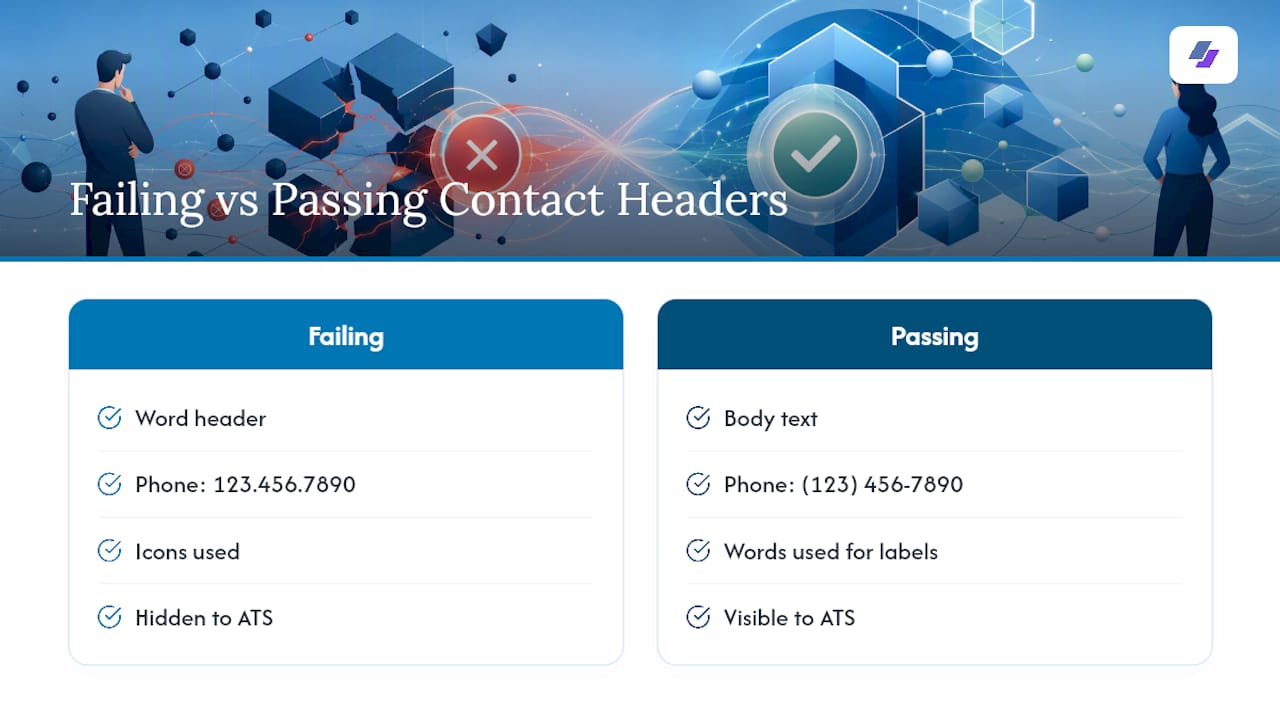
The header that fails: Name placed inside a Word header. Phone number written as 123.456.7890. Small icons used in place of the words “email” and “website.” The ATS skips the header region entirely, misreads the phone number’s punctuation, and can’t extract text sitting inside an icon or image, so the whole contact block effectively disappears.
The header that passes: Name typed directly into the document body. Below it, one line: City, State | (123) 456-7890 | firstname.lastname@email.com | linkedin.com/in/you. Every character here is plain, parsable text sitting in the body, exactly where the system expects to find it.
The difference isn’t about design polish. It’s about whether the software reading your resume before a human ever does can actually find the words you typed.
How Do You Test Contact Details With an ATS Checker?
Two tests catch nearly every contact-formatting problem, and both take less than five minutes.
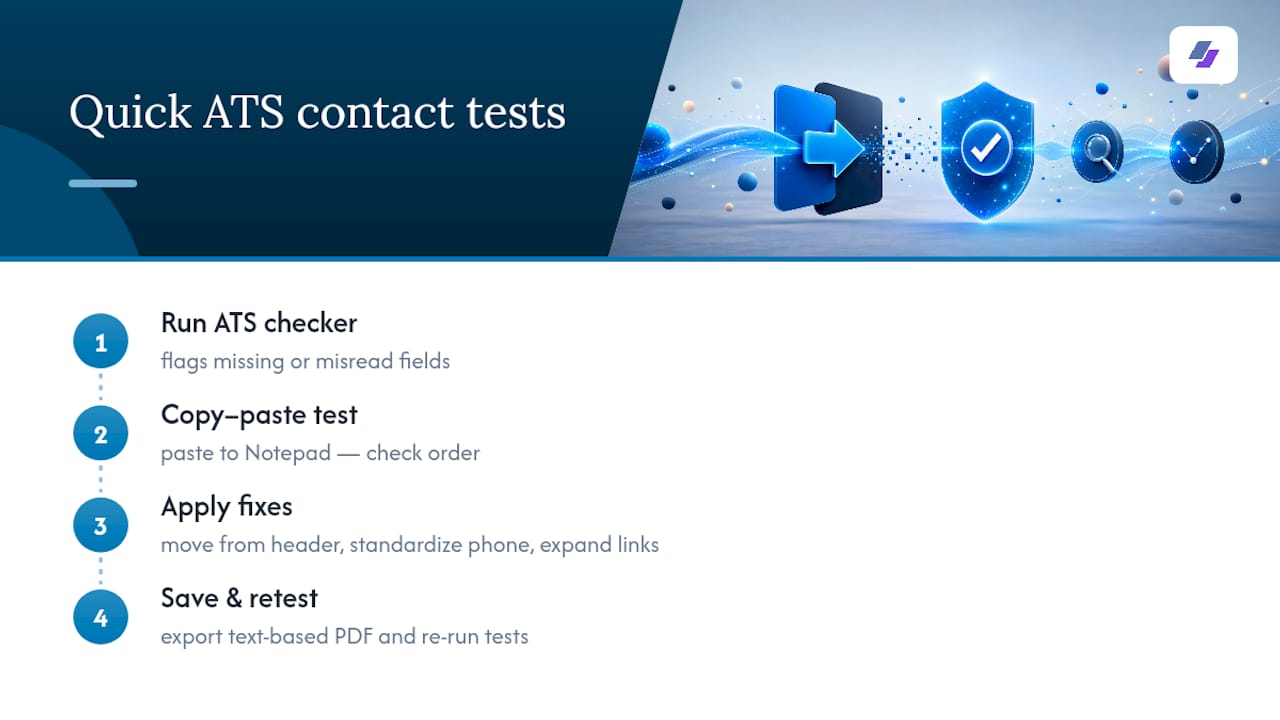
First, run your resume through an ATS resume checker or simulator. Tools like the one from Kickresume will flag missing fields, such as an email address the system couldn’t locate or a phone number it read incorrectly. Second, do the copy-paste test: select all the text, paste it into Notepad, and check whether the order matches what’s on your actual resume. If your contact line splits apart or shows up out of sequence, a table or text box is usually the cause.
If a scan flags a missing field, the fix is almost always small. Move the info into the document body if it’s sitting in a header. Standardize your phone format if it’s inconsistent. Swap any shortened link for the full URL. Then re-save as a text-based PDF and run the test again. Most fixes resolve in a single retest, since one formatting change is usually the only thing standing between a clean parse and a dropped field.
Why Publishers and Tools Like JobAlign Take Contact Formatting Seriously
Getting this section right isn’t guesswork. It’s a documented parsing problem that affects a huge share of applications before a recruiter ever opens them. That’s the exact gap JobAlign was built to close: an AI resume platform that syncs directly with your LinkedIn profile and generates tailored, ATS-optimized resumes for each application.
JobAlign automatically places name, phone, email, and links in body-safe positions using ATS-friendly templates, rather than leaving that formatting to guesswork on every new application.
For job seekers applying to multiple roles, that removes one of the most common, and most avoidable, reasons a resume never reaches a human.
Simple Habits That Keep Your Contact Info Reliable
The single most useful habit here is keeping one master header file and pasting it into every tailored resume instead of retyping it each time. Retyping is where small errors creep in, an extra space, a dropped digit, an old phone number.
Test the header again after any formatting edit, before you apply, not after. A five-minute copy-paste check now saves you from wondering later why a promising application went quiet. And keep your voicemail greeting and LinkedIn profile current, since both are the first things a recruiter checks once your resume actually gets through.
— Johan
Let JobAlign Build Your ATS-Safe Header Automatically
An AI resume platform that automates building a compliant resume header saves time for those rebuilding contact formatting manually for each application. It can sync with LinkedIn profiles, extract experience and skills, and generate tailored resumes using ATS-optimized templates placing contact information where parsers expect, avoiding header, footer, or text box placement issues.
Generated resumes keep the contact block in the document body, using standard phone and email formats and full URLs, reducing manual rebuilding of this section for each application. If you want to see the full formatting standard behind that approach, the ATS resume guide breaks it down in detail. Otherwise, connect your LinkedIn profile and generate your first ATS-optimized resume in a couple of minutes.
Sources
- How to Write an ATS Resume (With Template and Tips)
- Free ATS-Friendly Resume Template (Word + Google Docs, 2026) | CV Review
- Resume Format for ATS: ATS-Friendly Format Checklist (2026)
- How to Format Contact Info So ATS Reads It: Complete Guide