Convert Gig Portfolio to Resume: A Freelancer's Guide

Convert Gig Portfolio to Resume: A Freelancer’s Guide
Here’s the core move: pick 3 to 5 projects that match the job you want, convert each into a job-style role title, write 2 to 3 outcome-first bullets per entry and link your portfolio at the top of the page. That’s a resume Applicant Tracking Systems can actually parse. Automated tools like Jobalign build this structure automatically and report an 87% success rate getting resumes past ATS filters, which is worth knowing before you spend a weekend formatting by hand.
Your quick action plan looks like this:
- Select the gigs that map to your target role
- Convert each one into a standard job title
- Quantify the results with real numbers
- Tailor the language to match the job posting
- Link your portfolio so evidence backs every claim
Key Takeaways
A gig portfolio becomes a job-ready resume when you select relevant projects, convert them into titled entries with quantified bullets, and match the language of the job posting.
| Point | Details |
|---|---|
| Select before you write | Filter projects against the job description before drafting a single bullet. |
| Title the function, not the client | Use job-style titles like “Marketing Consultant,” not the client’s company name. |
| Lead every bullet with a number | Quantified outcomes get remembered; vague task lists get skipped. |
| Format for ATS parsing | Save as PDF, avoid graphics and columns, keep dates consistent. |
| Automate for volume | Jobalign generates tailored, keyword-matched resumes with a reported 87% ATS success rate for readers sending multiple applications. |
Table of Contents
- How to Convert Gig Portfolio Projects Into Resume Entries
- What Should a Freelancer’s Resume Structure Look Like?
- How Do You Tailor a Gig Resume to Pass ATS Filters?
- When Should You Automate the Tailoring Process?
- Common Mistakes Freelancers Make When Building This Resume
- How Do You Add Soft Skills and Client Feedback Without Bloating the Resume?
- My Approach to Converting a Portfolio Into a Resume
- Let Jobalign Handle the Repetitive Part
- Further Reading and Tools
- Frequently Asked Questions
How to Convert Gig Portfolio Projects Into Resume Entries
Freelance work doesn’t map cleanly onto resume format, and that’s exactly why so many gig workers freeze up here. You didn’t have a “job title.” You had a client, a scope, and a deadline. The fix is a four-step conversion process.
Step 1: Filter by relevance, not chronology. Open the job description you’re targeting and highlight every skill, tool, and outcome it mentions. Then hold your project list against that list. A logo redesign for a bakery matters less than a brand system you built for a 12-location franchise if the job wants enterprise-scale design experience. Cut anything that doesn’t earn its place.
Step 2: Give each project a job-style title. “Freelance Client Work” tells a recruiter nothing. “Marketing Consultant, E-Commerce Vertical” tells them exactly what function you served. Base the title on the role you actually performed, not the client’s name.
Step 3: Write bullets that lead with outcomes. Use a Context-Action-Result (CAR) shorthand: what was the situation, what did you do, what changed. Skip the task list. Lead with the result.
Step 4: Add context lines for continuity. A line noting “6-month contract, healthcare client” under your title tells a hiring manager this was intentional freelance structure, not a string of jobs you couldn’t keep.
Here’s the conversion in practice:
-
Raw: “Built a website for a local restaurant.”
-
Resume-ready: “Designed and launched a responsive site for a regional restaurant group, cutting page load time by 40% and increasing online reservations within the first quarter.”
-
Raw: “Did social media for a few small businesses.”
-
Resume-ready: “Managed content strategy across 5 small-business accounts, growing combined follower count by 3,200 and doubling monthly engagement.”
Pro Tip: Pull the exact technical skills and process terms straight from the job posting, then check whether your project bullets already contain them. If not, you probably have the experience. You just haven’t named it the way the employer expects.
What Should a Freelancer’s Resume Structure Look Like?
Gig workers tend to over-explain. A hiring manager doesn’t need your full project history. They need proof, fast, that you can do the job in front of them. Structure your resume so the strongest evidence sits highest on the page.
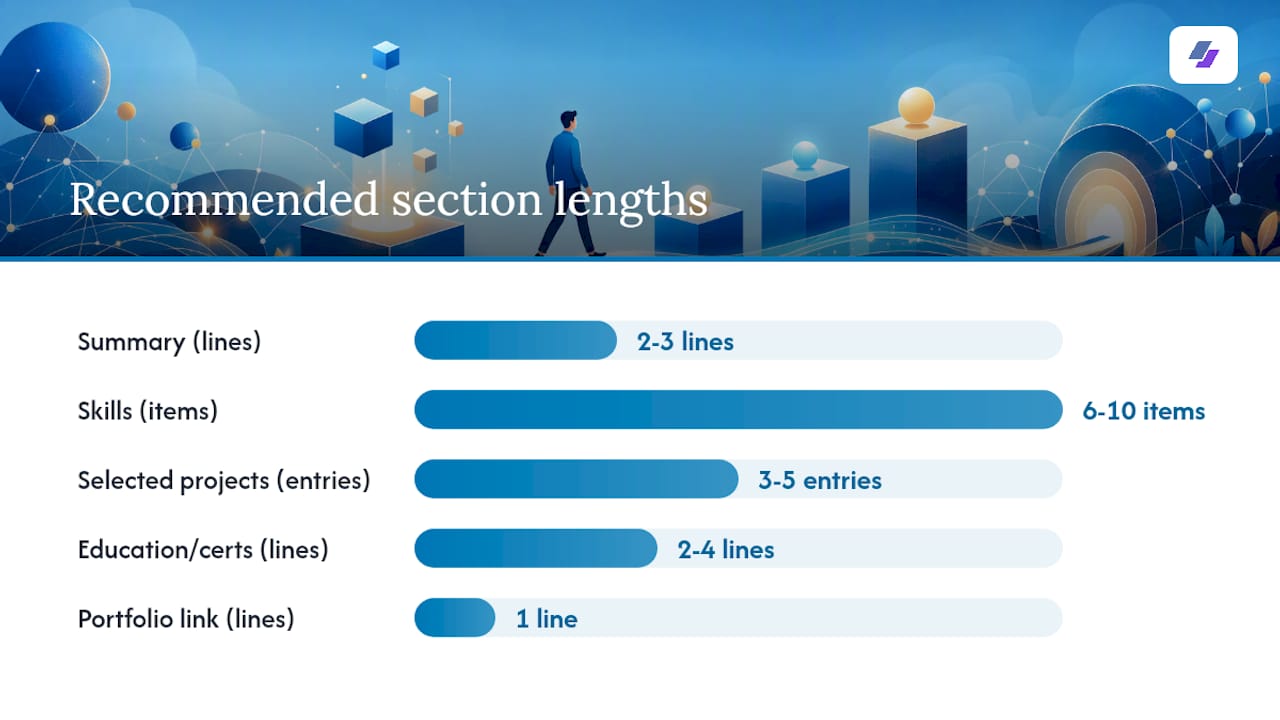
Lead with a two-line summary that states your specialty and the outcome you deliver. Follow it with a skills section grouped by category (technical, tools, domain expertise) rather than a flat list. Then present your best projects as focused entries, formatted the same way a traditional job history would be. Close with education, certifications, and your portfolio link.
One page works if you have under 8 years of freelance experience and 3 to 5 strong projects to show. Two pages make sense once you’re consolidating a longer track record or applying for senior roles where depth of experience matters more than brevity.
| Section | What to include | Ideal length |
|---|---|---|
| Summary | Specialty, years of experience, one measurable outcome | 2 to 3 lines |
| Skills | Grouped by category, matched to job posting language | 6 to 10 items |
| Selected projects | 3 to 5 entries, each with title, dates, and 2 to 3 bullets | 1 to 2 lines per bullet |
| Education/certs | Degree, relevant certifications, dates | 2 to 4 lines |
| Portfolio link | Full URL or shortened link, placed under your name | 1 line |
Put your portfolio link directly under your header contact info, and repeat it beside your strongest project entry as supporting evidence. A recruiter scanning for 10 seconds should see it twice without hunting.
How Do You Tailor a Gig Resume to Pass ATS Filters?
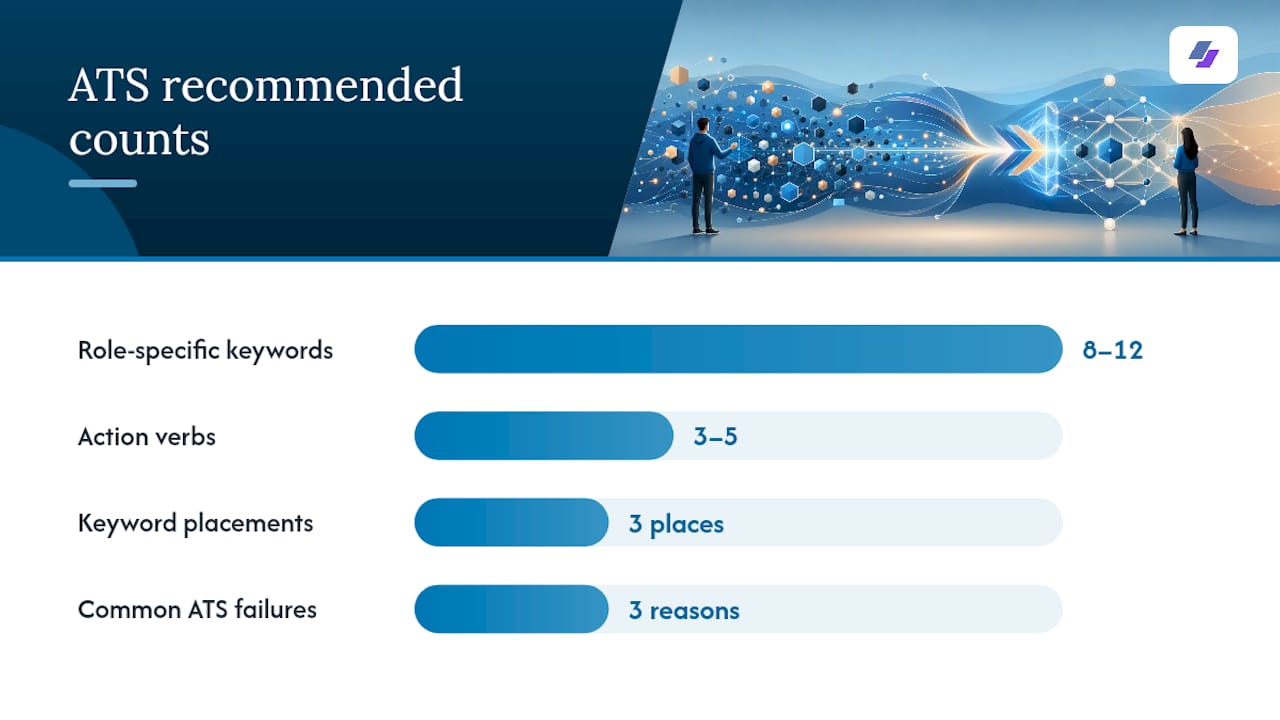
Every job posting is a keyword list in disguise. Read it once for meaning, then read it again hunting for repeated nouns and verbs. Pull 8 to 12 role-specific keywords (tools, platforms, methodologies) and 3 to 5 action verbs the posting favors.
- Place your top keywords in the summary, the skills section, and at least one project bullet each. Repetition across sections signals relevance without reading as stuffed.
- Match the exact phrasing the posting uses. If it says “stakeholder management,” don’t substitute “client relations.”
- Save your resume as a PDF using a standard template, since most ATS software parses text-based PDFs cleanly. Avoid text boxes, columns with graphics, or scanned images.
- Skip decorative fonts and icons that ATS parsers can’t read. Plain formatting outperforms polish here.
Pro Tip: Keep one master resume with every project, every metric, and every skill you’ve ever used. Copy from it for each application instead of rebuilding from scratch. This is the single biggest time-saver for freelancers applying to multiple roles.
Gig resumes fail ATS scans for specific reasons: inconsistent date formats across short contracts, vague titles like “Consultant” with no functional context, and too many entries crammed onto one page. Jobalign’s ATS guide breaks down keyword placement rules if you want a deeper reference.
When Should You Automate the Tailoring Process?
Writing one tailored resume by hand takes an hour if you’re fast. Writing fifteen takes a weekend you don’t have. That’s the trade-off worth naming honestly: manual tailoring gives you full control, automation gives you speed and consistency across volume.
Jobalign syncs directly with your LinkedIn profile, pulls your experience and skills, then analyzes each job description you paste in to generate a tailored resume with the right keywords already placed. For a single application to a role you care deeply about, editing by hand still makes sense. For batch applications across a dozen similar postings, automation saves real hours.
Before sending any automated output, check three things:
- Does the generated title still reflect what you actually did?
- Are the quantified results accurate, not inflated by the tool?
- Does the summary read like you, not like generic filler?
Automation handles structure and keyword matching well. You still own accuracy.
Common Mistakes Freelancers Make When Building This Resume
The most common error is trying to list everything. A resume with 15 short gigs reads as scattered, not versatile. Consolidate similar short-term projects under one role entry, like “Freelance Graphic Designer, Multiple Clients,” and detail only the 2 strongest examples underneath.
The second mistake is using client or project names as titles. “Acme Corp Project” tells a recruiter nothing about your function. Add a job-style title with a short parenthetical: “UX Consultant (Fintech Startup).”
The third mistake, and the costliest one, is skipping quantification. “Improved client’s social presence” is forgettable. If you don’t have exact numbers, estimate conservatively rather than leaving the claim vague.
Quick fixes before you submit anything:
- Save as PDF, not an unusual file format
- Confirm dates are consistent across every entry
- Cut your summary to 2 to 3 lines, no more
- Fold client testimonials into a single short line rather than a separate block
How Do You Add Soft Skills and Client Feedback Without Bloating the Resume?
Freelancers often either ignore soft skills entirely or oversell them with vague adjectives like “great communicator.” Neither works. The better approach: demonstrate soft skills through the outcome, not the label. Instead of “strong communication skills,” write “coordinated feedback across 3 stakeholders on a compressed 2-week timeline.” The skill shows up in the result.
Client testimonials carry real weight for freelancers because they substitute for the manager references a traditional employee would have. But they need to be compressed. Pull one sentence, not a paragraph, and attach it directly under the relevant project bullet rather than creating a separate testimonials section that eats space.
If you have multiple strong testimonials, save the rest for your portfolio site itself and link to it rather than cramming quotes onto the resume. Jobalign’s breakdown on testimonials covers exactly how much testimonial content belongs on the page versus off it.
My Approach to Converting a Portfolio Into a Resume
. My rule of thumb: if a project doesn’t map to a verb in the job posting, it doesn’t make the cut, no matter how proud you are of it. Write bullets backward from the result, then verify the resume parses cleanly before you trust it. Everything else is polish.
Let Jobalign Handle the Repetitive Part
Manually rewriting a resume for every application eats hours you’d rather spend pitching clients or finishing paid work. Jobalign is built for exactly that bottleneck: it syncs with your LinkedIn profile, reads the job description you’re applying to, and generates a fresh, keyword-matched resume in minutes instead of hours.
- Tailored resumes, generated on demand, one per posting
- Automatic keyword integration pulled from the job posting itself
- One-click, ATS-compatible PDF output ready to submit
If you’re applying to more than a couple of roles this month, try Jobalign and generate your first tailored resume from your LinkedIn profile.
Further Reading and Tools
- Developer Resume Guide: ATS keyword examples for technical freelancers.
- Project-Based Resume Guide: how to frame freelance projects as resume entries.
- Evaluating Developer Portfolios Remotely: partner guidance on translating technical work for hiring managers.
- Resume Examples by Job: ATS-ready templates by category.
- Portfolio Video Tools: for creative freelancers adding visual samples.
Frequently Asked Questions
How many gig projects should I include on my resume? Stick to 3 to 5 projects that directly match the job you’re targeting. More than that dilutes the page and makes ATS parsing messier.
Should I use my client’s business name or a job title on my resume? Use a job-style title first, then add the client or industry type in parentheses. Titles tell ATS software and recruiters what function you served.
Can I really turn a portfolio into a resume without professional help? Yes. Following a relevance filter, a CAR bullet structure, and consistent formatting gets most freelancers to a strong draft. Tools like Jobalign can also automate the tailoring step if you’re applying at volume.
What file format is safest for ATS? A standard, text-based PDF built from a simple template. Avoid scanned images, unusual fonts, or multi-column layouts that confuse ATS parsers.
Where should I put my portfolio link on the resume? Directly under your name and contact info at the top, and once more beside your strongest project entry as supporting evidence.