How to Highlight Relevant Experience on Your Resume

Lead with the experience that proves you can do the job, not necessarily your most recent role. That single shift is what separates a resume that gets a callback from one that gets filtered out. JobAlign’s ATS-optimized resumes pass ATS filters at an 87% success rate, largely because they prioritize relevance over chronology. Here is a brief micro-process to get you started right now:
- Extract keywords. Pull several exact phrases from the job description: required skills, deliverables, tools, and job-specific verbs.
- Score your experiences. For each role or project, ask: does it demonstrate that skill? Does it show a measurable result? Is it recent enough to matter?
- Prioritize and rewrite. Move your top 2–3 matches to the top of your experience section and rewrite their bullets with a result attached.
Sample achievement bullet (marketing role):
Grew organic search traffic 43% in six months by redesigning the content calendar and targeting 15 high-intent keywords identified through SEMrush audits.
That bullet works because it names the action, the method, and the outcome. Every bullet you write should clear that same bar.
Table of Contents
- What counts as relevant experience on a resume?
- How to identify which experiences are most relevant to a specific job
- How to present your relevant experience on the page
- How to write bullets that prove you are the right fit
- Handling special situations: gaps, career changes, and no experience
- What ATS actually looks for when it scans your experience
- Rewrite checklist and before/after examples
- Key Takeaways
- The part most job seekers skip
- How JobAlign helps you tailor every resume faster
- Useful sources for further reading
What counts as relevant experience on a resume?
Relevant experience is any role, project, or activity that demonstrates the skills and outcomes an employer is hiring for. It is not limited to paid, full-time jobs. Internships, volunteer work, class projects, leadership roles, freelance contracts, and academic coursework all qualify when they map to the job requirements.

The practical question is not “Was I paid?” but “Does this prove I can do the work?” A capstone project that involved managing a $20,000 budget is more relevant to a project manager role than a paid retail job from the same period.
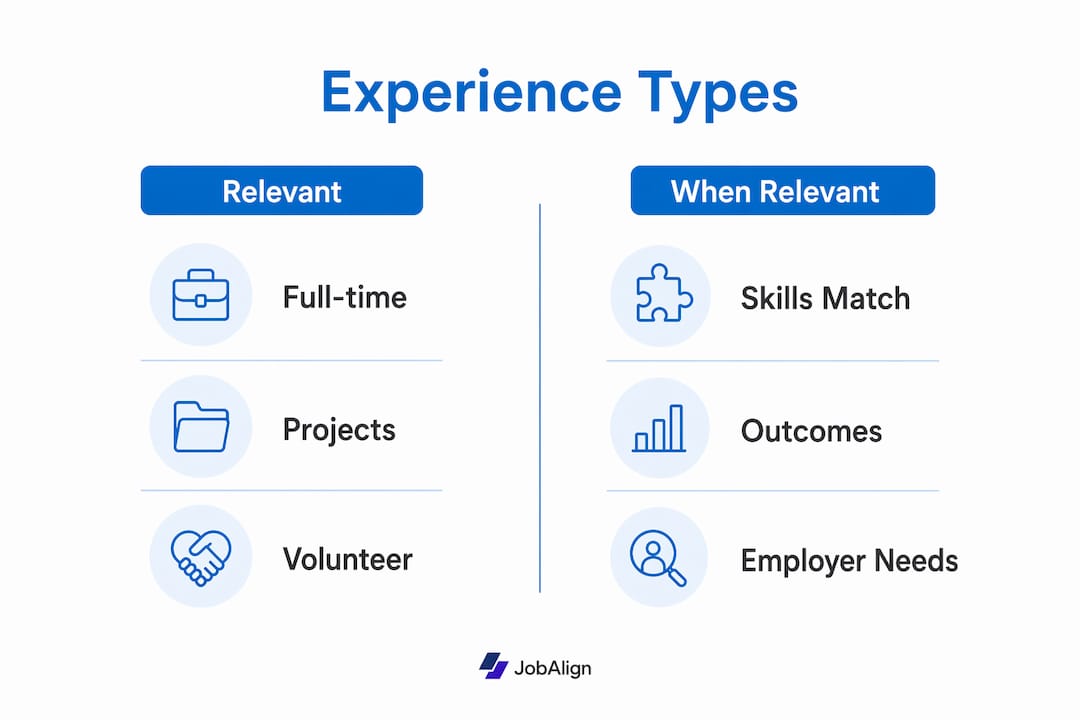
| Experience type | When it counts as relevant | Suggested section label |
|---|---|---|
| Full-time paid role | Always, if the skills transfer | Work Experience / Professional Experience |
| Internship | When it matches the target role’s core tasks | Relevant Experience |
| Volunteer work | When it shows leadership, technical, or domain skills | Volunteer & Community Work |
| Class project / capstone | When it produced a real deliverable or result | Relevant Projects |
| Freelance / contract work | When the output is verifiable (portfolio, client, metrics) | Freelance Work / Selected Projects |
| Leadership role (club, org) | When it demonstrates management or cross-functional skills | Leadership Experience |
Create a specialized section like “Relevant Projects” or “Leadership Experience” whenever a category of experience is strong enough to stand on its own and would get buried under a generic “Work History” label.
How to identify which experiences are most relevant to a specific job
Start with the job description, not your resume. Most job seekers do it backwards. Here is the repeatable process:
- Copy the job description into a plain document. Highlight every skill, tool, deliverable, and outcome the employer mentions more than once. Those repeated items are the highest-priority keywords.
- Separate technical requirements from soft skills. Technical requirements (Python, Salesforce, financial modeling) are usually non-negotiable. Soft skills (communication, cross-functional collaboration) are supporting evidence.
- Score each of your experiences. Use this fast heuristic drawn from career advising practice: assign 0–3 points for skill match, 0–2 for result relevance, and 0–1 for recency. Any experience scoring 4 or higher belongs near the top of your tailored resume.
- Build a quick match matrix. Three columns: job requirement, your experience example, and the evidence (a metric, a link, or a named output). Fill in as many rows as you can. Gaps in the evidence column tell you where to dig for numbers.
- Capture ATS-friendly phrasing. Use the job description’s exact wording where it fits naturally. If the posting says “cross-functional project management,” use that phrase, not “worked with multiple teams.” Verbs matter too: “led,” “built,” and “reduced” score better than “helped with” or “was responsible for.”
Transferable skills perform better when tied to specific challenges and measurable outcomes. Framing beats listing every time.
How to present your relevant experience on the page
Where you place experience matters almost as much as what you write. Here is how to structure the page for maximum impact.

| Section | When to use it | Placement |
|---|---|---|
| Professional Summary | Every tailored resume | Top, before experience |
| Relevant Experience | When your most relevant role is not your most recent | Immediately after summary |
| Work Experience | Standard chronological history | After Relevant Experience |
| Relevant Projects | Students, career changers, freelancers | After Work Experience or near top |
| Skills | Always, for ATS keyword density | After experience sections |
| Selected Achievements | When you have 2–3 standout wins that span multiple roles | Optional, near top |
Ordering by relevance, not just recency. Career guides generally recommend including up to 10–15 years of relevant experience. If your most relevant role is five years back, create a “Relevant Experience” section and list it first, then follow with a “Additional Work History” section for the rest. Hiring managers read top-to-bottom; put your proof where they look first.
Formatting rules that protect ATS parsing:
- Use standard date formats: “Jan 2022 – Mar 2024” or “01/2022 – 03/2024.”
- Avoid tables, text boxes, headers/footers, and graphics inside the experience section.
- Stick to standard section labels. “Work Experience,” “Professional Experience,” and “Relevant Experience” all parse reliably. Invented labels like “My Story” do not.
- Place portfolio or work sample URLs as plain text directly under the relevant role or project title.
A targeted summary statement at the top should name the role you are applying for and reference two or three core competencies pulled directly from the job description. That one section signals relevance before a recruiter reads a single bullet.
Pro Tip: If you are applying to a role where your most relevant experience is buried on page two, create a “Selected Achievements” section at the top with two or three bullets that span your career. It acts as a highlight reel before the full chronology.
How to write bullets that prove you are the right fit
The formula is simple: action verb + context/task + quantified result. Emory’s career development team calls this the CAR structure (Challenge, Action, Result), and it is the single most reliable way to make a bullet land.
High-impact action verbs by function:
- Leadership: Led, Directed, Managed, Coached, Oversaw
- Analytics: Analyzed, Modeled, Forecasted, Audited, Measured
- Delivery: Shipped, Launched, Deployed, Executed, Delivered
- Growth: Grew, Increased, Expanded, Accelerated, Generated
The difference between a weak bullet and a strong one is almost never the experience itself. It is whether the writer committed to a number. “Improved customer satisfaction” tells a recruiter nothing. “Raised NPS from 32 to 61 over two quarters by redesigning the onboarding email sequence” tells them everything they need to decide.
Before/after rewrites:
Direct match (operations manager role):
- ✗ Before: “Responsible for managing warehouse operations and staff.”
- ✓ After: “Managed 18-person warehouse team, cutting order fulfillment errors by 27% through a new pick-and-pack verification process.”
Career change (teacher moving to corporate L&D):
- ✗ Before: “Taught high school English to 30 students per class.”
- ✓ After: “Designed and delivered curriculum for 120+ learners annually, improving standardized assessment pass rates by 19% through differentiated instruction methods.”
Early-career (marketing intern):
- ✗ Before: “Helped with social media posts and analytics reports.”
- ✓ After: “Produced 3 weekly social posts across Instagram and LinkedIn, contributing to a 14% follower growth over a 10-week internship.”
Role-specific sample bullets to adapt:
- Customer success: Retained 94% of an at-risk account portfolio ($1.2M ARR) by building quarterly business reviews and proactive escalation workflows.
- Developer: Reduced API response time by 38% by refactoring legacy endpoints and introducing Redis caching on a Node.js backend.
- Finance analyst: Built a cash-flow forecasting model in Excel that reduced month-end close time from 3 days to 6 hours.
Handling special situations: gaps, career changes, and no experience
Not every resume tells a straight story. Here is how to surface relevant work when your history is nontraditional.
Career changers should resist the urge to list every job they have ever held. A small set of high-quality, relevant projects beats a long list of marginally related jobs. Create a “Relevant Experience” or “Selected Projects” section and populate it with the cross-functional accomplishments that map directly to the target role. Your summary should name the new field explicitly and connect your background to it in one sentence.
Students and entry-level candidates can place coursework, capstone projects, and internships under a “Relevant Projects” section near the top of the page. Internships and volunteer experience are entirely appropriate here if they demonstrate the required skills. Label each project with a title, a one-line description, and a bullet or two showing what you built or measured.
Employment gaps and contract work deserve honest, functional labels. “Freelance UX Design — Selected Projects (2023–2024)” is cleaner and more credible than a vague date gap. List two or three client outcomes underneath and link to the portfolio piece that proves it.
For career changers especially: your summary is doing the heavy lifting. It is the one place on the resume where you can explicitly connect your old world to the new one. Spend more time on those three sentences than on any single bullet.
Pro Tip: Place your portfolio URL directly under your name and contact info at the top of the resume, not buried in a footer. A hiring manager who wants to verify your work should be able to find it in under three seconds.
Adding a portfolio link in non-creative fields still works as a trust indicator. A PDF of a financial model, a GitHub repo, or a published case study all let a recruiter verify the claim before the interview.
What ATS actually looks for when it scans your experience
Approximately 75% of resumes are rejected by ATS before a human reads them. Most of those rejections are preventable.
Do this:
- Use standard section headings (“Work Experience,” “Skills,” “Education”) that every major ATS recognizes.
- Place keywords in at least three locations: the summary, the experience bullets, and the skills section.
- Use the exact phrases from the job description where they fit naturally. ATS systems often match on exact strings, not synonyms.
- Save as .docx for most applications. Some ATS platforms parse PDF reliably, but .docx is the safer default.
- Test your resume’s parsing by copying the full text into a plain-text editor (Notepad or TextEdit). If the formatting collapses into unreadable strings, the ATS will see the same thing.
Avoid this:
- Tables, columns, text boxes, and graphics inside the experience section.
- Headers and footers for contact information (many parsers skip them entirely).
- Fancy bullet symbols. Standard round bullets parse cleanly; decorative icons often do not.
- Keyword stuffing. Placing a skills list in white text or repeating a phrase ten times triggers spam filters in modern ATS platforms.
For a deeper look at ATS keyword placement by section, JobAlign’s keyword guide covers which terms carry the most weight by role category.
Rewrite checklist and before/after examples
Use this checklist every time you tailor a resume for a new application.
- [ ] Pull 8–10 exact keywords from the job description.
- [ ] Score your top 5 experiences using the skill match / result relevance / recency heuristic.
- [ ] Rewrite the top 3 bullets using the CAR formula with a metric in each.
- [ ] Update the summary to name the role and reference 2–3 competencies from the job description.
- [ ] Add a portfolio link under your contact info or directly under the relevant role.
- [ ] Run the plain-text paste test to confirm ATS parsing.
- [ ] Save as .docx unless the application explicitly requests PDF.
Annotated before/after examples:
Example 1 — Project manager applying to a SaaS company:
- ✗ Before: “Managed multiple projects simultaneously and communicated with stakeholders.”
- ✓ After: “Delivered 4 concurrent SaaS implementation projects on time and under budget, managing stakeholder communication across 3 time zones for a 200-seat enterprise client.”
- What changed: Added scope (4 projects, 200-seat client), a result (on time, under budget), and a specific context (SaaS, enterprise) that mirrors the job description.
Example 2 — Data analyst moving from retail to fintech:
- ✗ Before: “Used Excel to track sales data and create reports for managers.”
- ✓ After: “Built automated Excel dashboards tracking $4M in weekly sales data, reducing manual reporting time by 60% and surfacing margin trends that informed two pricing decisions.”
- What changed: Quantified the data scale, named the business impact, and reframed a retail task as an analytical accomplishment relevant to fintech.
Pro Tip: Pair each strong bullet with a portfolio piece organized in CAR format (Challenge, Action, Result). A hiring manager who clicks through and sees the full context behind a claimed achievement is far more likely to trust the resume overall.
JobAlign’s AI resume optimizer runs this rewrite process automatically, mapping your LinkedIn experience to the job description and flagging bullets that lack metrics or keywords.
Key Takeaways
Tailoring your resume to each job description, starting with keyword extraction and ending with metric-backed bullets, is the single most reliable method to highlight relevant experience and pass both ATS filters and recruiter review.
| Point | Details |
|---|---|
| Relevance beats recency | Lead with the experience that best proves you can do the job, even if it is not your most recent role. |
| Score before you write | Use the skill match / result relevance / recency heuristic; prioritize experiences scoring 4 or higher. |
| CAR formula for every bullet | Every bullet needs an action verb, a context, and a quantified result to earn its place. |
| ATS parsing starts with formatting | Use standard headings, avoid tables and graphics, and run the plain-text paste test before submitting. |
| JobAlign automates the process | JobAlign syncs with LinkedIn, extracts relevant experience, and generates tailored, ATS-optimized resumes with an 87% ATS pass rate. |
The part most job seekers skip
Here is something worth saying plainly: most job seekers spend 90% of their time writing a resume and almost no time deciding what belongs on it. The selection problem is harder than the writing problem.
The scoring heuristic in this guide exists because “relevant” is not a feeling. It is a calculation. When you force yourself to assign points to each experience before you write a single bullet, you stop defaulting to recency and start defaulting to fit. That shift alone moves resumes from the rejection pile to the interview stack.
There is also a credibility gap that almost no one addresses. A bullet that claims a 40% improvement is easy to write and easy to doubt. A bullet that links to a portfolio piece, a published case study, or a GitHub repo is much harder to dismiss. Resumes and portfolios that reinforce the same wins make recruiters more likely to trust the claims. That is not a creative-field rule. It applies in finance, operations, engineering, and customer success just as much.
The last thing worth saying: a generic resume is not a time-saver. It is a time-waster dressed up as efficiency. One tailored resume that gets an interview beats ten generic ones that disappear into ATS.
How JobAlign helps you tailor every resume faster
Most of the process described in this guide, from keyword extraction to bullet rewriting to ATS testing, takes 45–90 minutes per application when done manually. JobAlign cuts that to a few minutes.
Connect your LinkedIn profile once, and JobAlign pulls your experience, skills, and accomplishments automatically. Paste in a job description, and the platform maps your background to the role’s requirements, flags missing keywords, and generates a tailored, ATS-optimized resume you can download as a clean .docx or PDF. Every resume is unique to that application. There is no monthly subscription required to get started, and each credit covers one job posting, with up to 12 generations to refine that version.
If you are applying to multiple roles at once, JobAlign’s bulk-tailoring feature means you are not starting from scratch each time. The 87% ATS pass rate comes from keyword precision and clean formatting, both handled automatically. Your next step: generate your first tailored resume in under two minutes.
Useful sources for further reading
| Source | Best for |
|---|---|
| Santa Monica College Career Services | Comprehensive guide to experience sections, accomplishment statements, and tailoring basics |
| Emory CPD — Impressive Resume Bullets | CAR formula, action verbs, and bullet-writing mechanics |
| Virginia Tech Career — Portfolio Guide | How to build and link portfolio evidence to resume bullets |
| University of Florida CareerHub | Transferable skills framing and resume structure guidance |
| Indeed — Years of Experience | How far back to go and when to drop older roles |
| Assurant Careers Blog | Career-change tactics and transferable skill presentation |
| JobAlign ATS Resume Guide | ATS parsing rules, keyword placement, and formatting tests |