Job Seekers: Use Job Description Keywords to Beat ATS in 15 Minutes

Job description keywords are the repeated skills, tools, credentials, and outcome terms an employer flags as required or preferred in a posting. Your first move is simple: pull out the must-have terms before the nice-to-haves, then place them where you can actually back them up. Get that right, and you improve your odds with both the applicant tracking system and the human who reads what survives it.
TL;DR:
- Prioritize including exact-match skills, tools, and certifications listed explicitly as required by the job posting, especially those with “must have” language.
- Place keywords in the summary section, top job bullets, skills line, and certifications to maximize both ATS and recruiter visibility.
- Focus on role-specific, measurable achievements and avoid keyword stuffing or vague buzzwords to prevent disqualification.
- Use automation tools for initial keyword extraction but verify relevance and integrity through human review and truthful representation.
- Tailor each resume individually for each posting, ensuring must-have keywords are clearly demonstrated with concrete results.
Table of Contents
- How Do You Extract Keywords From a Job Description?
- Which Job Description Keywords Actually Move the Needle?
- Where Should Keywords Go on Your Resume?
- Should You Use a Keyword Finder or Check Manually?
- What Keyword Mistakes Cost You Interviews?
- Balancing Automation With Honesty on Your Resume
- Generate an ATS-Ready Resume From Any Job Posting
- Sources
How Do You Extract Keywords From a Job Description?
You don’t need special software for this, though a tool speeds things up. The manual version takes maybe fifteen minutes per posting and teaches you to spot patterns you’ll use for every application after.
- Copy the full posting into a document. Don’t work from the browser tab. You want to highlight, cut, and rearrange freely.
- Scan the headings first. “Requirements,” “Qualifications,” and “What You’ll Need” carry more weight than “About the Company” or “Perks.”
- Highlight repeated words and phrases. If “Salesforce” or “cross-functional” shows up three times, that’s not filler. That’s the ATS telling you what it’s scanning for.
- Flag explicit required language. Phrases like “must have,” “required,” and “minimum X years” separate deal breakers from wish-list items.
- Classify each term into one of four buckets: tools and software, certifications or licenses, core responsibilities, and outcomes or results.
- Build a two-column list. Must-haves on one side, nice-to-haves on the other. This list becomes your resume-editing checklist.
- If you’re using a keyword finder, paste the same posting in and compare its output against your manual highlights. Discrepancies usually mean you missed something buried in a paragraph, not that the tool is wrong.
That comparison step matters more than people think. Tools are fast at catching frequency, but they miss context. You catch context.
Which Job Description Keywords Actually Move the Needle?
Not every keyword carries equal weight, and treating them as interchangeable is one of the fastest ways to waste your edits. Rank them in this order:
- Named skills, tools, and languages. “Python,” “QuickBooks,” “Figma,” “Salesforce Marketing Cloud.” These are exact-match terms an ATS is built to catch, and they’re the easiest for you to prove or disprove honestly.
- Certifications, licenses, and required degrees. A “PMP required” or “RN license” line is often a hard filter. If you have it, it belongs near the top of your resume, not buried in a footnote.
- Experience-level signals. Years of experience, team size managed, or budget owned tell a recruiter what scale you’re used to operating at.
- Responsibilities phrased as outcomes. “Reduce churn,” “increase pipeline,” “cut processing time” are weaker as raw keywords but strongest when you attach a number to them.
A KINETK analysis of keyword-finder workflows found that the strongest resumes pair verifiable, role-specific terms with short metrics. That combination is what convinces both the software and the person reading it afterward.
Here’s what that rewrite looks like in practice.
Where Should Keywords Go on Your Resume?
Placement decides whether a keyword actually registers or just sits there unnoticed. Prioritize these four zones:
- Summary or profile section. This is the first block both the ATS and the recruiter scan, so your top three or four must-have terms belong here.
- Top bullets under your most recent role. Recency and relevance both carry weight in scoring, so don’t save your best keyword-matched bullet for the bottom of the page.
- A dedicated skills line. List tools and technical terms exactly as the posting phrases them, since ATS matching is often literal.
- Certifications section. If the posting names a specific credential, don’t paraphrase it. Match the exact wording.
Structure each bullet as action verb plus keyword plus measurable result. The other proves you did the job. The Ohio State Career Guide recommends this same action-verb-plus-result structure, and it holds up whether you’re writing for an entry-level role or a director title. Just don’t cram every keyword into one paragraph. Readability for the human still matters.
Should You Use a Keyword Finder or Check Manually?
Both, in that order. A finder extracts repeated terms, named tools, certifications, and common role phrases faster than you can by eye, which makes it a solid first pass. What it can’t do is judge whether a suggested term actually fits your background.
- Run the finder first to get a raw list of candidate terms from the posting.
- Re-run your edited resume against the same posting to confirm the must-haves actually landed.
- Read your top three bullets as a recruiter would, cold, with no context. If a keyword feels dropped in rather than earned, rewrite it.
- Keep every claim truthful. A keyword you can’t defend in an interview is a liability, not an asset.
Coursera’s guide to resume keywords makes a similar point about tailoring each resume to its specific posting rather than reusing one generic version across applications. Manual edits beat an automated suggestion whenever the tool proposes a term technically present in the posting but genuinely outside your experience. Skip those, no matter how often they repeat.
Pro Tip: Search your finished resume for your own must-have list, one term at a time. If a required keyword doesn’t show up with Control+F, a scanning recruiter won’t find it either.
What Keyword Mistakes Cost You Interviews?
Keyword stuffing is the most common trap. Repeating “leadership” five times without a single example of what you led does nothing for you. Fix it by attaching an outcome metric to each claim instead of piling on adjectives.
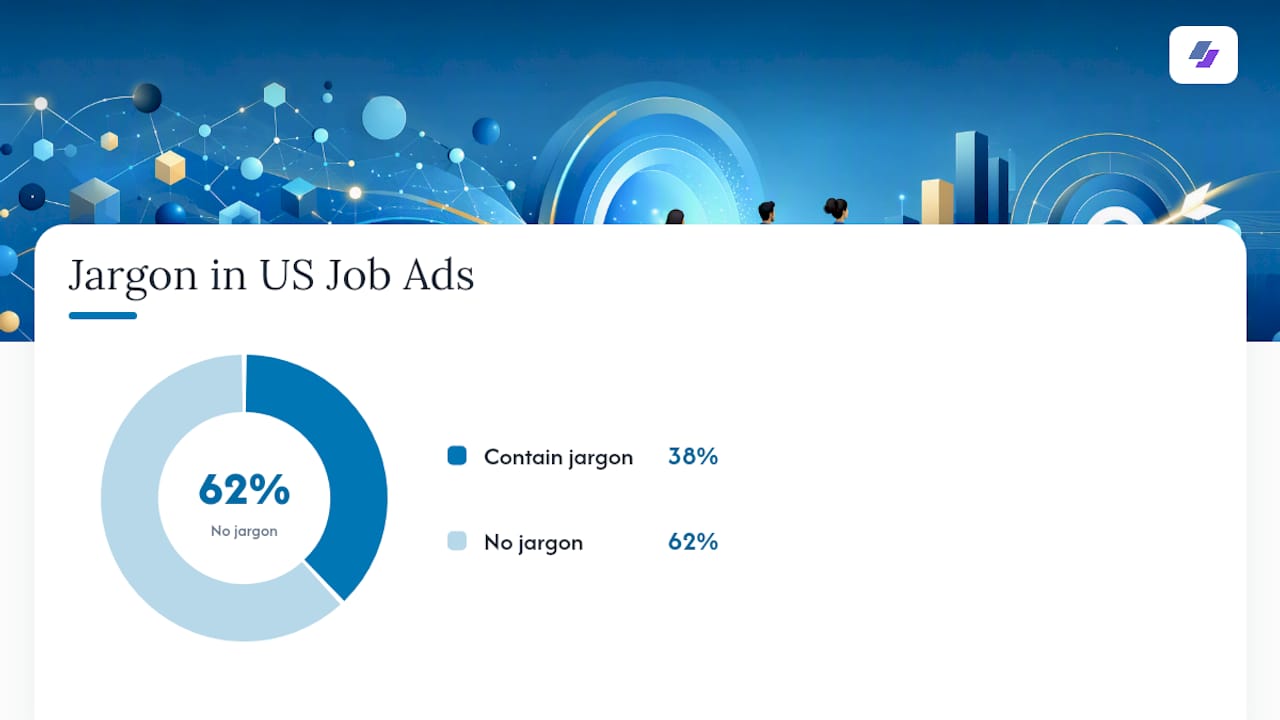
Chasing culture buzzwords is the second trap. An analysis of 6.3 million US job ads found 38% contained confusing jargon, with “team player” appearing roughly 77 times per 1,000 postings. Mirroring that same vague language back doesn’t help you stand out. Textio’s research points the same direction: role-specific, technical terms outperform filler phrases like “passionate” or “fast-paced” for both search matching and recruiter interest.
- Don’t list a skill you can’t discuss in detail during an interview. Use nearby honest phrasing instead, or leave it out.
- Run a final check for typos, exact-title matches, and consistent formatting before you submit.
Balancing Automation With Honesty on Your Resume
Automation is genuinely useful here, but only up to the point where it starts guessing on your behalf. A tool can tell you which terms repeat in a posting. It cannot tell you whether you’ve actually led a team of twelve or just sat near one.
I’d rather see a candidate submit a slightly less keyword-dense resume that’s entirely true than a perfectly optimized one that falls apart under a follow-up question. That’s the trade-off worth protecting. Something like Jobalign can speed up the extraction and formatting work considerably, but the last step should always be a human read, ideally your own, out loud, asking whether every line survives a direct question about it.
— Johan
Generate an ATS-Ready Resume From Any Job Posting
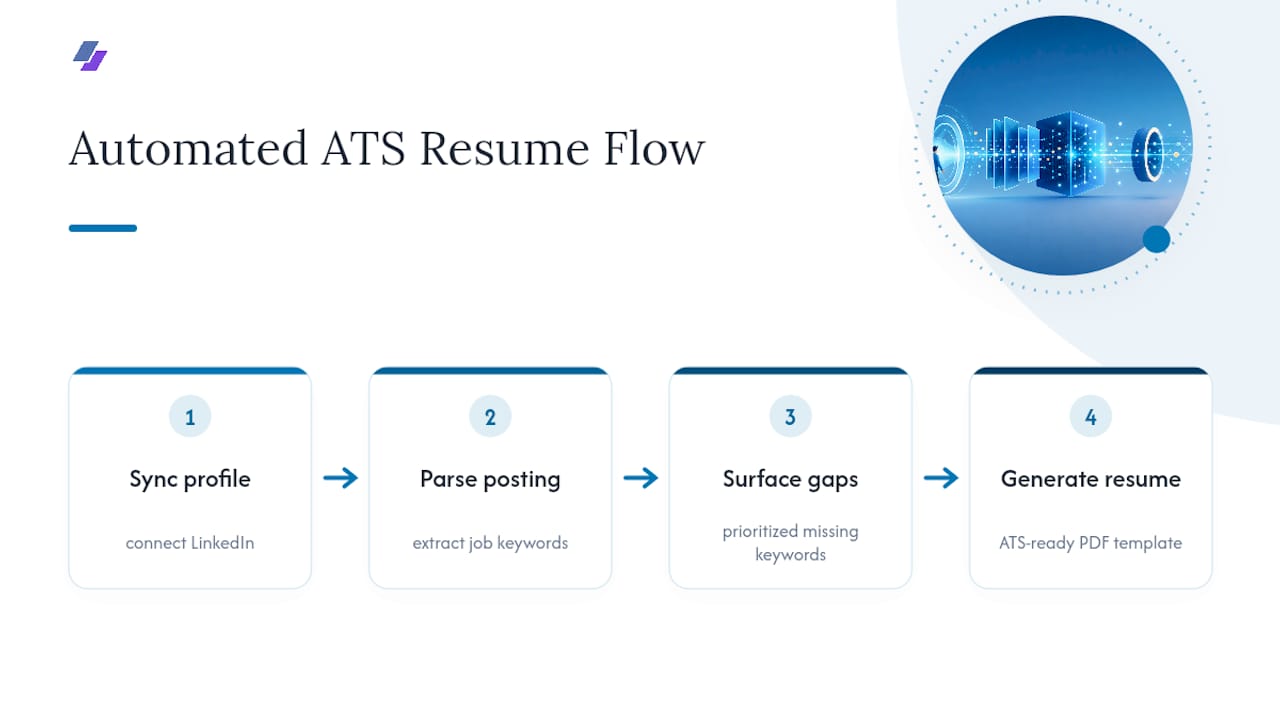
Manually building the two-column keyword list above works, but doing it for every single application adds up fast if you’re sending out a dozen tailored resumes a week. The platform automates that extraction step directly: it syncs with your LinkedIn profile, parses the job posting you’re targeting, and surfaces the prioritized keywords your resume is missing, then outputs an ATS-ready PDF built on a professional template.
That’s the practical shortcut for everything covered above. Instead of manually classifying tools, certifications, and outcome terms for each posting, you get a tailored draft in minutes, one you still read and adjust for accuracy before you submit. Try the LinkedIn resume generator to build your first tailored resume, or check the ATS resume guide if you want to understand exactly how the filtering works before you start.
Sources
Forbes’ analysis of jargon in job ads backs the case against buzzword-chasing. KINETK and Coursera break down the extraction and tailoring workflow in more detail. Textio’s blog explains why role-specific language consistently outperforms culture-speak with both software and recruiters.
- Why employers should avoid jargon in job postings — Forbes
- How to Find Keywords in a Job Description | KINETK
- Stop writing job posts that scare away the right people — Textio blog
- Keywords for your career materials — Ohio State Career Guide