3 Edits That Get Callbacks on Remote Resumes With Copy Ready Bullets

A remote job resume has to do two things at once: pass the ATS scan and prove you can work independently without someone checking on you every hour. Most rejections trace back to one of three fixable gaps. Add a “Remote” label to your role or location line, mirror the exact async and tool keywords from the posting, and rewrite one achievement per job as an independent-delivery metric.
TL;DR:
- Adding a “Remote” label in your contact line, job title, summary, and bullet points significantly increases visibility to ATS filters and recruiters.
- Use a single-column, ATS-friendly format with clear section headers and avoid tables, icons, or graphics to ensure proper parsing.
- Quantify results, specify tools used, and mirror the exact vocabulary from the job posting for optimal ATS ranking and relevance.
- Remote job postings attract three to ten times more applicants than in-office roles, making keyword optimization essential for visibility.
- Focusing on one strong, measurable achievement per role, rewritten as an independent-delivery metric, greatly improves your chances of catching a recruiter’s eye.
Table of Contents
- Quick Checklist: What to Fix Before You Hit Submit
- Which Resume Format Actually Works for Remote Jobs?
- Where Do You Put “Remote” on a Resume?
- How Do You Optimize a Remote Resume for ATS?
- Bullet Examples and Sample Resumes by Career Level
- How Jobalign Speeds Up the Tailoring Process
- What Actually Moves the Needle on a Remote Application?
- Try Jobalign to Tailor Your Remote Resume in Minutes
- Sources
Quick Checklist: What to Fix Before You Hit Submit
Before you send another application, run your resume against this list. Every item takes under two minutes to fix.
- Use a single-column layout. Two-column resumes still trip up older ATS parsers.
- Label your remote status clearly: either “Remote” in the job title line or a location line like “Remote (based in Denver, MT).”
- Add a one-line timezone and availability note near your contact info.
- Swap generic phrases like “team player” for tools and methods named in the posting.
- Skip tables, text boxes, headers/footers with contact info, and any graphics or icons.
Do: quantify results, name the specific tools you used, and match the posting’s exact phrasing for skills. Don’t: rely on vague adjectives like “detail-oriented” or “self-motivated” with nothing to back them up.
Which Resume Format Actually Works for Remote Jobs?
Format choice matters more for remote applications than in-office ones, because ATS parsing quirks and recruiter scan patterns both come into play. Indeed’s guidance on remote resume templates and samples lays out three formats worth knowing:
- Chronological. Best if you’ve held one or more remote or hybrid roles in the past five years. Recruiters read this format fastest, and it’s the safest default for ATS parsing.
- Functional. Groups skills ahead of job history. Useful if you’re pivoting industries, but many ATS systems struggle to parse skill-first layouts, so use it only when chronological genuinely hurts you.
- Combination. A short skills summary up top, followed by chronological history. This works well when you have scattered remote-adjacent experience (freelance gigs, contract work, a side project) that needs framing before the job history explains it.
A workable skeleton looks like this:
Header: Name · Email · Phone · [City, State] · Remote · UTC−6 (CT)
Skills block: list tools by category (communication, project management, documentation) rather than as one long unsorted string.
Experience: 3 to 5 bullets per role, each following action, context, tool, metric.
Keep it to one page unless you’re at senior or executive level with directly relevant history spanning 15-plus years, per ATS Verification’s 2026 length guidance. Use a standard font like Calibri or Arial at 10 to 11 points, and save as a .docx or PDF that preserves selectable text, never a scanned image.
Where Do You Put “Remote” on a Resume?
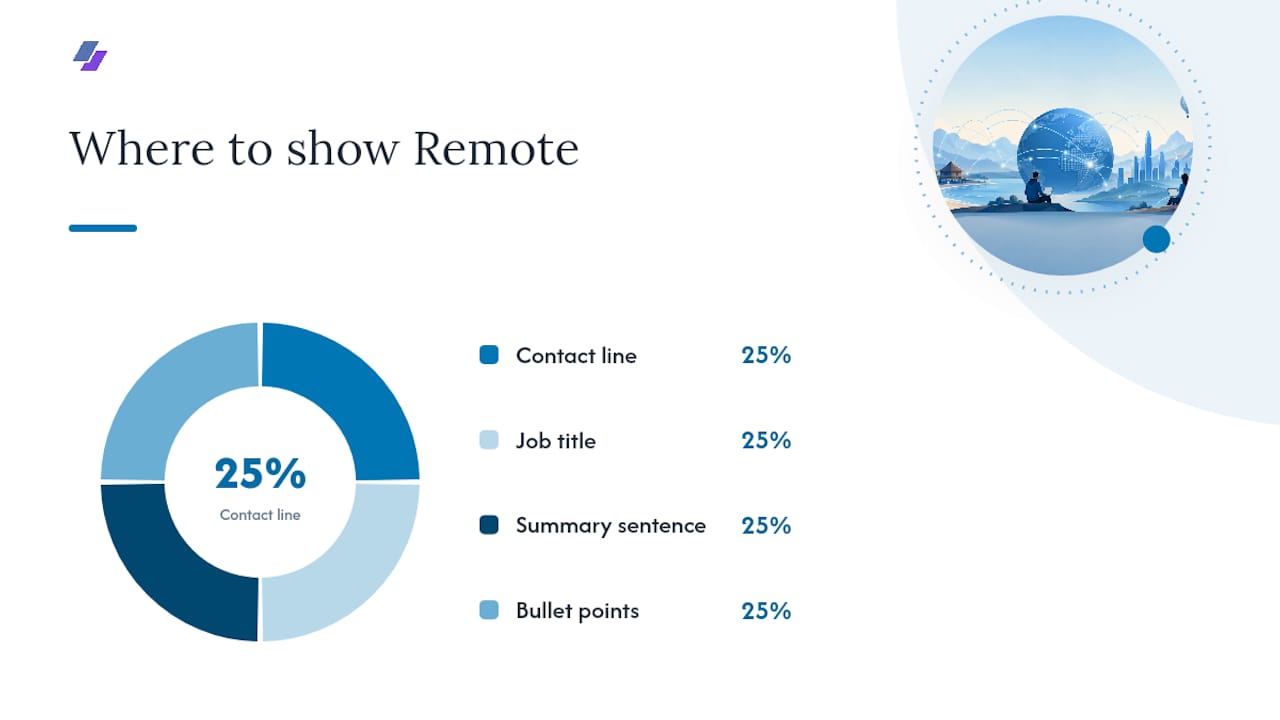
Four places, and missing any one of them costs you visibility.
- Contact line: “Remote · Austin, TX · UTC−5 · available 8am–4pm ET.” This single line does more filtering work than an entire paragraph of explanation.
- Job title line: “Customer Success Manager — Remote (US, EST)” instead of just the title alone.
- Summary sentence: work a remote-proof phrase into your two-line summary, like “led a 12-person distributed team across three time zones.”
- Bullet points: this is where the real proof lives. Career-development guidance from Pitt State’s advice on tailoring for remote jobs recommends showing quantified, independent outcomes rather than simply stating you “worked remotely.”
Rewrite pattern: action + context + tool + metric. “Managed client onboarding” becomes “Ran onboarding for 40+ enterprise accounts across a distributed customer success team using Zendesk and Loom, cutting average time-to-first-value from 21 to 14 days.”
If you’ve never held a formal remote title, you still have evidence. Freelance projects, contract work, open-source contributions, volunteer coordination for a nonprofit board that meets over Zoom, or documentation you wrote for a team wiki all count as remote-readiness proof. Present it honestly: “Freelance contract, remote” is a legitimate line item, not a weaker substitute for full-time employment.
Pro Tip: If your only remote-adjacent experience is a side project, give it a real header (“Independent Project, Remote”) and treat the bullets exactly like a job. Recruiters care about the evidence, not the employment status.
How Do You Optimize a Remote Resume for ATS?
Remote postings routinely pull 3 to 10 times the applicants of a comparable in-office role, according to We Work Remotely’s 2026 trends report. That volume means the ATS filter, not a human, makes the first cut on nearly every application.
By the numbers: Remote job postings attract 3x to 10x more applicants than equivalent on-site roles, according to We Work Remotely. Skipping keyword optimization in that pool is close to guaranteeing you never reach a recruiter’s inbox.
Mirror the posting’s own vocabulary rather than paraphrasing it. If the listing says “distributed team,” write “distributed team,” not “spread-out group.” TrulyRemoteWork’s 2026 guide recommends weaving in terms like async, timezone overlap, documentation-first, and specific tools such as Slack, Notion, Jira, and Loom, placed in both your skills block and your bullets.
Formatting checklist:
- Single-column layout, standard section headers (“Experience,” “Skills,” not creative labels).
- No tables, images, icons, or text boxes.
- Save as .docx or a text-selectable PDF, never a flattened image file.
- Run a quick parse test: copy your resume text into a plain text editor. If it comes out garbled or out of order, the ATS will see the same mess.
Jobalign’s guide on how ATS software actually ranks resumes walks through the scoring mechanics in more depth if you want to understand what happens after you hit submit.
Bullet Examples and Sample Resumes by Career Level
The formula stays constant across every level: action + independent or remote context + tool + metric. Only the scale of the outcome changes.
Entry level:
- “Coordinated social media content calendar for a 5-person remote marketing team using Trello and Canva, increasing on-time post delivery from 70% to 95%.”
- “Completed a 200-hour remote internship documenting API workflows in Notion, reducing onboarding time for new hires by 3 days.”
Mid level:
- “Led async standups for an 8-person distributed engineering team via Slack and Jira, shipping two feature releases per quarter with zero missed sprint deadlines.”
- “Managed client accounts across four time zones, using Loom for video walkthroughs that cut clarification emails by 40%.”
Senior level:
- “Directed a fully remote 15-person product team spanning three continents, launching a redesigned onboarding flow that lifted activation rates by 18%.”
- “Built the documentation-first culture for a distributed org, cutting new-hire ramp time from 6 weeks to 3.”
Developers can pull role-specific phrasing from Jobalign’s software engineer resume keyword guide or browse a full developer resume example built around remote-readiness signals.
How Jobalign Speeds Up the Tailoring Process
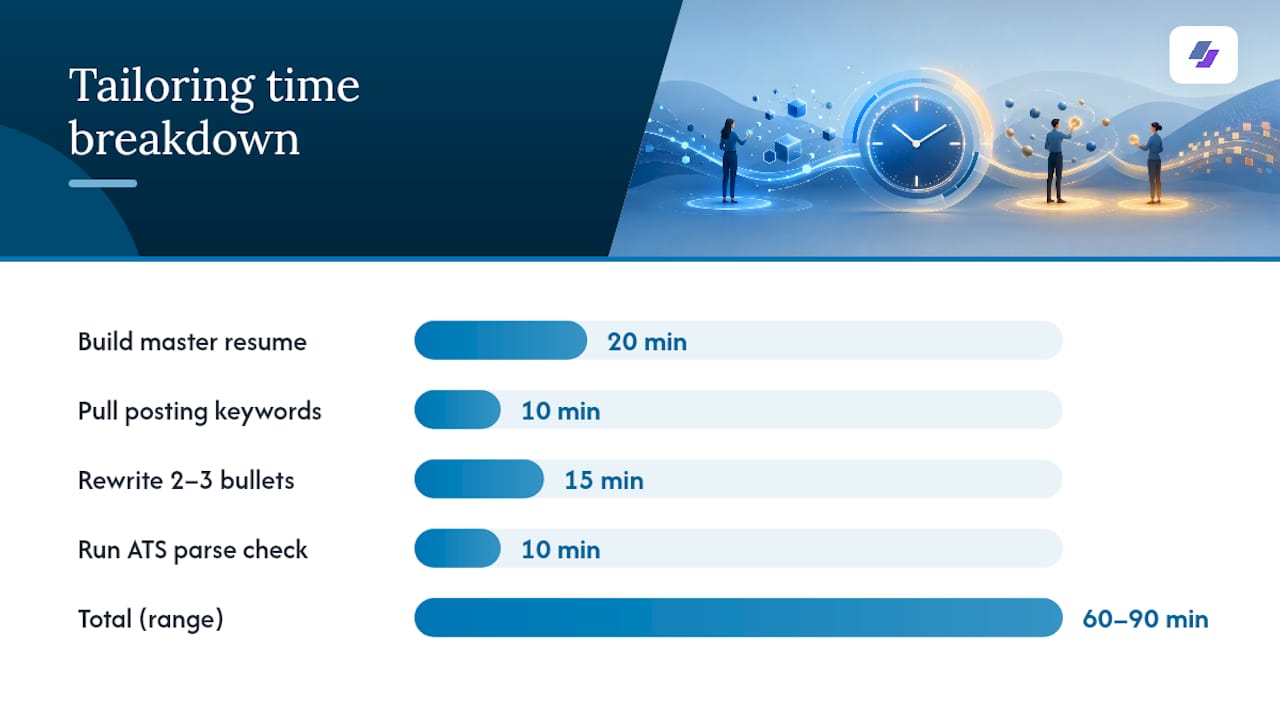
The manual version of this process, done right, takes about 60 to 90 minutes per application: build a master resume (20 minutes), pull keywords from the posting (10 minutes), rewrite two or three bullets to match (15 minutes), then run an ATS parse check (10 minutes). Multiply that across a dozen applications a week and the math stops working for most job seekers.
Jobalign automates the middle steps. It syncs directly with your LinkedIn profile, extracts your relevant experience and skills, then tailors a resume against the specific job posting’s language, aiming for the same kind of ATS pass rate serious job seekers need in a market this competitive.
What automation still can’t do for you:
- Verify that a claimed metric is accurate. You’re the only one who knows if “cut costs by 20%” is real.
- Get your timezone phrasing exactly right for your specific situation.
- Decide which achievement genuinely deserves the spotlight on a one-page resume.
Review those three things yourself before you submit, no matter which tool generated the draft.
What Actually Moves the Needle on a Remote Application?
If you do only one thing after reading this, make it this: pick your single strongest achievement per role and rewrite it as an independent-delivery metric. Not “collaborated with the team,” but “delivered X outcome, working async, using Y tool, with Z measurable result.” Recruiters skimming hundreds of resumes for a remote posting are hunting for proof you can operate without supervision, and a vague soft-skill line gives them nothing to latch onto.
For a sustainable weekly rhythm: tailor one master resume section per day rather than rewriting from scratch each time, batch your keyword research for three postings at once instead of one by one, and set aside 15 minutes weekly to review which bullets are actually getting callbacks. Small, consistent edits beat one exhausting overhaul.
— Johan
Try Jobalign to Tailor Your Remote Resume in Minutes
Rewriting bullets, hunting keywords, and running parse checks by hand works, but it eats an hour per application. Some tools reduce that time by syncing with your LinkedIn profile and generating a tailored, ATS-optimized resume for each posting automatically, pulling the relevant experience and skills without you starting from a blank page every time. If you’re applying to multiple remote roles a week, some services build a fresh resume for each posting so you don’t have to manually rebuild a document for every application. Head to Jobalign’s resume generator to sync your LinkedIn profile and generate your first tailored, ATS-ready resume.
Sources
- The Perfect Remote Resume: 2026 Trends & ATS Tips — We Work Remotely
- Remote Work Resume: Templates and Samples — Indeed
- How to Write a Resume for Remote Jobs (2026) — TrulyRemoteWork