Create a Unique Resume for Every Application

Why tailoring your resume for each job doubles your callbacks
Tailored resumes convert into interview callbacks at a significantly higher rate than untailored ones. That single fact should settle the debate. Recruiters spend only seconds on an initial resume scan, which means your most relevant skills and keywords need to be front and center, not buried three bullet points down.
Here is what tailoring actually does for you:
- Beats the ATS first. Applicant Tracking Systems compare your resume text directly against the job posting. Exact keyword matches carry real weight. A generic resume can score poorly even when you are fully qualified.
- Signals genuine interest. Tailoring your resume demonstrates enthusiasm and thoughtfulness. Hiring managers notice when someone has clearly read the job description.
- Focuses the recruiter’s eye. You are not rewriting your whole resume. You are surfacing the most relevant parts of real experience for this specific role.
Table of Contents
- How to create a unique resume for every application, step by step
- When to fully customize versus reuse a master resume
- Quick methods to tailor resumes without rewriting from scratch
- How ATS-optimized platforms simplify the whole process
- Tailored versus generic resumes: what the difference looks like
- Common mistakes to avoid when customizing resumes
- Strategies for managing multiple tailored resumes efficiently
- JobAlign cuts your resume tailoring time to under 10 minutes
- Key Takeaways
How to create a unique resume for every application, step by step
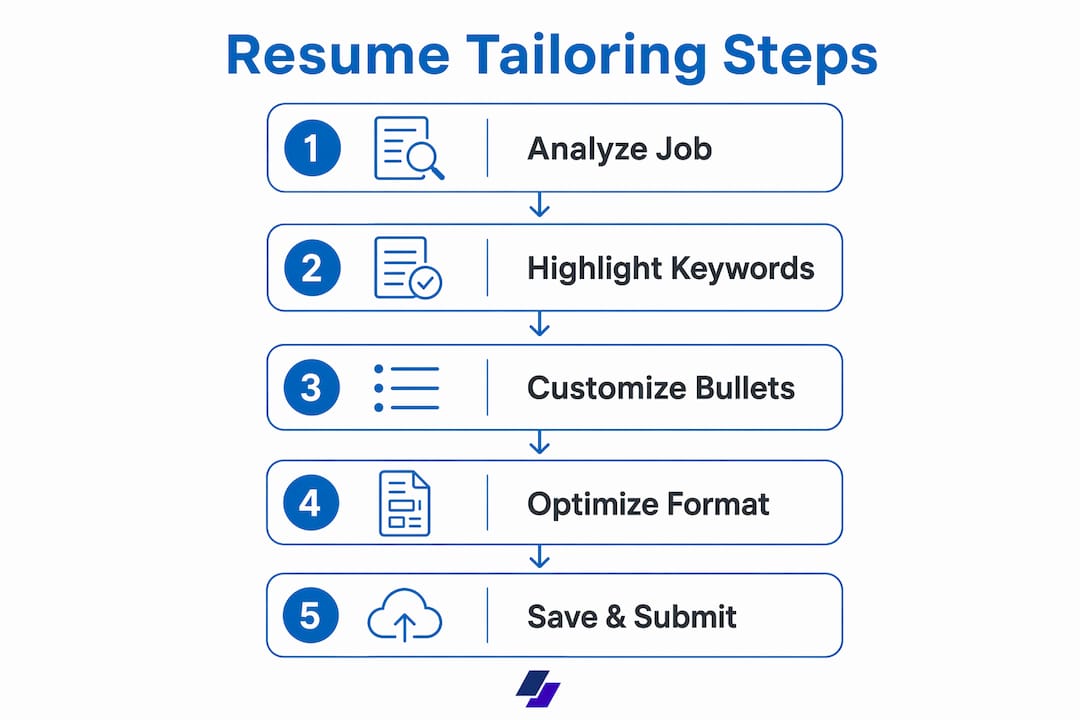
You do not need to start from scratch each time. Effective tailoring is surgical: three sections, focused edits, done.
- Read the job description carefully. Highlight keywords, repeated phrases, and the order of listed responsibilities. The first items mentioned are usually the employer’s top priorities.
- Update your summary. Rewrite it in 2–4 sentences to reflect the specific role title and the core skill the employer is prioritizing. If the posting says “data-driven marketing manager,” use those exact words.
- Reorder your top bullet points. Move the bullets that match the job description’s priorities to the top of your most relevant role. You are not inventing experience; you are surfacing what fits best.
- Customize the skills section. Add exact tool names, platforms, or methodologies from the posting that you genuinely have. Remove skills that are irrelevant to this role. ATS filters frequently scan this section first.
- Add quantified results. “Developed an email campaign that increased monthly sales by 10%” beats “created successful marketing campaigns” every time. Numbers give hiring managers something concrete to hold onto.
- Proofread for keyword alignment. Compare your summary to the job description. Check that each bullet in your work history connects to the role’s responsibilities. Then read it aloud — the language should sound natural, not copied.
Pro Tip: Save your resume file as “FirstName LastName, Job Title, Resume” — some ATS platforms let employers search by document file name.
When to fully customize versus reuse a master resume
Not every application needs the same level of effort. Here is how to think about it:
- Build 3–5 master resumes for distinct career tracks or skill sets. Career specialists recommend this approach: one master per job family, then minor role-specific adjustments per application.
- Minor tailoring suffices when you are applying within the same job family. Swap a few bullet points, refresh the summary, update the skills section. That is usually enough.
- Build a new core resume when you are pivoting to a different industry or role type. The framing, keywords, and even the format may need to shift significantly.
- Skip the spray-and-pray approach. Mass applications with a generic resume consistently underperform focused, tailored ones. Fewer, better-matched applications yield stronger results.
Quick methods to tailor resumes without rewriting from scratch
The most common objection is time. Fair. But proper tailoring covers only three sections. Done manually, that is 15–30 minutes per application. Done with an AI resume tool, it can drop to under 10 minutes.
- Build a master resume first. Include every role, every bullet, every skill. This is your source of truth, not something you send out.
- Paste the job description into an AI resume tool. Let it flag keyword gaps and suggest rewrites. This is faster than manual comparison and more reliable for catching ATS keywords you might miss.
- Focus your edits on three areas only: the summary, your top 3–5 bullets in the most relevant role, and the skills section. Your contact info, education, and the bulk of your work history rarely need to change.
“Tailoring your resume doesn’t mean a total overhaul. Small changes to how you emphasize your skills and experiences can make a big difference.” — Fidelity Careers
Pro Tip: YouTube has solid 2-minute walkthroughs showing exactly how to tailor a resume to a job posting without losing your mind in the process.
How ATS-optimized platforms simplify the whole process

| Feature | What it does for you |
|---|---|
| LinkedIn profile sync | Pulls your experience automatically — no manual data entry |
| AI keyword matching | Extracts job description keywords and maps them to your profile |
| Per-posting versions | One tailored resume per application, one credit each |
| ATS-friendly formatting | Machine-readable output that clears filter layers |
| Speed | Under 10 minutes from job posting to finished resume |

JobAlign automates keyword matching directly from your LinkedIn profile, generating ATS-optimized resumes with an 87% ATS filter success rate. No complicated setup. No starting from scratch for every role.
Tailored versus generic resumes: what the difference looks like
A generic resume lists your experience in chronological order and uses your own language throughout. A tailored resume mirrors the employer’s language, front-loads the most relevant experience, and connects your background directly to the role’s stated priorities.
Generic bullet: “Managed a sales team and exceeded targets.”
Tailored bullet (for a sales manager role emphasizing stakeholder coordination): “Led a 12-person sales team, coordinating cross-functional stakeholder outreach that drove a 10% increase in quarterly revenue.”
The experience is the same. The framing is not. That difference is what a recruiter notices in those first 6–7 seconds.
Common mistakes to avoid when customizing resumes
- Copying the job description word-for-word. Recruiters spot this immediately. Use the employer’s keywords, but write them in your own voice.
- Keyword stuffing. ATS systems detect and penalize unnatural keyword density. Use job-specific terms 1–3 times where they fit naturally.
- Changing too much. Tailoring three sections takes 15–30 minutes. Rewriting the entire resume for every application is not sustainable and usually not necessary.
- Ignoring ATS formatting rules. Avoid columns, text boxes, headers, footers, and special characters. These break ATS parsing before a human ever sees your resume.
- Applying to roles where you meet none of the requirements. Tailoring helps you highlight partial matches, but it cannot manufacture experience you do not have.
Strategies for managing multiple tailored resumes efficiently
Staying organized across dozens of applications is its own skill. A few habits make it manageable:
- Name files consistently: “FirstName LastName, Role, Company, Resume” keeps versions easy to find and looks professional to employers who search by file name.
- Use a tracking spreadsheet. Log the job title, company, date applied, and which resume version you sent. When you get a callback, you will know exactly which tailored version worked.
- Store master resumes in a dedicated folder, separate from tailored versions. Never accidentally send the master.
- Review and refresh your masters every 90 days. Skills, tools, and job market language shift. A master resume that is six months stale will produce weaker tailored versions. The benefits of tailored resume applications compound when your source material stays current.
JobAlign cuts your resume tailoring time to under 10 minutes
If you are applying to multiple roles a week, the manual tailoring process adds up fast. JobAlign gives you a faster route: connect your LinkedIn profile, paste a job description, and get a fully tailored, ATS-optimized resume in minutes. No templates to wrestle with. No keyword guessing. The platform’s proprietary technology achieves an 87% ATS filter success rate, and you can generate a fresh version for every posting without starting over each time.
Start building your tailored resume on JobAlign today, and spend your time preparing for interviews instead of reformatting documents.
Key Takeaways
Tailored resumes convert at more than double the interview callback rate of generic ones, making targeted customization the single highest-leverage action in any job search.
| Point | Details |
|---|---|
| Tailoring doubles callbacks | Tailored resumes convert at more than 2× the interview rate of untailored ones. |
| Three sections drive results | Focus edits on the summary, top bullet points, and skills section — the rest rarely needs to change. |
| Time cost is manageable | Manual tailoring takes 15–30 minutes; AI tools cut that to under 10 minutes per application. |
| Master resumes save time | Maintain 3–5 master resumes by job family, then make minor adjustments per role. |
| JobAlign automates the process | JobAlign syncs with LinkedIn and generates ATS-optimized resumes with an 87% filter success rate. |