Best ResumeAdapter.com Alternatives for ATS Success in 2026

If you need a stronger ATS pass rate than ResumeAdapter delivers, here are the top picks: Jobalign (unlimited LinkedIn-synced, ATS-optimized resumes with an 87% ATS success rate), JobScan (dedicated ATS keyword scanner), Rezi (AI-first resume writer with ATS scoring), Resume Worded (detailed ATS feedback and scoring), and FlowCV (free templates with clean export). Approximately 75% of resumes are rejected by ATS before a human ever reads them, so the tool you pick matters more than most job seekers realize.
- Jobalign — syncs with LinkedIn, generates unlimited tailored resumes per job posting, ATS-compatible PDF output
- JobScan — paste a job description and get a keyword match score; pure ATS analysis
- Rezi — AI drafting with built-in ATS scoring grid and real-time feedback
- Resume Worded — line-by-line resume scoring with actionable improvement suggestions
- FlowCV — free, design-clean templates with PDF/DOCX export, no ATS metrics published
- Resume.io — polished templates, guided content prompts, beginner-friendly
- Zety — AI content suggestions, large template library, strong for mid-career professionals
- Enhancv — visual, story-driven resumes; best for creative roles
- Kickresume — AI writer plus design flexibility, strong free tier
- Gruvi.ai — AI-powered resume and cover letter generation, newer entrant
Table of Contents
- Which ResumeAdapter.com alternatives should you compare side by side?
- What does each alternative actually do well?
- How we evaluated these alternatives
- How do you pick the right tool for your job search?
- How to switch from ResumeAdapter to a new platform
- Key Takeaways
- What actually matters when choosing a resume tool in 2026
- Jobalign gives you unlimited ATS-optimized resumes from your LinkedIn profile
- Useful sources and further reading
Which ResumeAdapter.com alternatives should you compare side by side?
The community-aggregated list on SaaSHub surfaces a consistent core set of tools that job seekers compare against ResumeAdapter. The table below maps each to its primary strength so you can cut straight to the tools that match your situation.
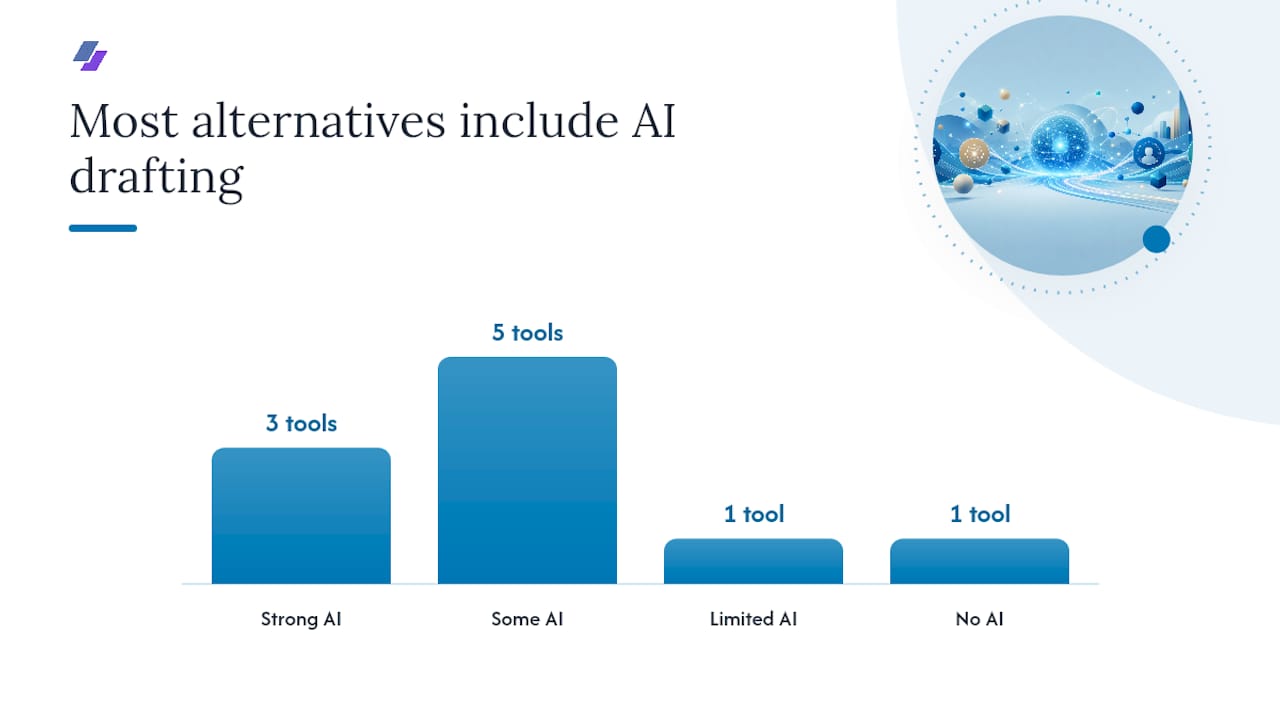
| Tool | Best for | ATS evidence | AI drafting | LinkedIn import | Free tier | Export |
|---|---|---|---|---|---|---|
| Jobalign | Unlimited ATS-optimized resumes | 87% success rate (vendor claim) | Yes, job-specific | Yes, direct sync | Free first resume | |
| JobScan | ATS keyword matching | Match score per job | Limited | Yes | Limited free scans | N/A (scanner) |
| Rezi | AI-first drafting + ATS score | ATS score per section | Strong | Manual import | Free plan | PDF, DOCX |
| Resume Worded | Detailed resume feedback | Line-by-line score | Suggestions only | Yes | Free basic score | |
| FlowCV | Free design-forward templates | None published | No | No | Fully free | PDF, DOCX |
| Resume.io | Beginner-friendly guided builder | Not published | Basic prompts | No | 7-day trial | PDF, DOCX |
| Zety | Mid-career, large template library | Not published | AI suggestions | No | Free draft | PDF, DOCX |
| Enhancv | Creative/visual resumes | Not published | AI bullet writer | No | Free plan | |
| Kickresume | Design + AI writing combo | Not published | Strong | No | Free plan | PDF, DOCX |
| Gruvi.ai | AI resume + cover letter | Not published | Strong | No | Free plan |
Not every tool publishes ATS pass-rate metrics. Vendor ATS claims should be verified with an independent scanner. Pricing tiers change; confirm current plans on each tool’s site.
What does each alternative actually do well?
The catalog of AI resume tools on EliteAI shows that most platforms cluster around three capabilities: ATS analysis, AI-driven rewrites, and keyword matching. Here is how the mandatory shortlist breaks down in practice.
Jobalign pulls your LinkedIn profile, reads the job description, and generates a tailored, ATS-compatible PDF resume in minutes. The platform claims an 87% ATS success rate and supports unlimited resume generation per subscription, which matters when you are applying to dozens of roles.
- ✅ LinkedIn sync, unlimited tailored resumes, ATS-compatible PDF
- ⚠️ Design customization is more limited than template-first tools
- Best for: High-volume U.S. job seekers who want ATS optimization without manual rewriting
JobScan is a pure ATS scanner. Paste a job description, upload your resume, and get a keyword match percentage. It does not write your resume for you.
- ✅ Precise keyword gap analysis, integrates with LinkedIn
- ⚠️ No resume builder; requires an existing resume
- Best for: Job seekers who already have a solid resume and want to tune it per posting
Rezi combines an AI writer with a real-time ATS score. Every section gets graded, and the AI suggests rewrites based on the job description. The Jobalign vs. Rezi comparison is worth reading if you are deciding between the two.
- ✅ Section-level ATS scoring, strong AI drafting
- ⚠️ Free plan is limited; full features require a paid subscription
- Best for: Job seekers who want to write and score in one place
Resume Worded scores your resume line by line and flags weak bullet points, missing keywords, and formatting issues. It does not generate resumes from scratch.
- ✅ Granular feedback, LinkedIn profile review included
- ⚠️ Feedback-only; no full AI drafting
- Best for: Job seekers who want a coach-style critique before submitting
FlowCV offers genuinely free, design-clean templates with PDF and DOCX export. No ATS metrics, no AI writer. Think of it as a Canva-style resume builder focused on clean layout over ATS scoring.
- ✅ Fully free, good-looking templates, fast setup
- ⚠️ No ATS optimization whatsoever
- Best for: Roles where design matters and ATS is not the primary filter
Resume.io guides you through each section with content prompts. Templates are polished and the interface is beginner-friendly, but ATS metrics are not published.
Zety offers a large template library and AI content suggestions. It suits mid-career professionals who want a guided experience with some AI assist.
Enhancv leans into visual storytelling. Strong for creative industries; less suited for corporate ATS-heavy pipelines.
Kickresume pairs a solid AI writer with design flexibility and a generous free tier. Good middle ground between aesthetics and content quality.
Gruvi.ai is a newer AI-powered tool that generates both resumes and cover letters. Worth watching as the feature set matures.
Pro Tip: Before committing to any paid plan, run your current resume through a free ATS scanner. If your match score is below 60% on a target job posting, prioritize an ATS-focused tool over a design-first one.
How we evaluated these alternatives
The evaluation criteria prioritized what actually affects your interview rate in 2026: ATS pass rates, AI drafting quality, LinkedIn integration, and pricing transparency. Zapier’s resume builder roundup frames the same logic: match the tool to your primary pain point, whether that is pipeline tracking, AI drafting, or ATS optimization.
Here is the trust checklist we applied:
- User community ratings: — SaaSHub’s community-weighted list is a useful discovery signal for which tools have sustained user interest.
How do you pick the right tool for your job search?
Start with your primary pain point. That single question cuts the shortlist in half.
- Low ATS pass rates? Go ATS-first: Jobalign for full resume generation, JobScan if you already have a resume and need keyword tuning.
- Stuck drafting from scratch? Go AI-first: Rezi or Kickresume for guided writing with ATS feedback built in.
- Applying to 20+ jobs? You need resume workflow automation: Jobalign’s unlimited tailored resumes per job posting is the clearest solution here.
- Creative industry, design matters? FlowCV or Enhancv. Accept that ATS scoring is not their strength.
- Tight budget? FlowCV is fully free. Kickresume and Enhancv have usable free tiers.
Red flags to watch for:
- No PDF export or export locked behind a paywall
- No privacy or data-deletion policy
- ATS claims with zero supporting data or methodology
- Hidden fees revealed only at checkout
- No free trial or freemium tier at all
For budget planning: most paid plans run $3–$30/month. Jobalign’s pricing details are at jobalign.app/en/pricing.html. Try the free tier of any tool for one real job application before upgrading.
How to switch from ResumeAdapter to a new platform
Migration takes under an hour if you follow these steps.
- Run an ATS scan on your new resume before applying. Use JobScan or Jobalign’s built-in ATS check to verify keyword alignment with your target job description. See the ATS resume keywords guide for placement tips.
A single resume migration takes roughly 15–30 minutes. Tailoring that resume to a specific job posting adds another 5–10 minutes with an AI-assisted tool.
Pro Tip: Save your DOCX master file locally before deleting your ResumeAdapter account. Some platforms delete user data 30 days after account closure.
Key Takeaways
Jobalign is the strongest all-in-one option for U.S. job seekers who need unlimited, LinkedIn-synced, ATS-optimized resumes across multiple applications.
| Point | Details |
|---|---|
| ATS rejection is the core problem | Approximately 75% of resumes are filtered out by ATS before a recruiter sees them. |
| Match tool to pain point | Low ATS scores → Jobalign or JobScan; drafting help → Rezi or Kickresume; design-first → FlowCV. |
| Migration is fast | Export DOCX from ResumeAdapter, import to new platform, run an ATS scan — under one hour total. |
| Verify ATS claims | Most tools do not publish pass-rate data; Jobalign’s 87% success rate is among the few published figures. |
| Jobalign recommendation | Start with Jobalign’s free plan to generate one tailored, ATS-optimized resume and test the workflow. |
What actually matters when choosing a resume tool in 2026
Most resume tool comparisons focus on template count or AI features. That framing misses the point. The question that actually determines your outcome is: does this tool help your resume pass the ATS filter on the specific job you want?
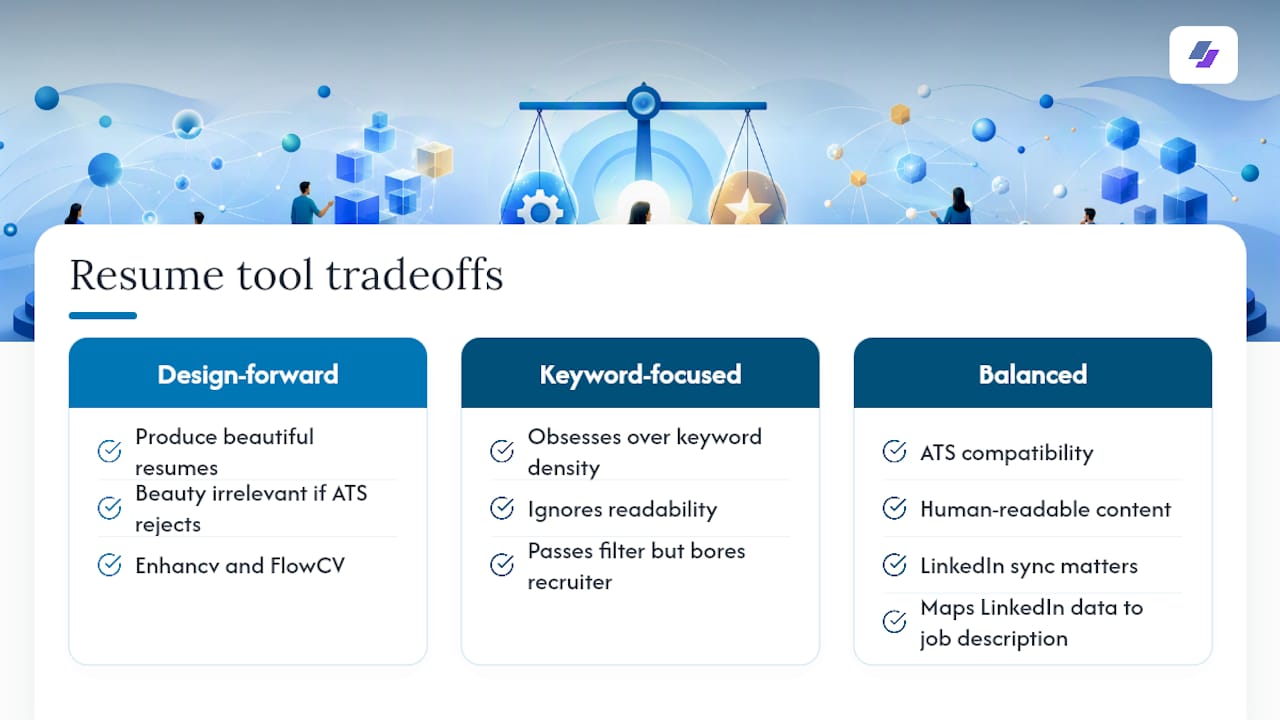
Design-forward tools like Enhancv and FlowCV produce beautiful resumes. But beauty is irrelevant if the ATS rejects the file before a human opens it. Conversely, a tool that obsesses over keyword density but ignores readability will produce a resume that passes the filter and bores the recruiter.
The tools that earn their place in a serious job search are the ones that handle both sides: ATS compatibility and human-readable content. That is a harder problem than it looks, and it is why LinkedIn sync matters so much. Your LinkedIn profile already contains the professional language, role titles, and skill vocabulary that ATS systems recognize. A tool that reads that data directly and maps it to a job description is doing something genuinely useful, not just reformatting a Word document.
For readers who want to go deeper on the AI optimization side, the step-by-step AI resume optimization guide covers the full workflow. For a broader perspective on how AI resume parsing works from the recruiter’s side, the BRDGIT article on AI resume parsing tools is worth reading before you finalize your tool choice.
Jobalign gives you unlimited ATS-optimized resumes from your LinkedIn profile
Every job posting deserves its own tailored resume. Jobalign’s free plan lets you generate your first ATS-compatible PDF in minutes by connecting your LinkedIn profile and pasting a job description. The platform extracts the relevant experience, maps it to the job’s keywords, and outputs a clean, machine-readable resume using expert-designed templates.
Paid plans unlock unlimited tailored resumes, full template access, and priority export. See the full breakdown at Jobalign’s pricing page. If you apply to more than a handful of roles per month, the time savings alone justify the subscription cost.
Some ATS-only scanners or design-first tools solve specific problems better than Jobalign does. But if your goal is to send a unique, ATS-optimized resume to every job you apply for without rebuilding it each time, start with Jobalign’s free LinkedIn resume generator and see the output for yourself.
Useful sources and further reading
The sources below were used to evaluate and compare the tools in this article. Independent resources are marked; vendor pages are noted.
- The best resume builders
- ResumeAdapter Alternatives & Competitors — SaaSHub
- Free Online Resume Builder | Easily create standout resumes
- LinkedIn Resume Generator | Custom Resume for Each Job Application - JobAlign
- How to stand out with a resume: 8 strategies that work in 2026 | JobAlign
Run an independent ATS scan on any resume you export before submitting. No tool’s output should go unverified.