What Resume Syncing Means for Job Seekers

Resume syncing is the process of connecting your LinkedIn profile to an AI resume builder so the tool can extract your career data and generate tailored, ATS-optimized resumes for each job application. Think of it as turning your LinkedIn profile into a live source of truth that feeds a resume engine, not a one-time copy-paste.
- LinkedIn as your master record: Your profile holds structured career data (titles, dates, skills, education) that an AI builder can read, rewrite, and reformat for each role.
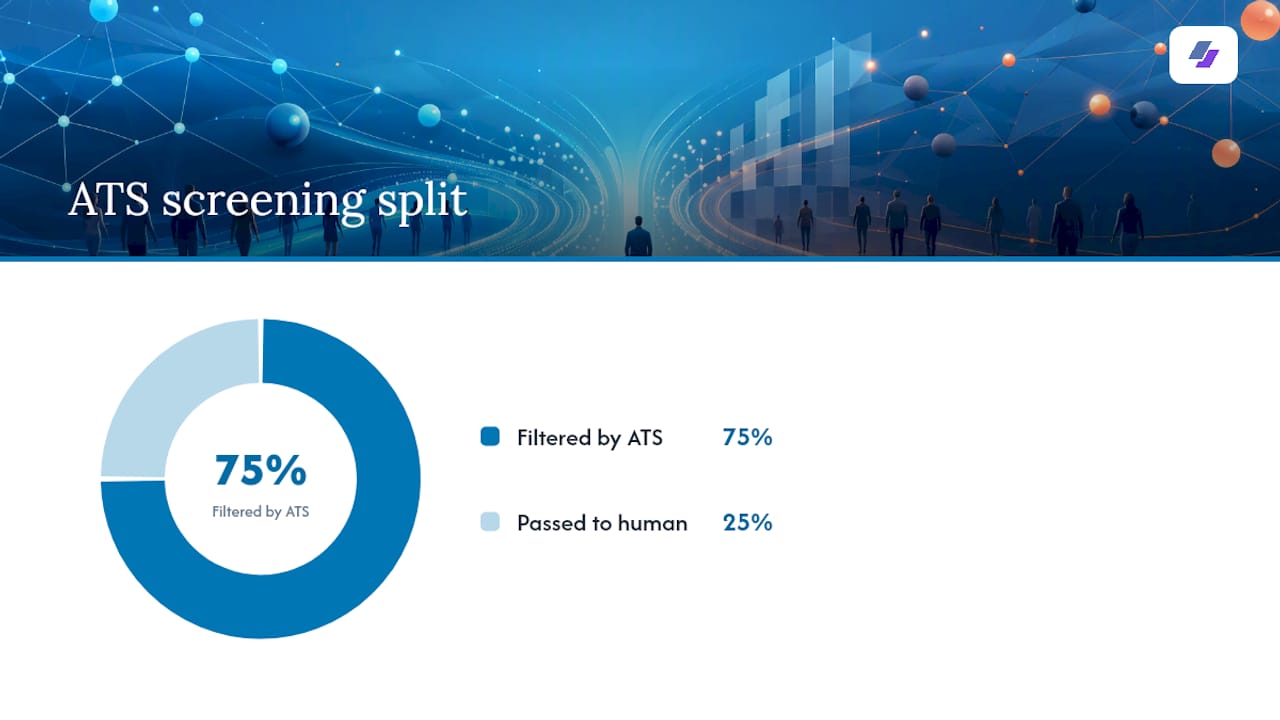
- ATS screening is the target: Applicant Tracking Systems filter roughly 75% of resumes before a human ever reads them. Syncing gives the AI the raw material to optimize for those filters.
- Jobalign is built around this workflow: It connects to your LinkedIn profile, extracts your experience, reads the job description, and produces a keyword-matched, ATS-ready PDF, with no manual reformatting required.
One rule holds regardless of which tool you use: always review the generated resume before you submit it. Automation handles the heavy lifting; human judgment catches the errors.
Key Takeaways
Resume syncing connects your LinkedIn profile to an AI resume builder so the tool can extract your career data and generate tailored, ATS-optimized resumes for every job you apply to, with human review required before each submission.
| Point | Details |
|---|---|
| What syncing does | Extracts LinkedIn fields and rewrites them into a job-specific, ATS-optimized resume automatically. |
| Callback impact | Tailored resumes can produce roughly a 40% lift in callback rates versus generic exports, per AI tailoring tool data. |
| Sync drift risk | Keep LinkedIn as your master record and update it first whenever a fact changes to prevent document inconsistencies. |
| Human review required | Always check job titles, dates, and achievement metrics before submitting any AI-generated resume. |
| Jobalign’s result | Jobalign reports an 87% ATS pass rate for resumes generated through its LinkedIn sync and tailoring pipeline. |
Table of Contents
- What does resume syncing mean, exactly?
- Which LinkedIn fields actually get extracted?
- What resume syncing delivers for your job search
- Permissions, privacy, and LinkedIn terms you must check first
- How to connect LinkedIn and generate your first tailored resume
- What can go wrong and why human review is required
- Best practices for ATS-friendly results before and after you sync
- How Jobalign implements resume syncing
- What I actually check first when reviewing a synced resume
- Jobalign gets you from LinkedIn profile to ATS-ready resume in minutes
- Sources
What does resume syncing mean, exactly?
Resume syncing, more formally called profile-to-resume synchronization, describes a two-stage pipeline. First, a data extraction component reads your LinkedIn profile (or a PDF export of it). Second, a tailoring component rewrites and formats that data into a resume matched to a specific job description.
Open-source implementations of this architecture demonstrate the same two-stage pattern: an extraction agent pulls structured fields, and a construction agent formats and tailors the content. Modular, multi-agent designs separate these responsibilities deliberately, because isolating extraction from tailoring makes errors easier to catch and fix.
Here is how data moves through the pipeline:
| Stage | What happens | Who does it |
|---|---|---|
| LinkedIn URL / OAuth connect | You authorize read-only access to your profile | You + LinkedIn |
| Data extraction | The tool pulls structured fields (titles, dates, skills) | Extraction agent |
| Content mapping and rewriting | Bullets are rewritten to mirror the job posting’s verbs and keywords | Tailoring agent |
| ATS optimization | Keywords are placed, formatting is made machine-readable | Formatter |
| Export | An ATS-safe PDF is generated and labeled | You |
OAuth vs. PDF import: Most tools offer two connection methods. OAuth reads your profile directly via LinkedIn’s API and returns clean, structured fields. A PDF import requires the tool to parse a document, which can lose formatting and structure. OAuth is more reliable when it is available.
Which LinkedIn fields actually get extracted?
Not every field on your profile carries equal weight. Here is what AI resume builders typically pull, grouped by category:
Header and contact
- Full name, location, email, phone, LinkedIn URL, portfolio or personal site
Professional identity
- Headline, About/summary section
Experience
- Job titles, company names, employment dates, and role description bullets
Education
- Degrees, institutions, graduation years, honors
Skills and endorsements
- Listed skills (structured data, usually parsed cleanly)
Certifications and licenses
- Issuing organization, credential name, issue and expiry dates
Projects and publications
- Title, description, associated dates (often parsed as free text, so accuracy varies)
Fields parsed as structured data (titles, dates, skills) tend to come through accurately. Fields stored as free text (role description bullets, project summaries) often need rewriting because LinkedIn’s formatting does not map cleanly to a resume’s bullet structure.
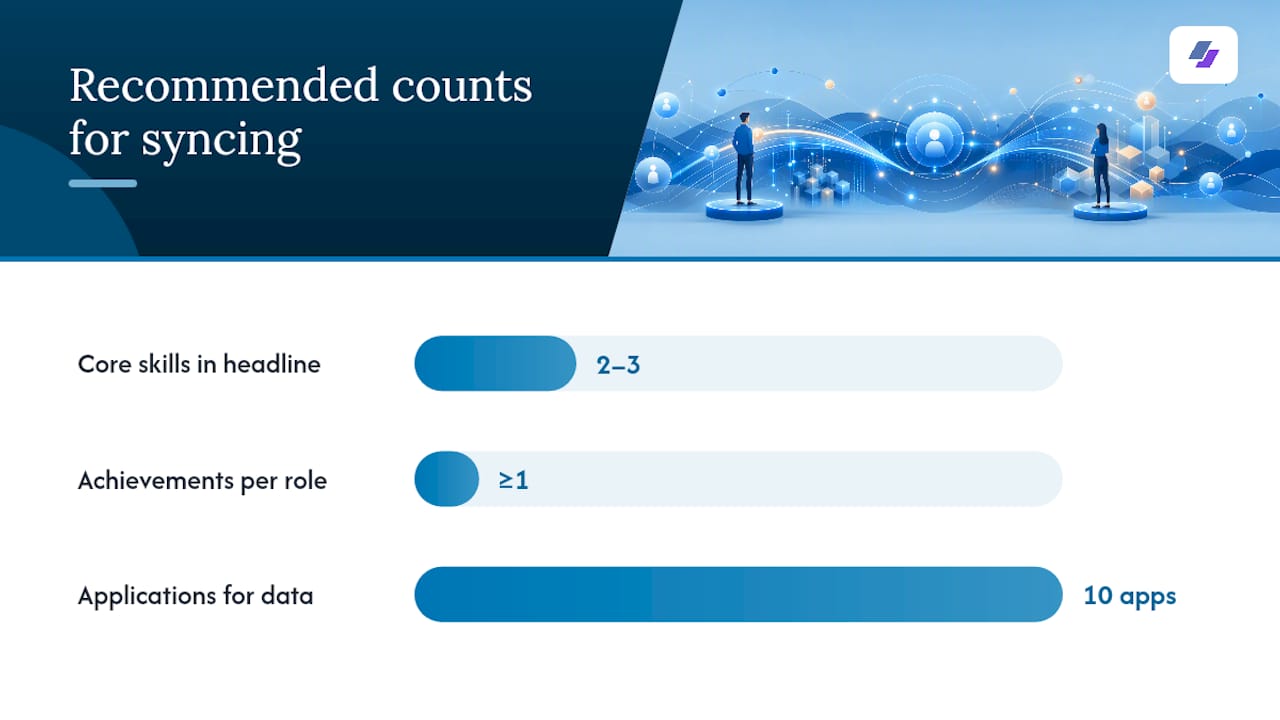
Pro Tip: Before you sync, audit three things on your LinkedIn profile: confirm every job title matches what you want on your resume, verify all employment dates are correct, and add at least one quantified achievement per role. Garbage in, garbage out.
What resume syncing delivers for your job search
The most direct benefit is time. Writing a tailored resume from scratch for every application is the kind of task that slows most job seekers to a crawl. Syncing collapses that to minutes.
- Consistency: One verified LinkedIn profile feeds every resume version, so titles, dates, and metrics stay aligned across documents. Recruiters cross-check LinkedIn against your resume, and inconsistencies create red flags that can end your candidacy before an interview.
- ATS keyword alignment: The tailoring agent reads the job description, identifies the employer’s priority terms, and rewrites your bullets to mirror those verbs and keywords. This goes well beyond a simple export.
- Volume without quality loss: You can generate a unique, job-specific resume for every application without rewriting anything manually.
Callback lift from tailored resumes: Tailored resumes can produce roughly a 40% lift in callback rates compared to generic versions, based on results reported by AI tailoring tools. Results vary by industry and role, but the directional signal is consistent.
Permissions, privacy, and LinkedIn terms you must check first
Before you connect anything, run through this checklist.
OAuth dialog permissions to verify:
- The tool requests read-only profile access, not write access
- It asks for the minimum scope needed (profile, email) rather than broad permissions
- You can revoke access at any time from LinkedIn’s security settings
Privacy policy items to confirm:
- How long the tool stores your profile data after you disconnect
- Whether your data is shared with third parties or used to train models
- Whether you can request deletion of your data
LinkedIn terms of service:
- LinkedIn’s terms prohibit scraping and automated data extraction that violates their rate limits. Prefer tools that use official OAuth access rather than scraping approaches.
- Only sync profiles you own or have explicit permission to use.
How to connect LinkedIn and generate your first tailored resume
Follow these steps the first time you use a resume syncing tool.
- Audit your LinkedIn profile. Fix job titles, correct dates, and add metrics to at least your top three roles before you connect.
- Connect via OAuth. Click the LinkedIn connect button, review the permission dialog, and authorize read-only access. If OAuth is not available, export your LinkedIn PDF and upload it.
- Review extracted fields. Check every pulled field against your actual profile. Correct any title mismatches, truncated bullets, or wrong dates before proceeding.
- Paste the job description. Give the tool the full job posting for the role you are targeting.
- Let the AI tailor the resume. The tailoring agent rewrites your bullets to match the job’s keywords and priorities. Review the output critically.
- Run an ATS check. Use the tool’s built-in checker or an external ATS optimization guide to confirm keyword coverage and formatting.
- Export and label the version. Save the PDF with a clear label: Role + Company + Date (e.g., “ProductManager_Acme_Jan2026”).
Pro Tip: Keep a master document, updated every time you change your LinkedIn profile, that holds your full career history with all metrics intact. Each tailored resume is a filtered, keyword-matched version of that master. Never edit the tailored copy and forget to update the master.
Pre-submit checklist:
- Keywords from the job description appear in your bullets
- All dates are accurate and consistent with LinkedIn
- At least one quantified achievement per role
- Contact information is current and complete
What can go wrong and why human review is required
Automation is fast. It is not infallible.
Common extraction errors:
- Truncated role description bullets (LinkedIn’s character limits cut off longer entries)
- Incorrect employment dates when roles overlap or have gaps
- Job title mismatches when your LinkedIn title differs from your formal title
- Certifications missing expiry dates
- Media attachments and project links ignored entirely
Sync drift is the most common long-term failure. Over time, your LinkedIn profile, your master resume, and your tailored resumes can diverge. A promotion you added to LinkedIn may not appear in resumes you generated six months ago. Practitioners recommend keeping LinkedIn as the verified master record and propagating any factual change from there first.
| Issue | Symptom | Quick fix |
|---|---|---|
| Truncated bullets | Short, incomplete descriptions | Edit in the tool before tailoring |
| Wrong dates | Overlapping or missing periods | Correct on LinkedIn first, re-sync |
| Title mismatch | Resume title differs from LinkedIn | Align both before generating |
| Missing certifications | Cert absent from resume | Add manually post-generation |
Automated screening systems can reject resumes for inconsistencies that a human reviewer would overlook. That is why manual review of every AI-generated resume is not optional.
Best practices for ATS-friendly results before and after you sync
Apply these before you generate and again before you submit.
- Optimize your LinkedIn headline to include your target job title and two or three core skills.
- Write bullets in the past tense with an action verb + result + metric format.
- Match the job description’s exact verbs (“managed” vs. “led” vs. “directed” matters to ATS parsers).
- Keep dates in a consistent format (Month Year) across every document.
- Remove graphics, tables, and columns from your LinkedIn summary if you plan to PDF-import.
- Order experience by relevance to the target role, not just chronologically.
- Avoid acronyms without spelling them out at least once (ATS parsers often miss unexpanded acronyms).
- Use standard section headers (Experience, Education, Skills) rather than creative alternatives.
- Quantify at least one achievement per role before you sync so the AI has real data to work with.
- Re-run the ATS check after every edit, not just after the initial generation.
Before/after example:
Original LinkedIn bullet: “Responsible for managing social media accounts.”
Pro Tip: Label every resume version with Role + Company + Date and keep a simple spreadsheet tracking which version went to which application. After 10 applications, you will have real data on which tailored versions generate callbacks, and you can refine your approach accordingly.
How Jobalign implements resume syncing
Jobalign’s pipeline follows the same extraction-to-output architecture described above, built specifically for job seekers applying to multiple roles at once.
Feature set:
- LinkedIn OAuth connection for structured field extraction
- PDF import fallback for profiles where OAuth is not preferred
- Job-description tailoring that rewrites bullets to match employer keywords
- Built-in ATS compatibility checks
- One resume per credit, no subscription
- Version labeling by role and company
- Export to ATS-safe PDF templates designed by career specialists
The pipeline in plain terms:
LinkedIn URL → Data extraction agent → Tailoring agent → Formatter → ATS-safe PDF export
For context, AI tailoring tools that rewrite bullets to mirror job-posting keywords consistently outperform static profile exports in ATS scoring.
What I actually check first when reviewing a synced resume
Most job seekers assume the AI got everything right. In practice, the first 30 seconds of any review should focus on four things: are the job titles exactly what you want a recruiter to see, are the employment dates correct to the month, do the top three achievements have real numbers attached, and does the skills section reflect the keywords in the job description?
Everything else, formatting, section order, summary language, can be refined after you confirm the factual foundation is solid.
Maintaining a master document is not optional if you are applying to more than five roles. Update LinkedIn first whenever a fact changes, then regenerate. That discipline is what separates job seekers who get callbacks from those who wonder why their resume is not working.
Jobalign gets you from LinkedIn profile to ATS-ready resume in minutes
If you are applying to multiple roles and rewriting your resume manually each time, you are spending hours on a task that should take minutes. Jobalign connects directly to your LinkedIn profile, reads the job description you are targeting, and produces a keyword-matched, ATS-optimized resume in a format that passes automated screening.
- One tailored resume per credit, no subscription required
- 15 ATS-safe PDF templates built to pass automated parsers
- 87% ATS pass rate based on Jobalign’s own performance data
Signing in with LinkedIn uses OAuth limited to your name and email address. Your profile content itself is read by the browser extension you install, on the LinkedIn pages you open, and removing the extension ends that access at any time. Sync your profile with the browser extension and your first LinkedIn-only resume is free, so you can see exactly what gets extracted before you pay. Credit packs add more postings and full template access. Try Jobalign’s LinkedIn resume generator and have your first tailored resume ready before your next application deadline. Full pricing details are available here.
Sources
- How to create a tailored resume from LinkedIn | Sprout (blog)
- Resume, cover letter, and LinkedIn profile synchronization (The Interview Guys blog)
- achuajays/LinkedIn-Resume-Builder (GitHub)
- Autofill your job applications using AI - Anthropos
- What Is Automated Resume Screening? HR Guide 2026 | Testask Blog