Job Seekers: Stop Chasing ATS Myths, Use EEOC Rules and 5 Resume Fixes

Most of what you have read about applicant tracking systems is exaggerated or applies only to specific setups, not every employer. ATS behavior depends heavily on which product a company uses and how its recruiters configure it, so a rule that is true at one company can be false at the next. This article walks through the biggest myths, what actually happens instead, and the fixes that matter.
TL;DR:
- Most ATS rejection statistics are vendor-specific and do not apply uniformly across all companies, making broad assumptions about ATS behavior unreliable.
- Using a text-based PDF or DOCX, a simple one-column layout, and natural keyword integration significantly improve the chances of ATS parsing your resume correctly.
- Employers are legally responsible for ensuring automated screening tools comply with nondiscrimination laws, regardless of the software used.
- Focusing on clear, human-readable resumes rather than trying to outsmart ATS algorithms leads to better hiring outcomes for applicants.
- JobAlign offers automated resume tailoring by syncing with LinkedIn, helping job seekers efficiently generate ATS-optimized applications without extensive manual effort.
Table of Contents
- 1. The myths job seekers believe most often
- 2. Resume and application fixes that actually matter
- 3. What the data and the law actually say
- 4. Why clarity beats every ATS trick
- 5. How JobAlign helps you skip the guesswork
- Sources
- FAQ
1. The myths job seekers believe most often
Some version of these claims has probably landed in your inbox or your group chat. Here is what is real, what is not, and what to do about each one.
Fact-checking work tracing the claim back to its source found it originates from an unverified vendor figure, and current vendor and survey data show wide variance in how companies actually configure their systems. Some employers screen aggressively, others barely filter at all. The number is not fake because ATS rejection does not happen, it is fake because no single percentage applies to every company.
Myth: ATS uses AI to decide who gets hired. Many systems now include AI-assisted ranking or scoring features, but that is different from AI making hiring decisions. Employers remain legally responsible for the outcomes of any automated tool they use, and EEOC guidance on AI in hiring makes clear that workers keep their existing protections regardless of what technology screens them. Recruiters still make the actual call, and most organizations keep a human reviewing anything an algorithm flags.
Treat any score, from any source, as a rough signal rather than a pass or fail line.
Myth: You can trick ATS with keyword stuffing or hidden white text. This one backfires more than any other trick on this list. Modern parsers extract hidden text just as easily as visible text, which means a recruiter opening your resume sees a wall of repeated keywords that make no sense in context. Even when it slips through parsing, a human reader spots it immediately and moves on.
Myth: PDFs are unreadable by ATS, so never submit one. This depends entirely on how the PDF was made. A text-based PDF, the kind exported directly from Word, Google Docs, or a resume builder, parses fine in the overwhelming majority of systems. An image-based PDF, usually created by scanning a printed page or exporting a flattened design file, has no extractable text at all and will fail every time. The myth conflates two very different file types.
Myth: Columns and creative layouts always get rejected. Creative layouts raise your risk of parsing errors, they do not guarantee rejection. Vendor parsing documentation consistently lists columns, text boxes, and headers or footers as common sources of extraction mistakes, not automatic disqualifiers. A resume in two columns might parse perfectly in one system and scramble completely in another.
Myth: A public ATS checker shows you the employer’s actual score. Free online checkers run outside any employer’s account and apply their own rules, which have nothing to do with the specific ATS or configuration a company actually uses. A high score on a public tool tells you your file is at least readable. It tells you nothing about how a particular employer’s system will rank you.
Myth: ATS are only for large companies. Plenty of small and mid-sized businesses use ATS platforms too, often lighter tools built for basic filtering and organization rather than large-scale automated ranking. The product you are up against at a 20-person startup is often nothing like the one at a Fortune 500 company, which is exactly why blanket advice about “the ATS” falls apart in practice.
Pro Tip: Assume any resume tip you read online applies to “some ATS, sometimes,” not “all ATS, always,” and you will make better formatting decisions.
A useful summary of why these myths spread and persist:
- Vendor-sourced statistics get repeated online without anyone checking the original methodology.
- Job seekers understandably want one universal rule instead of a range of employer-specific behaviors.
- Fear spreads faster than nuance, especially around something as high-stakes as a job application.
One in ten resumes ATS checkers score highly on public tools still get rejected internally, because checkers run outside the employer’s own account and configuration. The score you see is a readability estimate, not a preview of the real decision.
2. Resume and application fixes that actually matter
Forget the tricks. These are the steps that reduce parsing errors and help your real qualifications come through clearly.
- Save your resume as a text-based PDF or DOCX file, and keep it under the file size limits most application portals enforce.
- Use a single-column layout with clear, standard section headers like “Work Experience,” “Education,” and “Skills” so any parser can identify them.
- Write keywords into real sentences, pairing an action with a result and the context it happened in, rather than listing bare terms at the bottom of the page.
- Answer screening questions honestly, and use your cover letter to add context a form field cannot capture, like a career change or a gap in employment.
- Test your file before you submit it: open it in a plain text viewer, search for a few key phrases to confirm they extracted correctly, and confirm the export was not flattened into an image.
Pro Tip: Copy your resume text and paste it into a blank document. If the formatting turns into a jumbled mess, an ATS parser will likely struggle with it too.
Getting the keyword integration right matters more than most people think. Looking closely at how to use job description keywords naturally will save you from the awkward, robotic phrasing that keyword stuffing produces, while still surfacing the terms a recruiter’s search is likely to use. And if formatting choices still feel like guesswork, a deeper look at why resume formatting matters for your job search breaks down exactly which design choices create risk and which ones are safe.
3. What the data and the law actually say
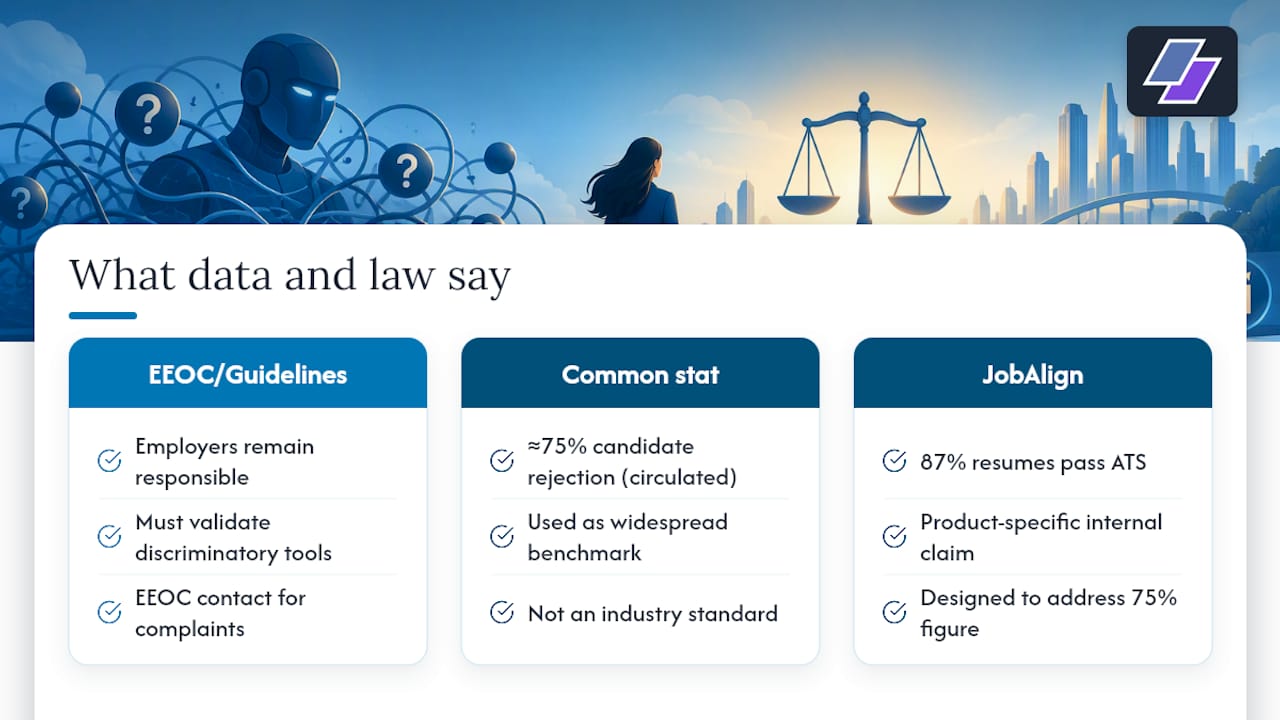
Employers do not get a legal pass just because a machine made the first cut. Under EEOC and ADA guidance on automated hiring tools, employers remain responsible for ensuring that any selection procedure, automated or not, is job-related and free of discriminatory impact. That responsibility does not transfer to the software vendor.
Employers must ensure that automated hiring tools comply with existing nondiscrimination laws, and must validate tools that produce an adverse impact on protected groups.
The Uniform Guidelines on Employee Selection Procedures reinforce this: any tool used to screen candidates, whether a test, a form, or an algorithm, is expected to be validated against the job it is screening for. If you ever suspect a screening process treated you unfairly based on a protected characteristic, the EEOC provides guidance and contact channels for workers to raise that concern.
On the practitioner side, JobAlign’s own resume optimization data shows an 87% success rate in producing resumes that pass ATS filters for its users, built specifically to address the roughly 75% rejection figure that circulates online, treated here as one company’s internal performance claim rather than an industry-wide benchmark.
4. Why clarity beats every ATS trick
I have spent enough time looking at resume rejections to notice a pattern: the people who obsess over “beating” the algorithm usually write worse resumes than the people who just focus on being clear. Chasing a score turns your resume into a document written for a machine instead of for the human who eventually has to make a hiring decision.
The single most actionable takeaway here is simple: write for a person, format for a parser, and stop trying to outsmart software you cannot see. If you want structured, step-by-step help putting that into practice, JobAlign’s resources walk through the process in more detail.
— Johan
5. How JobAlign helps you skip the guesswork
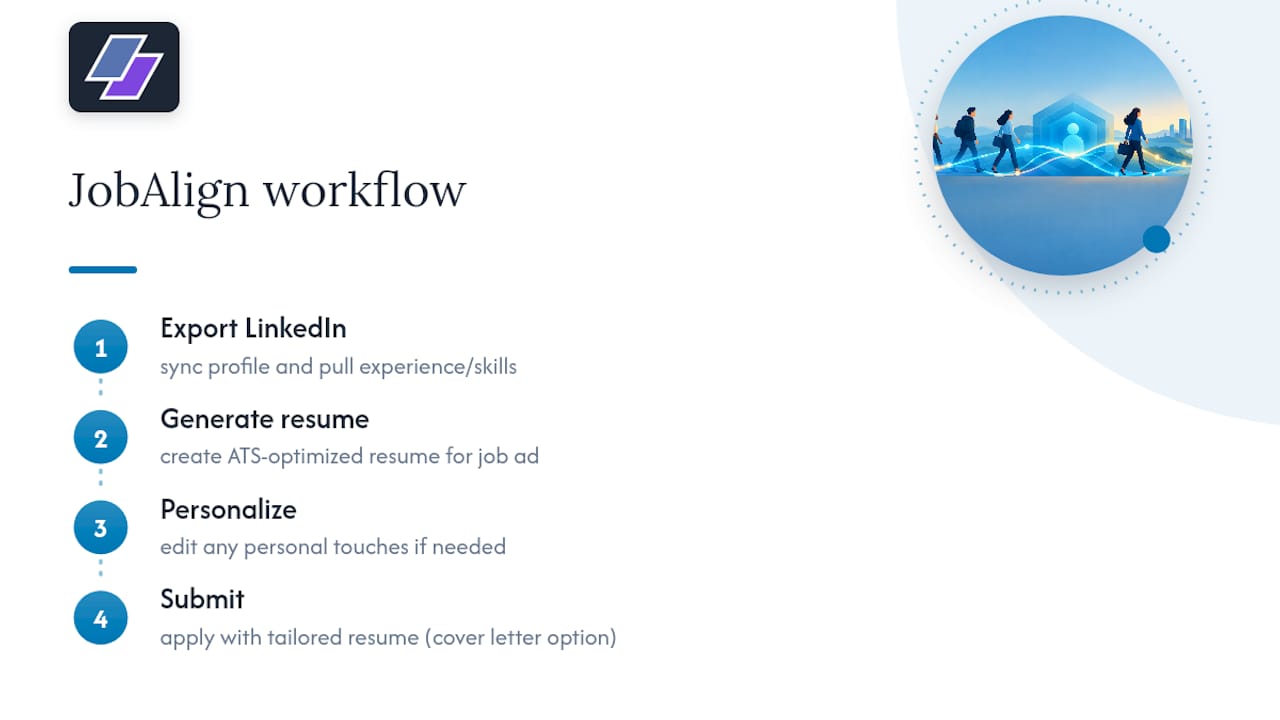
Once you know the myths are not the real obstacle, the real obstacle becomes time: tailoring a resume for every job description takes effort most job seekers do not have to spare. JobAlign syncs directly with your LinkedIn profile, pulls your actual experience and skills, and generates a tailored, ATS-optimized resume for each application without you rebuilding it from scratch every time.
The workflow is straightforward: export your LinkedIn profile, generate an ATS-ready resume built around a specific job description, adjust anything that needs a personal touch, and submit. Plans include a personalized cover letter, and the service maintains user data privacy without sharing with third parties for tracking.
If you want to see it in action first, try the free LinkedIn resume tool. When you are ready for unlimited tailored resumes across every application, JobAlign’s Solo, Starter, Pro, and Ultimate plans are laid out on the pricing page.
Sources
For readers who want to check the claims above directly: the EEOC and ADA guidance on algorithmic hiring covers employer obligations under federal law, the EEOC’s AI and employment discrimination resource outlines worker protections, and the fact-checked breakdown of common ATS myths traces the origins of the statistics debunked throughout this piece.
- Americans with Disabilities Act: Tips for Workers and Employers (EEOC/ADA guidance)
- Employment Discrimination and AI for Workers (EEOC)
- 10 ATS Myths, Fact-Checked with Primary Sources (2026)
FAQ
Is 80% a good ATS score?
A score can look strong, but it depends entirely on which tool produced it and how that tool’s rubric works, since there is no universal scoring standard across ATS products. Treat any score as a rough readability signal rather than a guarantee of advancing.
Can ATS tell if you used AI?
Most ATS platforms are built to parse and organize resume content, not to detect whether AI helped write it. Detection features exist in some standalone tools, but they are separate from the core parsing and filtering functions an ATS performs.
Is ATS still a thing?
Yes, ATS platforms remain standard across companies of every size, though their features vary widely from basic filtering to AI-assisted ranking. Even small businesses commonly use lightweight ATS tools to organize applications, so the myth that they only matter at large companies does not hold up.
What can ATS not read?
ATS parsers generally struggle with image-based PDFs, text embedded in headers or footers, unusual fonts, and complex multi-column layouts, since these commonly cause extraction errors. A clean, text-based file with a single-column layout avoids most of these problems.