5 ATS Resume Sections That Parse: Copyable Headings & Safe Swaps

Use five sections in this order: Contact, Professional Summary, Work Experience, Skills, and Education. Standard headings like these let parsers segment your resume reliably instead of dumping content into a generic bucket. Add Certifications, Projects, Volunteer, or Awards only when they strengthen your case for the role, and keep every heading plain, familiar, and easy for software to recognize.
TL;DR:
- Using single-column, left-aligned layouts with plain text and standard headings prevents ATS parsing errors and content loss.
- Consistently placing dates in the same line as job titles in the format of Month YYYY or MM/YYYY improves recognition of employment duration.
- Embedding keywords within experience bullets with specific, quantifiable results carries more weight than isolating them in skills sections.
- Personalizing resumes for each job by matching the posting’s language and phrases enhances both parser detection and recruiter relevance.
- Avoiding creative headings, graphics, tables, and placing contact info in the body rather than headers or footers increases chances of successful parsing.
Table of Contents
- What goes in each core section so ATS can read it
- Deciding on optional sections and how to name them safely
- Formatting rules that keep your resume machine-readable
- Tailoring, testing, and fixing your resume for each job
- Where JobAlign fits into this process
- What actually moves the needle on ATS resumes
- Build your ATS-ready resume in minutes
- Sources
- FAQ
What goes in each core section so ATS can read it
Every section has a job to do, and the parser only does that job correctly when you feed it the format it expects. Here’s what belongs in each one, and how to structure it so nothing gets lost on the way into the applicant tracking database.
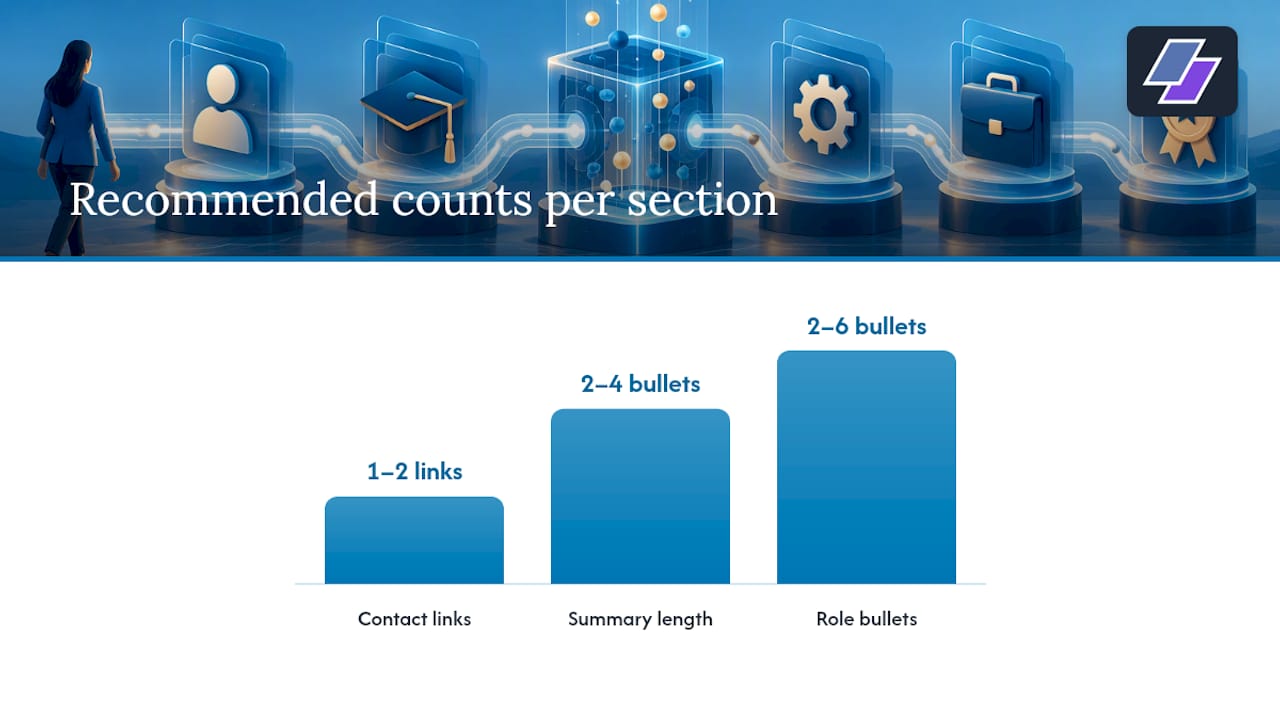
Your contact information goes first, in the body of the document, never in a header or footer. Some parsers skip header and footer fields entirely, which means your name and phone number can vanish before a recruiter ever sees your resume. Keep it simple: full name, phone number, a professional email address, and a link to your LinkedIn profile. One or two links is plenty. A portfolio link is fine if it’s relevant, but a resume crowded with five different URLs starts to look like a link directory instead of a document about you.
The professional summary is optional, but when you use it, make it short and specific. Two to four bullet points or a two-line paragraph works better than a dense paragraph of adjectives. This section is also a natural home for a few of the exact keywords from the job posting, provided they honestly describe your background. A summary that says “results-driven professional with strong communication skills” tells a parser and a recruiter nothing. A summary that says “operations manager with six years leading supply chain teams across retail and logistics” tells them exactly what to expect below.
Work Experience is where most of the parsing weight sits, and it needs a consistent structure for every entry:
- Job title on its own line or paired clearly with the company name.
- Company name and city/state directly below or beside the title.
- Dates in Month YYYY format, kept on the same line as the job title or company rather than floating in a separate column.
- Two to six bullet points per role, each starting with an action verb and describing a specific result.
That date placement matters more than it sounds like it should. Career-center guidance from Santa Clara University’s career center recommends consistent Month YYYY or MM/YYYY formatting with dates on the same line as the job title, because inconsistent date formats can cause parsing errors that lead to omitted employment periods. If a parser can’t compute how long you held a job, it may not count that job at all when a recruiter filters for years of experience.
Inside those bullets is where your keywords do the most good. Rather than writing “responsible for managing budgets,” write “managed a $400,000 departmental budget,” and work in the specific terms from the job description wherever they honestly apply. A parser reading “led cross-functional teams to launch three product releases” extracts both a skill and a quantified result in one line.
Skills sections are still worth including, but treat them as a backup, not your main keyword strategy. List your core skills as short comma-separated items or simple bullets, five to twelve terms is usually enough. The real keyword work should already be happening inside your experience bullets, because that’s where context lives.
Education closes out the core four with degree, institution, and graduation date. Write out the full degree name and include the common abbreviation, something like “Master of Business Administration (M.B.A.),” so the resume matches however a recruiter or parser searches for it. If you graduated more than a few years ago, the date matters less, but include it consistently with the same Month YYYY format you used above.
Deciding on optional sections and how to name them safely
Certifications, Projects, Volunteer work, and Awards can all strengthen a resume, but only when they add information a recruiter can’t already get from your experience section. A certification directly tied to the job posting deserves its own heading. A generic training certificate from years ago probably doesn’t need one at all, it can live as a single line under Education instead.
The heading itself matters almost as much as the content underneath it. Career-services guidance from UC Santa Barbara points out that standard headings like “Work Experience,” “Education,” “Skills,” and “Certifications” act as primary signals parsers use to divide your document into sections, and unfamiliar headings risk getting your content bucketed as “Other,” where it becomes far less visible to recruiter searches.
Here are safe swaps for common optional sections:
- Use “Certifications,” not “Badges” or “Credentials.”
- Use “Projects” or “Selected Projects,” not “Things I’ve Built.”
- Use “Volunteer Experience,” not “Giving Back.”
- Use “Awards” or “Honors and Awards,” not “Recognition.”
If you need to split your work history into two groups, keep the word “Experience” in both headings, something like “Relevant Experience” and “Additional Experience.” Dropping “Experience” entirely in favor of a creative label is one of the fastest ways to have that whole section misfiled.
Pro Tip: When in doubt, name the section exactly what a hiring manager would call it out loud. If it sounds like a chapter title from a memoir, rename it.
Formatting rules that keep your resume machine-readable
Layout choices break more resumes than bad content ever does. Stick to a single-column, left-aligned format and skip tables, text boxes, images, and multi-column layouts entirely, especially for your contact information, job titles, and dates. Guidance from Ohio Northern University’s ATS resume guide recommends single-column layouts with contact information placed in the document body rather than in headers or footers, since graphics, tables, and columns all raise the risk of content getting scrambled or dropped during parsing.
A few concrete rules will keep you safe:
- Use a common font like Calibri, Arial, or Times New Roman at 10 to 12 point size.
- Avoid decorative bullets, icons, or special characters that can strip out to nothing or turn into garbled symbols.
- Keep dates in Month YYYY or MM/YYYY format and place them on the same line as the job title or company, every time, with no exceptions.
- Save your final file as a .docx unless the job posting specifically asks for a PDF.
- Use plain bold or ALL CAPS for section headings, without punctuation or icons attached.
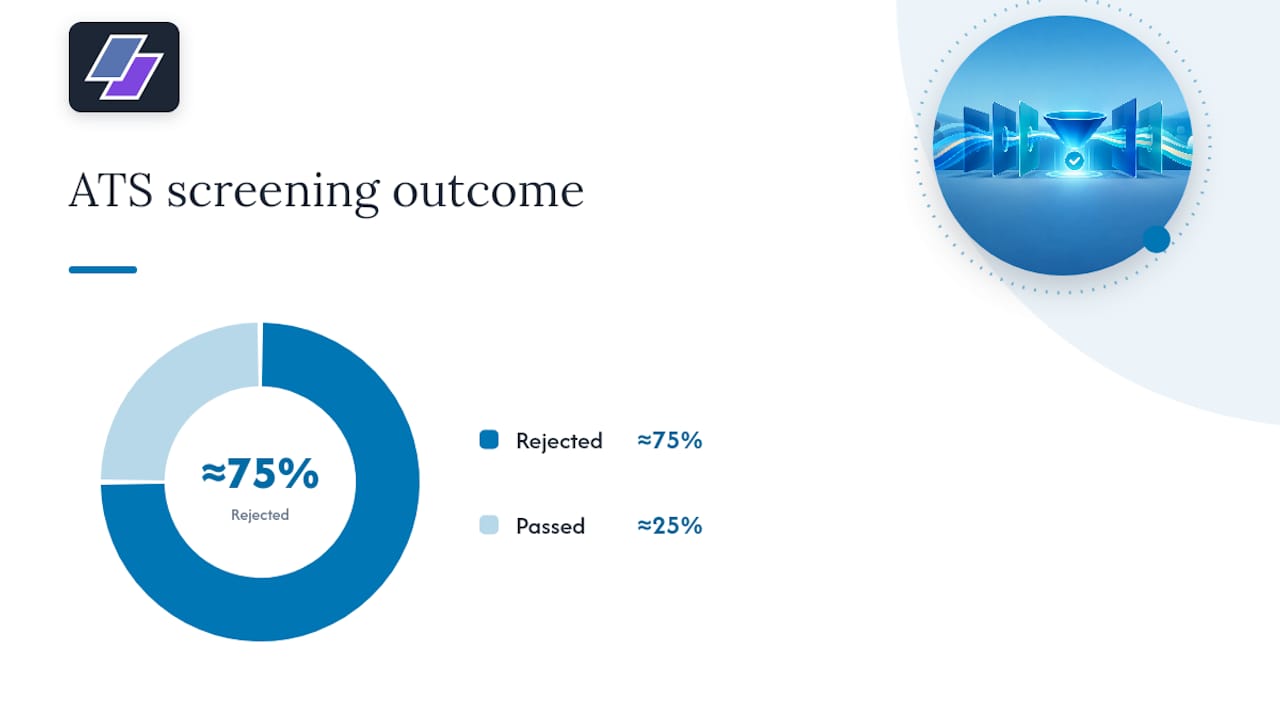
Nearly three in four resumes get rejected by ATS before a person ever reads them. That single statistic explains why formatting discipline matters more than clever design. One reliable check costs nothing: open your resume, save a copy as plain text (.txt), and read through it. Research from MIT’s Career Advising & Professional Development office recommends this exact test, since saving as plain text reveals missing text, reordered content, or corrupted fields before you ever submit the file. If your job titles show up in the wrong order or your bullet points merge into one paragraph, that’s your layout causing the damage, not your content.
Tailoring, testing, and fixing your resume for each job
Keep one master resume with every job, skill, and achievement you might ever use, then build a tailored version for each application by pulling the master resume down to what fits the posting. Career-center guidance from Kansas State University recommends this master-resume approach specifically because most employers now run applications through some form of ATS, and a tailored version gives you a faster path to matching each posting’s language.
When you tailor, work the job description’s own phrases into your experience bullets rather than pasting them into a skills list. Parsers and recruiters both weight context more heavily than an isolated keyword, and guidance from CareerBridge backs this up, noting that keywords embedded in achievement-oriented bullets carry more weight than the same terms sitting alone in a skills section.
Before you submit anything, run two quick checks:
- Save the file as .txt and confirm the section order and content match what you intended.
- Use an employer portal preview or a parser tool to confirm your job titles, dates, and skills extracted into the right fields.
Pro Tip: If a section comes out mislabeled in your parser check, the fix is almost always the heading, not the content underneath it.
Where JobAlign fits into this process
Everything above is doable by hand, but it’s also exactly the kind of repetitive, detail-heavy work that’s easy to get wrong under deadline pressure. There are tools that sync with your LinkedIn profile and build tailored resumes for each job posting automatically, applying the same principles covered here without you having to rebuild the document every time.
- LinkedIn sync can pull your experience and skills directly into a structured, ATS-ready format.
- Unlimited resume generation means a fresh, tailored version for every job you apply to, rather than one generic file reused everywhere.
- Built-in templates can use safe, standard headings and consistent Month YYYY date formatting by default.
- Job-specific keywords can be placed into your experience bullets automatically, matching the contextual approach recruiters and parsers respond to best.
If you’d rather see this in practice than build it section by section, JobAlign’s resume examples by job show the same structure applied across different roles.
What actually moves the needle on ATS resumes
Most of the advice about beating applicant tracking systems focuses on tricks: hidden keywords, font manipulation, oversized skills sections. None of that matters as much as getting the basics right. Standard headings, clean single-column layout, and consistent dates fix more parsing failures than any keyword trick ever will, because the biggest cause of resume rejection isn’t a missing skill, it’s a document a machine can’t read in the first place.
If you take one thing from this piece, take the heading list. Everything else is refinement.
— Johan
Build your ATS-ready resume in minutes
Rewriting a resume by hand for every job posting is tedious even when you know the rules. Some resume builders handle the formatting, heading structure, and keyword placement automatically by syncing with your LinkedIn profile, so you spend your time applying instead of reformatting. Try the free LinkedIn resume export and see an ATS-ready draft built from your own profile in minutes.
Sources
- JobScan common ATS resume formatting mistakes - Santa Clara University Career Center
- Build sections — Career Services, UCSB
- A guide to adapting your resume for the applicant tracking system (ATS) — ONU
- Make your resume ATS-friendly — MIT Career Advising & Professional Development
FAQ
Is a 70% ATS score good?
Most career guidance treats an ATS match score in that range as solid but improvable, since scores vary widely between parsing tools and there’s no single universal passing threshold. Focus less on hitting an exact number and more on using standard headings, clean formatting, and keywords placed in context.
Can ATS detect a ChatGPT resume?
Standard applicant tracking systems are built to parse and organize resume content into sections, not to detect how the text was written. What actually causes problems is generic, keyword-stuffed phrasing that reads poorly to a human recruiter once your resume clears the initial parsing stage.
What are the five sections of a resume?
The five core sections are Contact, Professional Summary, Work Experience, Skills, and Education, in that order. These standard headings give parsers a reliable way to segment your document, as outlined in guidance from UC Santa Barbara’s career services.
What are common ATS resume mistakes?
The most common mistakes are using multi-column layouts, placing contact information in a header or footer, using nonstandard or creative section headings, and inconsistent date formats. Each of these can cause a parser to lose content or misfile it under a generic category where recruiters rarely look.