How to Build a Resume Without Work History: Templates & Tips

Build a strong resume without paid work history by leading with your skills, education, projects, and volunteer experience. No paycheck required. Hiring managers at the entry level are looking for proof of capability, not a list of employers, and your coursework, club roles, and personal projects deliver exactly that. Here is the recommended section order for a no-experience resume:
- Contact info — your name, professional email, phone, LinkedIn URL, and city/state
- Summary or objective — 2–3 lines connecting your strengths to the role
- Skills — hard skills (software, languages, tools) and soft skills (communication, organization)
- Education — degree, school, GPA if 3.5+, and relevant coursework
- Projects / Relevant experience — class projects, personal builds, volunteer roles, extracurriculars
- Certifications and online courses — Google, Coursera, LinkedIn Learning, etc.
Each section does a specific job. Your skills section proves you can do the work. Your education section proves you can learn and follow through. Your projects section proves you have already applied those skills in a real context, even without a formal employer.
Key Takeaways
Building a resume without paid work history is entirely achievable when you lead with skills, education, and projects framed as achievement-focused bullets tailored to each job posting.
| Point | Details |
|---|---|
| Use a combination format | Lead with skills and a summary, then list education and projects; it satisfies both ATS and human reviewers. |
| Move education to the top | Include GPA (if 3.5+), relevant coursework, and academic projects to prove domain knowledge. |
| Write action-result bullets | Every bullet needs an action verb and at least one specific detail or number to signal real impact. |
| Tailor keywords per application | Extract repeated terms from the job description and place them in your summary, skills, and bullets. |
| Jobalign speeds tailoring | Jobalign’s LinkedIn sync and keyword extraction generate a tailored, ATS-ready resume in minutes for each role. |
Table of Contents
- What hiring managers actually look for when you have no job history
- Which resume format works best when you have no paid experience
- How to structure your resume section by section
- How to turn projects, volunteering, and hobbies into strong resume bullets
- ATS and keyword optimization for a no-experience resume
- Two sample resumes you can adapt right now
- Your pre-send checklist: formatting and proofreading
- What to do after you finish your first draft
- Jobalign makes the no-experience resume faster and smarter
- Sources
What hiring managers actually look for when you have no job history
Good news: hiring managers value transferable skills, reliability, and evidence of follow-through far more than a job title. A volunteer who showed up every Saturday for six months signals reliability better than a two-week internship ever could.
Here is what actually moves the needle for entry-level recruiters:
- Transferable skills with context. “Strong communicator” means nothing. “Presented a 10-minute research summary to a 30-person class” means something.
- Evidence of impact. Numbers, even small ones, carry weight. How many people attended the event you organized? How many social posts did you write?
- Consistency and follow-through. Repeated commitment to anything, whether a club, a volunteer shift, or a personal project, signals that you finish what you start.
- Relevant hard skills. If the job posting lists Excel, Python, or Canva and you have used them in class, list them. ATS filters scan for these exact terms before a human ever reads your resume.
The split between ATS filters and human reviewers matters here. ATS software scans for keyword matches against the job description. A human recruiter then spends roughly seven seconds on the top half of your resume looking for a clear role fit. You need to satisfy both audiences, which means keywords in the right places and a clean, readable layout.
Pro Tip: Add one small, measurable detail to every bullet. The size of the event, the number of pieces produced, the percentage improvement in a class project. Even a modest number makes a vague claim concrete.
Which resume format works best when you have no paid experience
Three formats dominate the job market, and they are not equally useful for a first-time applicant. A functional or combination resume helps you emphasize skills and projects over a work timeline when you have little or no paid experience.
- Reverse-chronological lists your most recent experience first. It is the default format most recruiters expect, but it backfires when your most recent experience is “nothing.”
- Functional (skills-led) groups your content by skill category rather than by employer. It hides an empty work history but is increasingly flagged by ATS as suspicious, and some recruiters dislike it.
- Combination opens with a strong skills or summary section, then lists any experience (paid or unpaid) in reverse order. It is the best of both worlds for most entry-level candidates.
For most first-job seekers, the combination format is the right call. You lead with your skills and a targeted summary, then list your education and projects. The work history section either stays short (with volunteer and informal work) or is relabeled “Relevant Experience” to include class projects and extracurriculars.
See the resume format types by industry guide for a breakdown of which format fits which job family.
Pro Tip: Applying to a tech or creative role? A combination format with a portfolio link outperforms a functional format every time. Applying to customer service or retail? A short reverse-chronological with a strong objective is often preferred because those hiring managers scan fast.
How to structure your resume section by section
When you lack paid work experience, move education higher and include relevant coursework, academic projects, GPA when strong, and certificates. The structure below reflects that priority.
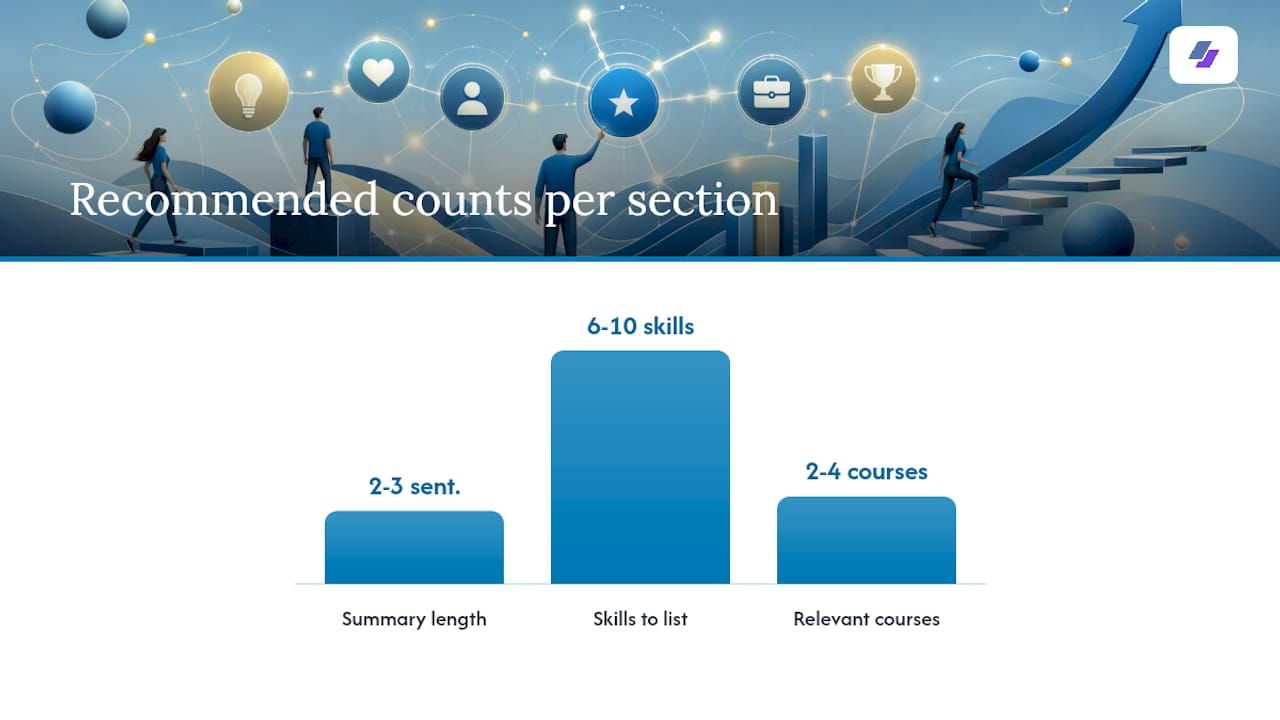
| Section | What to include | Why it proves fit |
|---|---|---|
| Contact info | Name, professional email, phone, city/state, LinkedIn URL | Lets recruiters reach you; a professional email signals attention to detail |
| Summary or objective | 2–3 sentences: your top skills, your target role, and one proof point | Frames your candidacy before the recruiter reads anything else |
| Skills | 6–10 hard and soft skills matched to the job posting | Feeds ATS keyword matching and shows role readiness at a glance |
| Education | Degree, school, graduation year, GPA (if 3.5+), relevant coursework | Proves academic follow-through and domain knowledge |
| Projects / Relevant experience | Class projects, personal builds, volunteer roles, extracurriculars | Demonstrates applied skills and real-world impact |
| Certifications / Courses | Google, Coursera, LinkedIn Learning, HubSpot, etc. | Shows self-directed learning and current tool knowledge |
A few details worth getting right:
- Summary vs. objective. Use a summary when you can tie coursework or projects directly to the role. Use an objective when your goal or target role needs to be stated clearly. For most first-time applicants, an objective is the safer choice.
- Skills section. Split into hard skills (Excel, Python, Canva, Salesforce) and soft skills (written communication, time management, collaboration). Pull the exact terms from the job posting.
- Education details. List your major, minor if relevant, and two to four courses that match the job. “Relevant coursework: Marketing Analytics, Consumer Behavior, Digital Media” tells a hiring manager more than a GPA alone.
- Labeling non-work experience. Title the section “Relevant Experience,” “Projects,” or “Volunteer Experience” rather than “Work History.” Framing unpaid experience with achievement-style bullets signals the same professionalism as paid roles.
Optional sections worth adding when they apply: a portfolio or GitHub link, language proficiency (Intermediate Spanish, Conversational Mandarin), and any honors or awards.
How to turn projects, volunteering, and hobbies into strong resume bullets
The formula is simple: Action verb + task + result. Every bullet should open with a strong verb, describe what you did, and end with a measurable or observable outcome.

Here is how that plays out across different experience types:
Before and after examples:
-
Vague: “Helped with social media for a school club.” Strong: “Created and scheduled 12 weekly Instagram posts for the Marketing Club, growing the account from 80 to 340 followers over one semester.”
-
Vague: “Did volunteer work at a food bank.”
-
Vague: “Worked on a class project about data analysis.” Strong: “Analyzed a 500-row sales dataset in Excel, built a pivot table summary, and presented findings to a class of 25 students.”
For converting non-work activities into resume bullets, the key is specificity. Babysitting three kids on a regular schedule becomes “Managed daily schedules and educational activities for three children, maintaining consistent routines over 18 months.” Freelance logo design becomes “Designed brand identity assets for two small businesses using Adobe Illustrator, delivering final files within a 5-day turnaround.”
Action verbs for entry-level candidates: organized, coordinated, built, edited, analyzed, presented, managed, created, supported, researched, trained, drafted, led, assisted, developed.
ATS and keyword optimization for a no-experience resume
Approximately 75% of resumes are rejected by ATS before a human ever reads them. For a first-time applicant, that number is a real threat because your resume may already be thin on the keywords ATS systems scan for. The fix is deliberate keyword alignment, not keyword stuffing.
Here is a step-by-step tailoring workflow:
- Copy the job description into a plain text document.
- Highlight the repeated nouns and phrases: role titles, tools, skills, and qualifications that appear more than once.
- Map each keyword to your proof: which class, project, volunteer role, or skill covers it?
- Place keywords in three spots: your summary, your skills list, and your project/experience bullets.
- Save the file as a tailored PDF named “FirstName-LastName-RoleName-Resume.pdf” so both ATS and human reviewers see a clean, role-specific file.
For ATS parsing, stick to standard section headers (“Education,” “Skills,” “Experience”) rather than creative labels like “My Story” or “What I Bring.” Use a clean single-column layout, standard fonts (Calibri, Arial, or Georgia at 10–12pt), and avoid tables, text boxes, or graphics in the body of the document. Those elements often break ATS parsing entirely.
See the ATS resume guide for a full breakdown of which formatting choices help or hurt your score.
Pro Tip: Jobalign’s LinkedIn sync pulls your coursework, projects, and skills directly from your profile, then maps them to the keywords in a specific job description. You get a tailored, ATS-ready resume without manually hunting for every keyword. The AI resume optimization workflow takes about two minutes per application.
Two sample resumes you can adapt right now
These are short, copy-paste-ready examples. Trim and customize each one to the job posting before you send it.
Student sample (recent graduate, marketing assistant role)
Objective: Detail-oriented marketing graduate seeking an entry-level marketing assistant role where I can apply skills in content creation, social media management, and data analysis to support campaign goals.
Skills: Content writing, Canva, Google Analytics, Excel, Instagram/TikTok management, research, time management, team collaboration
Education: B.S. in Marketing, State University, May 2026. GPA: 3.7. Relevant coursework: Digital Marketing, Consumer Behavior, Marketing Analytics.
Projects and relevant experience:
- Developed a 6-week social media content calendar for a class capstone project, increasing simulated engagement metrics by 35%.
- Volunteered as communications lead for the Student Marketing Association, writing bi-weekly newsletters sent to 200+ members.
- Researched and compiled a competitive analysis of five local businesses for a semester-long group project, presenting findings to a panel of three faculty members.
Career-starter sample (no degree, customer service role)
Objective: Motivated and reliable candidate seeking a customer service representative position where strong communication skills and a track record of consistent follow-through can contribute to team performance.
Skills: Active listening, conflict resolution, Microsoft Office, data entry, scheduling, written communication, Spanish (conversational)
Relevant experience:
- Provided regular childcare for two families over 14 months, managing daily schedules, preparing meals, and communicating weekly updates to parents.
- Completed Google’s Customer Service Fundamentals certificate (2025), covering de-escalation techniques, ticketing systems, and customer communication best practices.
- Organized a neighborhood fundraiser for 40 attendees, coordinating vendors, managing a $300 budget, and collecting $850 in donations.
Copy-paste objective lines by job family:
- Admin/office: “Organized and detail-focused candidate seeking an administrative assistant role to apply strong scheduling, data entry, and written communication skills.”
- Tech support: “Technically curious self-learner seeking a help desk or tech support role, with hands-on experience in troubleshooting hardware and software through personal projects.”
- Retail/customer service: “Friendly and reliable candidate seeking a customer-facing role where active listening and problem-solving skills can support a positive customer experience.”
Browse ATS-ready resume examples by job for role-specific templates you can download and customize.
Your pre-send checklist: formatting and proofreading
Career services offices consistently recommend clear contact info, a professional email, and a simple layout as the baseline for any entry-level resume. Beyond that, keep the resume to one page with clear, scannable headings so a recruiter can evaluate the top lines in seconds.
Run through this checklist before every submission:
- [ ] Name and contact info are at the top, with a professional email address (firstname.lastname@gmail.com, not partyguy99@)
- [ ] File saved as a PDF unless the posting specifically requests DOCX
- [ ] File named “FirstName-LastName-RoleName-Resume.pdf”
- [ ] Font is Calibri, Arial, or Georgia at 10–12pt; margins are 0.75–1 inch
- [ ] Resume fits on one page with no text smaller than 10pt
- [ ] Every bullet opens with an action verb and includes at least one specific detail or number
- [ ] Keywords from the job posting appear in the summary, skills section, and at least two bullets
- [ ] No spelling errors (read it aloud, then run a spell-check, then ask someone else to read it)
- [ ] LinkedIn URL in the contact section is active and matches the resume’s content
The seven-second rule is real. Recruiters scan the top third of your resume first. If your name, target role, and top two or three skills are not immediately visible, you lose that window. Keep your summary short, your skills list scannable, and your most impressive bullet at the top of each section.
What to do after you finish your first draft
Your first resume does not need to be perfect. It needs to be specific, honest, and tailored to one job. Start there.
Draft one version, then run it through an ATS check before you apply anywhere. Tailor the summary and skills section to each posting, even if you only change five words. Apply to a handful of roles, then treat every rejection as data: which keywords were you missing? Which section felt thin?
A few follow-up actions worth taking this week:
- Build a LinkedIn profile that mirrors your resume. Recruiters search LinkedIn before they call anyone, and a blank profile undercuts a strong resume.
- Create a simple portfolio folder, even a shared Google Drive, with writing samples, project files, or design work you can link from your resume.
- Practice answering “Tell me about a time you…” questions using the same bullets on your resume. The bullet becomes your story.
For a full application roadmap, the job application guide for graduates covers what to do after the resume is ready, including how to approach networking and follow-ups as a first-time applicant. For a broader view of the job search process, the job search workflow guide for new seekers is a practical companion resource.
Jobalign makes the no-experience resume faster and smarter
Writing a tailored resume from scratch for every application is slow, and getting the keywords right without a tool is genuinely hard. Jobalign solves both problems at once. Connect your LinkedIn profile, paste in a job description, and Jobalign extracts your relevant coursework, projects, and skills, then maps them to the job’s keywords and generates an ATS-optimized resume in minutes. No blank-page paralysis, no guessing which skills to list.
For candidates with no paid work history, that keyword-mapping step is especially valuable. Jobalign surfaces transferable skills you might overlook and places them in the right sections so your resume passes ATS filters and reads clearly to a human recruiter. You get a tailored resume per posting, expert-designed templates, and a PDF ready to submit.
Generate your first tailored resume with Jobalign and see how your coursework and projects map to a real job description in under two minutes.
Sources
- How to Write Your First Resume (Even Without Job Experience) | Choose Work! - Ticket to Work - Social Security
- How To Write a Resume With No Experience | Coursera
- Indeed