2-Page Federal Resume Format That Meets U.S. Merit Hiring Plan

A compliant federal resume format fits within two pages under the current Merit Hiring Plan, includes every mandatory data point HR uses to verify your eligibility, and uses clean, conservative ATS resume formatting that survives the upload process intact. USAJOBS’ own resume builder is the safest way to hit all three requirements at once, since it locks you into the page limit and prompts you for the fields agencies actually check.
TL;DR:
- Your federal resume must include detailed contact information, work history, supervisor contacts, federal service specifics, education, and supporting credentials, all within two pages.
- Use the USAJOBS resume builder or format your PDF to meet requirements such as margins, font size, and accepted file types, with PDF preferred for layout stability.
- Craft experience bullets using the CCAR method—Challenge, Context, Action, Results—to clearly demonstrate accomplishments with measurable outcomes.
- Avoid common errors like missing hours per week, supervisor contact info, relevant federal details, vague dates, or unnecessary graphics that can lead to rejection.
- Prepare all mandatory data before writing bullets, then integrate them into a formatted resume or use tools like JobAlign to automate compliance and keyword alignment.
Table of Contents
- What a Federal Resume Format Must Include
- Formatting, File Types, and the Page Limit That Changes Everything
- How to Turn Your Work History Into CCAR-Style Bullets
- Building and Submitting Your Resume in USAJOBS
- The Mistakes That Get Federal Resumes Rejected
- A Practical Workflow for Getting This Right the First Time
- Let JobAlign Handle the Formatting While You Focus on the Job
- Sources
What a Federal Resume Format Must Include
Federal HR specialists aren’t skimming for personality or a clever summary line. They’re checking boxes against a list, and if a box is empty, your application can get bounced before a human ever weighs your qualifications. The NARA federal resume guide lays out exactly which data points matter, and skipping any one of them is the single most common reason qualified applicants get screened out.
Here’s what belongs on every federal resume, no exceptions:
- Contact and eligibility details: full name, phone, email, mailing address, U.S. citizenship status, and any preference eligibility, such as Veterans’ Preference or Schedule A.
- Complete work history for each position: job title, employer name, city and state, start and end dates (month/year at minimum, some agencies want month/day/year), and hours worked per week.
- Supervisor information: name, phone number, and whether HR can contact them. Leaving this blank is a red flag reviewers notice immediately.
- Federal service specifics, if applicable: pay plan, series, and grade (for example, GS-9), plus your SF-50 and most recent performance appraisal if you’ve held a federal position before.
- Education: school name, degree or certificate, completion date, and GPA or credit hours when the announcement asks for them. Attach transcripts if the job vacancy announcement (JOA) requires them.
- Supporting credentials: certifications, professional licenses, training, publications, language proficiency, and required forms like a DD-214 for veterans or a Schedule A letter for applicants with disabilities.
The NIH Office of Human Resources is blunt about this: federal resumes differ from private-sector resumes precisely because of this level of detail. A private-sector employer rarely asks for your hours per week or your supervisor’s phone number. A federal HR specialist almost always does.
Formatting, File Types, and the Page Limit That Changes Everything
Here’s the number that governs everything else about your layout: two pages. Under the Merit Hiring Plan agency guidance issued by OPM, competitive and excepted service announcements that specify a two-page limit will have over-length resumes removed from consideration. Agencies are required to state this limit in the “How to Apply” section, so read that section closely before you build anything.
Pro Tip: Draft your resume in a plain document first, without worrying about page count. Trim it down to two pages only after you’ve written every CCAR bullet, so you’re cutting weak content instead of accidentally deleting a required field.
Beyond length, the USAJOBS Help Center spells out the technical specs that keep your resume readable on both ends:
- Margins of at least 0.5 inches; 1 inch is a safer bet if you have room to spare.
- Sans-serif fonts like Arial, Calibri, Roboto, or Noto Sans, at 14pt for headers and 10 to 12pt for body text.
- Accepted file types include PDF, DOC, DOCX, RTF, TXT, ODT, and even JPG or PNG, with a 5 MB upload limit per file.
- Left-aligned text, minimal bold, no graphics, tables, or columns, and never a PDF portfolio file, which USAJOBS systems often can’t parse correctly.
PDF is the safer export choice over Word because it locks your pagination and font rendering in place. A resume that looks like two pages in Word can bleed onto page three the moment it hits a different printer driver or screen resolution.
How to Turn Your Work History Into CCAR-Style Bullets
Federal HR reviewers and the NARA guide both point to the same method for describing experience: CCAR, which stands for Challenge, Context, Action, Results. Instead of listing duties like a job description, you frame each accomplishment as a problem you solved and the measurable outcome that followed.
Here’s how that compression works in practice:
- Identify the challenge. What problem or gap existed before you acted? Example: “A 40 percent backlog in grant application reviews was delaying funding decisions.”
- Set the context. Where did this happen, and what was your role? “As lead reviewer for a 12-person team at a state health agency…”
- Describe the action. What did you specifically do? “…I redesigned the intake workflow and trained staff on a new triage system.”
- State the result. What changed, in numbers where possible? “…cutting review time by 35 percent and clearing the backlog within one quarter.”
Compressed into a resume bullet, that becomes: “Redesigned grant intake workflow for a 12-person review team, cutting processing time 35 percent and eliminating a 40 percent application backlog within one quarter.” One sentence, four CCAR elements, zero wasted words.
When you write these bullets, mirror the exact language from the Duties and Qualifications section of the JOA. If the announcement says “stakeholder coordination,” use that phrase instead of a synonym like “team liaison,” but only when it accurately describes what you did. Since USAJOBS confirms that federal resumes go through a hybrid review where humans ultimately verify your qualifications, write for a person first and let accurate keyword alignment follow naturally, rather than stuffing terms that don’t reflect real experience.
Building and Submitting Your Resume in USAJOBS
You have two paths: the USAJOBS Resume Builder, or a custom PDF you upload yourself. The builder is the lower-risk option for most applicants because it enforces the two-page limit automatically and prompts you for every required field. A custom resume is acceptable too, as long as it contains everything the builder would have asked for.
A few practical notes before you submit:
- You can store up to five resumes in your USAJOBS profile, so keep one tailored version per JOA rather than reusing a single generic file.
- Copying and pasting from Word into the builder often strips or mangles bullet formatting. Retype bullets directly in the builder when this happens.
- Save your final upload as a PDF whenever the JOA allows it, since this preserves your pagination exactly as you formatted it.
- Before you hit submit, confirm your file type, page count, file size, and that every required supporting document (SF-50, DD-214, transcripts) is attached.
The Mistakes That Get Federal Resumes Rejected
Most disqualifications trace back to a short list of preventable errors. Over-length resumes top that list under current Merit Hiring Plan enforcement, but they’re not the only culprit.
Watch for these red flags before you submit:
- Missing hours per week. HR can’t calculate qualifying experience without it, and it’s one of the most commonly skipped fields.
- No supervisor contact information. An empty field here reads as incomplete, not just optional.
- Missing series and grade for prior federal service. Without this, reviewers can’t confirm your qualifying grade level.
- Graphics, tables, or unusual fonts. These often break parsing during upload and can make your resume unreadable on the reviewer’s end.
- Inconsistent or vague dates. “2019 to 2021” without months creates ambiguity that can cost you qualifying time.
- Unclaimed eligibility. If you qualify for Veterans’ Preference or Schedule A, state it explicitly and attach the required documentation.
Run through that list one more time immediately before you click submit. It takes two minutes and it’s the cheapest insurance you’ll get in this whole process.
A Practical Workflow for Getting This Right the First Time
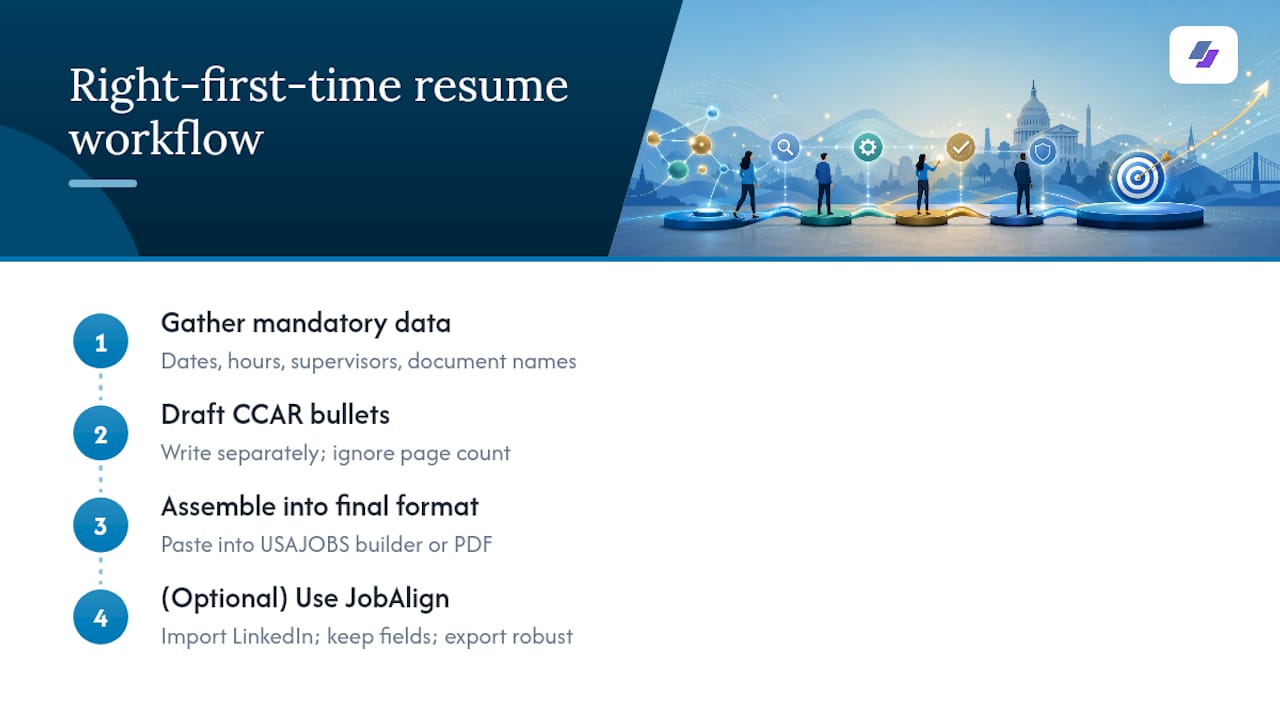
The applicants who struggle with federal resumes almost never lack qualifications. They lack a sequence. Gather every mandatory data point first, in one place, before you write a single sentence. Dates, hours, supervisor contacts, document names. Then draft your CCAR bullets separately, without worrying about page count, so you’re editing for strength rather than panicking about space.
Only after that should you paste everything into the USAJOBS builder or a formatted PDF. This order matters because most formatting disasters happen when applicants try to write, format, and trim simultaneously. JobAlign’s own resume workflow follows this same logic. It pulls your experience data directly from LinkedIn, keeps field completeness intact, and exports to a format built to survive the upload process without losing structure.
— Johan
Let JobAlign Handle the Formatting While You Focus on the Job
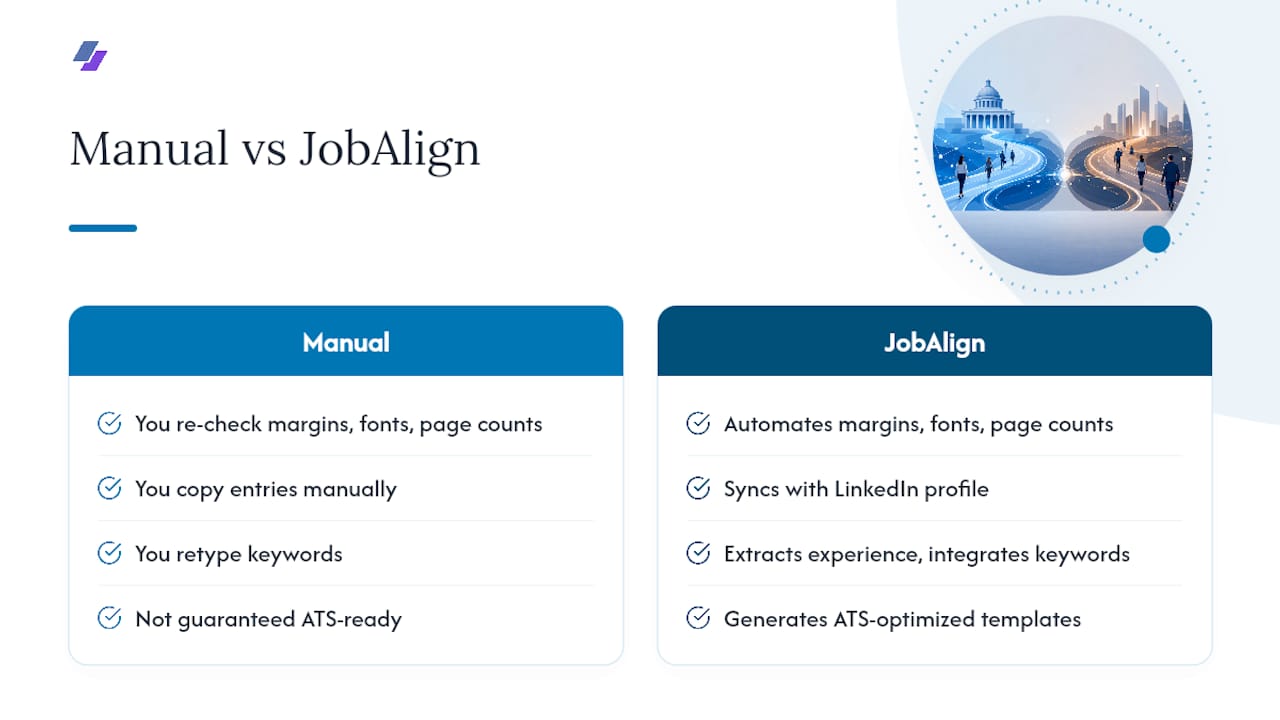
You’ve read the requirements. Now consider how much of that work JobAlign automates. Instead of manually re-checking margins, font sizes, and page counts every time you apply, JobAlign syncs directly with your LinkedIn profile, pulls your work history and skills, and generates a tailored resume built around ATS-optimized templates that respect the two-page limit by design.
Because federal HR reviewers check for specific data points, alignment matters as much as formatting. JobAlign extracts your relevant experience and integrates the keywords from the job posting you’re targeting, so your resume speaks the same language as the announcement without you retyping every entry by hand. For a deeper look at aligning your resume language with what a specific role demands, JobAlign’s ATS resume keyword guide walks through placement in more detail.
Start with a free resume generated from your LinkedIn profile and see how much time you get back on your next application. Try JobAlign now and generate your first tailored, ATS-ready resume in minutes.
Sources
- How do I write a resume for a federal job? - USAJOBS Help Center
- Agency guidance on the two-page limit on resume length - OPM
- NARA federal resume guide - National Archives
- Writing a federal resume - NIH Office of Human Resources