7 Ways to Package Freelance Skills for Employers

If you’re wondering how to package freelance skills for employers, here’s the short version: stop listing every gig separately, and start presenting your freelance work the way an employer already thinks about experience. Build one umbrella entry with a professional title, convert your best projects into quantified achievement bullets, format dates the way ATS software expects, and mirror that same story on LinkedIn.
Here’s how to move fast:
- Pick one target job posting and pull its top 5 to 8 keywords.
- Create a single umbrella entry (e.g., “Jane Doe Consulting — Marketing Strategist, Jan 2023 - Mar 2026”) and convert your two or three strongest projects into bullets matching that job description.
- Use month-year date formatting throughout, and choose a role title that mirrors the job you want, not the job you had.
Export that as a tailored PDF, and you’ve got an application that reads like employer-ready experience, instead of a patchwork of side gigs.
Key Takeaways
Packaging freelance experience for employers works when you combine an umbrella resume entry, quantified achievement bullets, and ATS-safe formatting, then mirror that story on LinkedIn.
| Point | Details |
|---|---|
| Use one umbrella entry | Consolidate freelance work under a single title and employer field instead of listing every client separately. |
| Choose hybrid format | A hybrid resume blends a skills summary with chronological history, fitting freelance-to-employer transitions best. |
| Quantify with scale signals | Pair every claim with two scale metrics, like team size or budget, especially when client names are confidential. |
| Format dates for ATS | Use “Jan 2023 - Mar 2024” style ranges; ambiguous formats can cause parsing systems to drop entries entirely. |
| Sync LinkedIn and resume | Match your headline, About summary, and umbrella entry across both so recruiters see one consistent story. |
| Automate the process | JobAlign syncs LinkedIn data, maps job-specific keywords, and exports ATS-ready PDFs to speed up this exact workflow. |
Table of Contents
- When Should You Include Freelance Work on a Resume?
- Which Resume Format Fits Freelance Experience Best?
- How Do You Turn Freelance Projects Into Achievement Bullets?
- What Makes a Freelance Resume Entry ATS-Friendly?
- How Do You Sync LinkedIn With Your Resume Story?
- Copy-Ready Examples for Your Resume
- Your Pre-Application Checklist
- Should You Ask Freelance Clients for Testimonials?
- How Do You Quantify Impact Without Breaking Client Confidentiality?
- Let JobAlign Handle the Heavy Lifting
- Sources
When Should You Include Freelance Work on a Resume?
Include freelance work when it’s relevant to the role, produced results you can measure, or fills a gap that would otherwise look suspicious. Cut or consolidate it when it’s unrelated to your target job, thin on outcomes, or bound by confidentiality you can’t work around.
A few thresholds make the call easier. List a project individually when the engagement ran three months or longer, involved leadership over a budget or a team, produced a number you can point to, or came from a client whose name carries weight. Everything else belongs in a consolidated line inside your umbrella entry, not its own row on the page. A hybrid resume format tends to handle this mix best because it lets you group by relevance instead of forcing strict chronology, and research from Boston University’s career center confirms that freelance work strengthens a candidacy specifically when it’s relevant and framed around measurable results.
Pro Tip: If a client contract bars you from naming them, anonymize with a descriptive label that signals scale, like “Series B SaaS startup” or “regional healthcare network,” and pair it with two scale metrics such as team size and budget. That tells a hiring manager more than a client’s name ever would.
Which Resume Format Fits Freelance Experience Best?
For most people transitioning from freelance work to an employer role, a hybrid format wins. It leads with a skills summary that frames your capabilities, then backs it up with a chronological work history, so you get the best of both without forcing a recruiter to guess how your projects connect.
Chronological alone tends to underserve freelancers because it invites a reader to count gaps and short stints. Purely functional resumes solve that but raise a different flag: recruiters often read them as a way to hide a spotty timeline, and many ATS platforms parse them poorly since there’s no clear date structure to extract.
Placement matters as much as format. Two options work:
- A single umbrella entry inside your main Experience section, listing your freelance identity (LLC name, “Self-Employed,” or “Independent Consultant”) as one continuous role with individual projects as sub-bullets. This is the approach that presents freelance experience most effectively for ATS parsing, since it gives the system one clean date range instead of five broken ones.
- A dedicated “Freelance Projects” section, better suited if freelancing has been your primary activity for years and deserves its own real estate.
Choose a title that matches your target job, not a vague label. “Independent UX Consultant” beats “Freelancer.” “Jane Doe Consulting, LLC — Product Strategy” beats “Self-Employed” with nothing else attached.
How Do You Turn Freelance Projects Into Achievement Bullets?
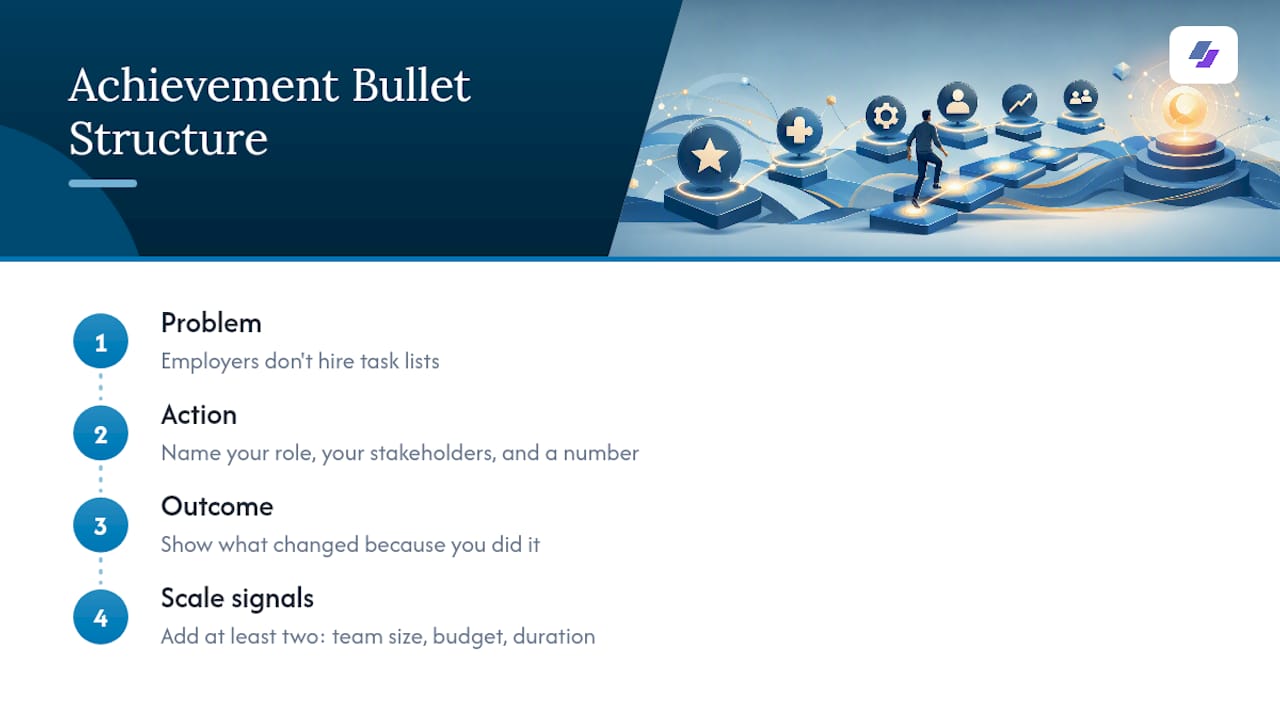
Employers don’t hire task lists. They hire outcomes, so every bullet needs to move from what you did to what changed because you did it. The simplest structure is Problem, Action, Outcome, written in employer language that names your role, your stakeholders, and a number.
Here’s the difference in practice:
Before: “Built email campaigns for small business clients.”
Before: “Helped a startup with its website redesign.”
Notice what changed beyond the numbers: the second version names a team, a duration, and a stakeholder structure. That’s not decoration. Adding at least two scale signals, such as team size, budget, or duration, is exactly what keeps freelance work from reading as a small gig instead of real professional experience.
Pro Tip: Bake in two collaboration signals per role, like team size and participation in a recurring meeting cadence (sprint planning, client check-ins, cross-functional syncs). Hiring teams often assume freelancers only work solo, and naming your involvement in team-based rituals directly counters that assumption.
What Makes a Freelance Resume Entry ATS-Friendly?
ATS software fails silently. It doesn’t reject you with an explanation; it just drops fields it can’t parse, and freelance resumes are especially vulnerable because of inconsistent formatting. Fixing that takes three concrete steps.
- Use standard date formats like “Jan 2023 - Mar 2024,” never “2023 - 2024” or seasonal labels. Ambiguous date formats are a known parsing failure point, and a dropped date range can mean a dropped job entirely.
- Give the ATS a stable employer field: an LLC name, “Self-Employed,” or “Independent Consultant” work, while a string of individual client names in the employer line often confuses the parser.
- Map 5 to 8 keywords straight from the job posting into your bullets and skills section. If the posting says “stakeholder management,” don’t write “worked with clients,” write “stakeholder management” somewhere it fits naturally.
On templates: pick something ATS-friendly with a simple structure, no tables, no text boxes, no icons standing in for headers. Save it as a PDF that preserves selectable text rather than a flattened image, and run it through an ATS preview tool before you hit submit. A resume that looks sharp to your eye can still be invisible to the system reading it first.
How Do You Sync LinkedIn With Your Resume Story?
Your resume and your LinkedIn profile need to tell the identical story, because recruiters routinely check both. Update four fields: your headline, your About summary, the Experience section’s umbrella entry, and your Featured section if you have testimonials or work samples to show.
Write your About paragraph in 2 to 3 sentences that frame freelancing as deliberate consulting, then point directly at the kind of employer role you want next. Positioning freelance periods as professional consulting rather than a stopgap reads far better than language that suggests you were just waiting for something better to come along.
Once LinkedIn matches your resume, reuse that copy directly. JobAlign’s LinkedIn sync pulls your existing bullets and experience data straight into a resume draft, so you’re editing one accurate source instead of retyping the same achievements twice. Test the export in an ATS preview before sending it anywhere.
Copy-Ready Examples for Your Resume
Sample umbrella entry:
Jane Doe Consulting — Marketing Strategist | Self-Employed | Jan 2023 - Mar 2026
Three before/after rewrites you can adapt:
- Before: “Ran social media for clients.” After: “Managed social strategy for 3 e-commerce clients, growing combined follower base by 40% and generating $28,000 in attributed sales over 6 months.”
- Before: “Worked on a mobile app feature.” After: “Collaborated with a 5-person product team to ship a checkout redesign feature, reducing cart abandonment by 12% within the first month post-launch.”
- Before: “Did user research for a startup.” After: “Led 15 user interviews and 2 usability studies for an early-stage startup, informing a redesign that raised task completion rates by 25%.”
Grab more formatted starting points from JobAlign’s resume examples by job if you want a template built around your specific target role.
Your Pre-Application Checklist
Run through this before you submit anything:
- Keywords matched: confirm 5 to 8 job-description terms appear in your bullets or skills section.
- Dates formatted correctly: month-year format throughout, no ranges like “2023 to 2024.”
- Top 3 bullets tailored: your strongest achievements speak directly to this specific job, not a generic version.
- LinkedIn aligned: headline and summary match the resume’s framing.
- Exported as ATS-friendly PDF: text-based, no design elements that break parsing.
- Parse-tested: run it through an ATS preview to confirm your experience actually reads through.
Should You Ask Freelance Clients for Testimonials?
Yes, and the ask is easier than most freelancers assume. A short, specific testimonial does something a bullet point can’t: it verifies your claim through someone else’s voice, which carries weight with a skeptical hiring manager reading past a nontraditional career path.
Request testimonials right after you deliver strong results, while the client’s enthusiasm is fresh. Ask a direct question instead of a vague one: “Could you share a sentence or two about the impact of the project, specifically around [the metric you improved]?” That framing tends to produce a usable, specific quote rather than a generic “great to work with.”
Where testimonials go matters. They rarely belong directly on a resume, since ATS systems parse resumes as structured data and a block quote just adds clutter. LinkedIn’s Featured or Recommendations sections are the better home, and you can reference “client feedback available on request” in a cover letter or interview instead. Keep one or two testimonials that name a concrete result rather than a personality trait. “A pleasure to work with” tells them nothing. For more on this, JobAlign’s guide on testimonials in freelancer resumes walks through where and how to place them without cluttering your core document.
How Do You Quantify Impact Without Breaking Client Confidentiality?
Numbers are what separate a forgettable freelance line from a compelling one, but plenty of contracts restrict what you can share. The workaround is to quantify your role and process, not the client’s proprietary results.
Instead of exact revenue figures you’re barred from disclosing, use percentages and ranges: “increased qualified leads by approximately 30%” instead of naming dollar figures tied to a specific account. Team size, project duration, and the scope of what you managed are almost never confidential, even when outcomes are. “Managed a 6-person cross-functional team across a 4-month product launch” tells a hiring manager plenty without touching sensitive client data.
When a client explicitly restricts even percentage-based claims, fall back on process-level detail: the number of stakeholders you coordinated, the size of the budget you controlled, or the number of deliverables you shipped on a recurring basis. These describe your capability rather than the client’s business performance, which sidesteps confidentiality concerns entirely while still giving a recruiter something concrete to evaluate. The goal isn’t to hit a specific number in every bullet. It’s to give the reader enough scale and structure that they can trust the experience is real and sized appropriately for the role you’re applying to next.
Why This Packaging Approach Actually Reduces Rejection Risk
Career coaching consistently shows that recruiters reject freelance resumes not because the work is weak, but because it’s presented in a way that looks unstable or hard to verify. Hiring expert Linda Moore has emphasized that relevance and storytelling, not just keyword density, are what separate a resume that gets read from one that gets skimmed and dropped. Umbrella formatting and team-context bullets fix the storytelling half; ATS-safe dates fix the parsing half.
Let JobAlign Handle the Heavy Lifting
Everything in this guide, the umbrella entry, the keyword mapping, the ATS-safe dates, takes real time to build by hand for every application. JobAlign is built specifically to shortcut that process: it syncs directly with your LinkedIn profile, pulls your role-relevant bullets, injects job-specific keywords pulled from the posting you’re targeting, and exports a clean, ATS-compatible PDF, all without you retyping a single achievement twice.

You get a tailored resume per posting instead of one static file you awkwardly edit every time, and an ATS-optimization preview that shows you where a resume might get parsed incorrectly before a recruiter ever sees it. If you’ve been maintaining separate freelance write-ups for every application, this collapses that into one workflow. Try a free LinkedIn-to-resume export and see your freelance story converted into an employer-ready, ATS-optimized resume in minutes.
Sources
This guide draws on career-center formatting guidance, ATS-specific resume advice, and freelance-to-employer transition tips:
- How to Format a Resume with Freelance Work – Center for Career Development | Boston University
- 6 essential resume tips for freelancers and contractors | Vault