Multiple Roles at One Company: 4 Resume Formats

A multi-role resume is a single resume document that lists two or more positions or promotions held at the same employer, organized so a recruiter can see your growth without flipping between separate entries. If you climbed from coordinator to manager at one company, this is your format. The practical verdict: use a multi-role layout when your roles were consecutive and related; switch to separate entries or even multiple resume versions when the functions were genuinely different or nonconsecutive.
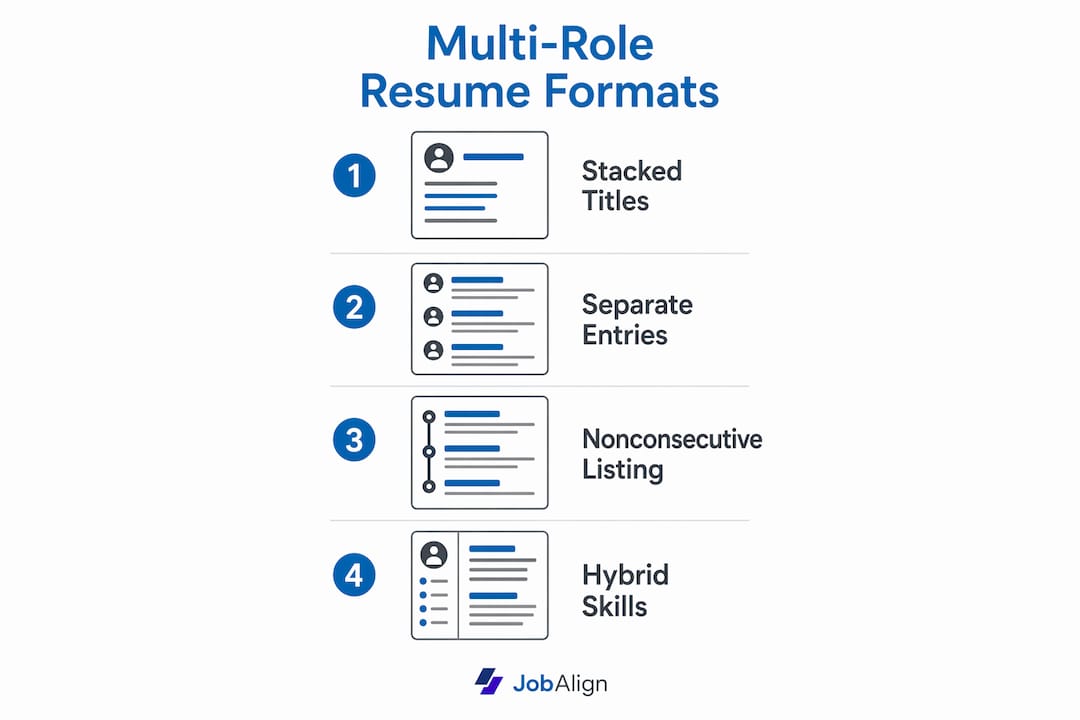
This guide covers the four main formatting options, how to write strong bullets for each role, ATS rules that protect your resume from being misread, three copy-ready snippets, and the most common mistakes recruiters flag in the first seven seconds.
Table of Contents
- Which resume format should you use for multiple roles?
- The four ways to show multiple positions at one company
- How to write bullets that actually show your growth
- How to present dates, title changes, and overlapping roles
- ATS impact and how to tailor your multi-role resume so it parses
- Three resume snippets you can copy and adapt
- What recruiters flag as red flags in multi-role resumes
- How your multi-role resume connects to your cover letter and LinkedIn
- How multi-role resume strategy shifts by industry and career level
- How to handle employment gaps and freelancing in a multi-role format
- Key Takeaways
- The one edit that changes everything
- JobAlign takes the formatting work off your plate
- Selected sources and further reading
Which resume format should you use for multiple roles?
Before you type a single line, run through this three-step check. Your answers determine the format.
- Are your roles consecutive and related? If yes, stack them under one company heading. This shows a clear progression and keeps the entry tight.
- Did the roles serve different functions or departments? If yes, give each role its own entry block under the same company name. Recruiters scanning for specific experience need to find it fast.
- Were the stints nonconsecutive (you left and returned)? List the company twice with separate date ranges. Merging them hides the gap and confuses ATS date parsing.
A fourth question applies to career changers or cross-functional professionals: does your job title tell the wrong story? If so, a hybrid resume format that leads with a skills block before the timeline may serve you better.
Job seekers often spend considerable time revising their resume for each application. Picking the right format upfront cuts that time significantly, especially once you have a core version to clone.
The four ways to show multiple positions at one company
Option A: Stack titles under one company heading
List the company name and total date range once, then stack each title with its own date range beneath it. This is the go-to for promotions or lateral moves within the same function.
When it works: Roles are similar in scope, or each one clearly builds on the last. The progression tells a story on its own.
Short snippet:
Acme Corp | Chicago, IL | 2019–2024
  Senior Marketing Manager | 2022–2024
  Marketing Manager | 2020–2022
  Marketing Coordinator | 2019–2020
Pros: Clean, concise, shows upward momentum at a glance. Cons: If the roles were very different, stacking hides that distinction and may cause a recruiter to miss relevant experience.
Option B: Separate entries per role under the same company
Keep the company name as a shared header but give each role its own block of bullets. This works when responsibilities differed enough that a recruiter targeting one skill set needs to find it clearly.

Short snippet:
Acme Corp | Chicago, IL

  Operations Lead | 2022–2024
  • Led cross-functional team of 12 to cut fulfillment time by 18%.

  Customer Success Manager | 2019–2022
  • Managed 200-account portfolio, achieving 94% retention rate.
Pros: Role-specific keywords appear in the right context, which helps ATS scoring. Cons: Takes more space; a long entry can push other employers off the first page.
Option C: List the company twice for nonconsecutive roles
If you left, worked elsewhere, and returned, list the company as two separate entries with their own date ranges. Merging them into one entry creates a date gap that ATS systems often flag as an error, and it misleads recruiters about your timeline.
Short snippet:
Acme Corp | Chicago, IL | 2022–2024
  Senior Analyst | 2022–2024

Acme Corp | Chicago, IL | 2017–2020
  Junior Analyst | 2017–2020
Pros: Honest, ATS-safe, and easy to read. Cons: Seeing the same company twice can prompt a recruiter question, so address the return briefly in your cover letter.
Option D: Hybrid or skill-first block
Group your strongest skills at the top, then list a condensed role timeline below. UC Davis career services note that functional and hybrid formats are most appropriate for career changers or professionals consolidating cross-functional experience, though they caution that ATS mapping requires extra care.

Pros: Puts transferable skills front and center for a pivot. Cons: Some recruiters prefer a clear chronological timeline; a purely functional format can feel evasive.
How to write bullets that actually show your growth
Every bullet should open with a strong action verb and land on a measurable result. Here is the before/after pattern we recommend:
- Before: “Responsible for managing social media accounts.”
- After: “Grew LinkedIn following by 42% in six months by shifting to a weekly video series.”
When you have stacked roles, the biggest trap is copying bullets from one role into the next. Instead, show evolving scope. If you managed a team of three as a coordinator, note that you led a team of ten as a manager. The number does the work.
Aim for three to five bullets per role. If two roles shared a major achievement, write it once under the higher-level title and reference the earlier groundwork in a single phrase. That keeps the entry tight without losing the credit.
High-impact action verbs for multi-role narratives: Spearheaded, Expanded, Promoted, Restructured, Mentored, Consolidated, Negotiated, Delivered, Accelerated, Overhauled.
Pro Tip: Before finalizing, search your resume for any verb or phrase that appears more than twice. Replace duplicates with synonyms from the list above. This also keeps your ATS keyword density varied and natural, which scores better than repetition.
How to present dates, title changes, and overlapping roles
Date format rules: Use month/year (March 2020) when precision matters, such as a role that lasted less than a year. For longer tenures, year-only ranges (2019–2022) are cleaner and just as informative. Never mix formats within the same entry.
Showing promotions: Place the most recent title first, then work backward. Each title gets its own date range on the same line or indented directly below the title.
Director of Product | January 2022–Present
Product Manager | June 2019–December 2021
Overlapping or concurrent roles: If you held a part-time internal role alongside your primary one (common in startups), list both under the company with a note in parentheses.
Product Manager | 2020–2022
  (Acting UX Lead, Q3–Q4 2021)
On editing historical titles: Keep your official HR title. Rewriting “Customer Service Rep” as “Client Experience Specialist” to sound better is a transparency risk. If your internal title was informal, you can add a clarifying phrase in parentheses, but never swap it out entirely.
ATS impact and how to tailor your multi-role resume so it parses
Three things commonly break ATS parsing in multi-role entries:
- Mis-parsed dates caused by inconsistent formats or merged date ranges across roles.
- Merged bullets that blend two roles’ responsibilities into one block, stripping the role context ATS uses to score keywords.
- Non-standard formatting such as text boxes, columns, or graphics that ATS systems cannot read.
ATS-safe checklist
- Save as a .docx or plain .pdf (not a scanned image).
- Use a clear hierarchy: Company Name → Job Title → Date Range → Bullets.
- Place keywords in bullet text, not just in a skills list at the bottom.
- Keep your skills section as a simple comma-separated or single-column list.
- Run your resume through an ATS resume check before submitting.
Keyword mapping
Extract five to eight keywords from the job posting. Map each one to the role where you actually used that skill, and place it in that role’s bullet. Repeating a keyword across multiple roles is fine when it is accurate; stuffing the same phrase into every bullet is not.
| Statistic | Detail | Source |
|---|---|---|
| ATS rejection rate | ~75% of resumes are rejected before a human reads them | JobAlign |
| Time spent tailoring | Job seekers often dedicate substantial time per application revising their resume | Vertali |
| Core variant benefit | Creating core resumes per job family speeds tailoring and improves ATS compatibility | 9cv9 |
Three resume snippets you can copy and adapt
Snippet 1: Stacked titles (promotion path)
Bright Solutions Inc. | Austin, TX | 2018–2024
  VP of Sales | 2022–2024
  • Closed $4.2M in new contracts, exceeding annual quota by 31%.
  • Built and managed a 15-person regional sales team.
  • Launched partner program generating $800K in Year 1 revenue.

  Senior Sales Manager | 2018–2022
  • Grew territory revenue from $1.1M to $2.8M over four years.
  • Hired and onboarded six account executives.
  • Introduced CRM adoption program, raising data accuracy to 96%.
Adapt this for any industry by swapping the revenue figures for the metrics your field tracks: units shipped, patients served, cases resolved.
Snippet 2: Separate entries (distinct functions)
Bright Solutions Inc. | Austin, TX

  Head of People Operations | 2021–2024
  • Reduced time-to-hire by 22% by redesigning the interview process.
  • Managed benefits program for 340 employees across three states.

  Finance Manager | 2018–2021
  • Oversaw $12M annual budget and monthly close process.
  • Implemented automated reporting, saving 8 hours per month.
Use this layout when applying for a role in one function only; tailor the summary to that function and let the other entry provide context.
Snippet 3: Hybrid skill-first block
CORE COMPETENCIES
Product Strategy | Agile Delivery | Stakeholder Management | Data Analysis

EXPERIENCE
Bright Solutions Inc. | Austin, TX | 2017–2024
  Product Director | 2021–2024 | Product Manager | 2017–2021
  • Defined three-year product roadmap adopted across six business units.
  • Shipped 14 features in 18 months, reducing churn by 19%.
Career experts recommend leading with a tailored summary and grouping achievements under skills for cross-functional candidates, which is exactly what this layout does.
What recruiters flag as red flags in multi-role resumes
The average recruiter spends about seven seconds on an initial scan. These are the things that end that scan early:
- Inconsistent dates: A role ending in “2021” in one place and “2021–2022” elsewhere signals carelessness or worse.
- Vague bullets: “Assisted with various projects” tells a recruiter nothing. Every bullet needs a verb and a result.
- Role inflation: Listing yourself as “Director” when your HR title was “Senior Manager” is a background-check risk.
- Overlong combined entries: A single company block running more than one page buries your best achievements.
- Columns, tables, or images in the body: ATS systems frequently skip or scramble content inside these elements.
Quick five-minute audit:
- Read every bullet aloud. If it sounds generic, rewrite it with a number.
- Check that every date is in the same format throughout.
- Confirm your most recent title matches what HR would verify.
- Open the file in a plain text editor. If the layout breaks, so will ATS parsing.
- Verify the file is saved as .docx or a text-based .pdf.
How your multi-role resume connects to your cover letter and LinkedIn
Your cover letter and LinkedIn profile are not separate documents; they are the same career story told in different formats. When your resume lists three roles at one company, your cover letter should reference that progression in one sentence and then pivot to why it makes you the right fit for this specific job. Do not summarize your resume in the letter; use it to add context the resume cannot, such as why you took on a second function or what you learned from a lateral move.
On LinkedIn, your experience section should mirror your resume’s structure. If you stacked titles on your resume, create one company entry on LinkedIn and add each role as a position within it. Recruiters who find you through LinkedIn will cross-reference your resume, and inconsistencies between the two raise questions. Keep titles, dates, and company names identical across both documents.
How multi-role resume strategy shifts by industry and career level
A software engineer listing three roles at one tech company can stack titles and lead with technical achievements. A nurse practitioner moving from staff to charge to director needs to show patient-volume metrics and leadership scope at each level. The format is the same; the evidence changes.
For early-career professionals, even two roles at one employer are worth stacking because they demonstrate retention and growth, qualities that matter when your total experience is limited. For senior leaders, the priority shifts: compress older roles to one or two bullets each and expand the most recent position where your strategic impact is clearest.
Industries with strict credentialing, such as healthcare, law, or finance, benefit from keeping original titles exact and adding a brief parenthetical for any informal leadership role. Creative fields, by contrast, often reward a hybrid or portfolio-linked format that shows range.
How to handle employment gaps and freelancing in a multi-role format
Gaps are not automatic red flags, but unexplained gaps are. If you left a company, freelanced for 18 months, and returned, list the freelance period as its own entry with a clear title such as “Independent Consultant” and two or three bullets showing what you delivered. Do not leave a blank stretch on the timeline.
For freelancing within a multi-role entry, treat it the same way you would an internal project role: give it a title, a date range, and measurable outcomes. “Freelance UX Designer (contract, concurrent with full-time role)” is honest, clear, and ATS-readable.
If a gap was for caregiving, health, or education, a one-line note in the entry is enough. Recruiters understand life happens. What they need is confidence that the gap is accounted for, not a detailed explanation.
Multitasking resume vs. multi-role resume: what is the difference?
A multitasking resume shows you juggling several responsibilities inside one job; a multi-role resume documents that you formally held several distinct positions. The fix is the same for both: name each scope explicitly and attach a number to it, instead of writing the word "multitasking" and hoping a recruiter believes it.
Applicant tracking systems rank the word "multitasking" poorly because nearly every resume contains it. What gets parsed and searched are the concrete scopes behind the claim. Three ways to prove multitasking without saying it:
- Split the workload into named tracks. "Managed support (40%), onboarding (35%) and billing escalations (25%) for a 2,000-customer portfolio" reads as verified multitasking.
- Quantify the switching. "Handled 30+ tickets a day across 3 product lines while shipping a weekly release note" proves parallel work with numbers an ATS can index.
- Keep one title per entry. If the juggling happened inside a single position, keep one heading with scoped bullets. If you truly carried two titles, structure it as a multi-role entry as described above.
Key Takeaways
A multi-role resume works best when you match the format to the relationship between your roles, write role-specific bullets with measurable outcomes, and verify the file parses cleanly before every submission.
| Point | Details |
|---|---|
| Choose the right format first | Stack for promotions, separate for distinct functions, list twice for nonconsecutive stints. |
| Write role-specific bullets | Lead with an action verb and a metric; never copy bullets from one role to the next. |
| ATS-proof before submitting | Use .docx or plain .pdf, clear title/date hierarchy, and run an ATS check every time. |
| Build core resume variants | Maintaining one core resume per job family cuts per-application revision time significantly. |
| JobAlign automates tailoring | JobAlign syncs with LinkedIn and generates ATS-optimized variants, reporting a high success rate at improving ATS passage. |
The one edit that changes everything
Most multi-role resumes we see have the same problem: the bullets read like a job description, not a career story. The titles change, but the language stays flat. “Managed team. Oversaw budget. Coordinated projects.” That pattern tells a recruiter you held the roles. It does not tell them you grew.
The single most effective edit is to take your oldest role’s bullets and ask: what did this role make possible in the next one? Then rewrite the newer role’s bullets to show that answer. “Expanded the team I built as coordinator from three to eleven” is a stronger bullet than “Managed a team of eleven” because it shows trajectory, not just a snapshot.
If you want to test this in ten minutes, pull up your resume, find the oldest role, and rewrite its top bullet to end with a phrase like “which led to…” or “setting the foundation for…” Then check whether the next role’s bullets pick up that thread. If they do not, you have found the gap. Fix it there first, and the rest of the resume usually falls into place.
JobAlign’s LinkedIn sync workflow pulls your full role history automatically, so you spend your ten minutes on the writing, not on copying and pasting dates.
JobAlign takes the formatting work off your plate
Formatting a multi-role resume correctly takes time, and getting the ATS layer right takes even more. JobAlign pulls your complete work history directly from LinkedIn and builds a tailored, ATS-optimized resume for each job you apply to, without you rebuilding the document from scratch every time. Its proprietary optimization reports an 87% success rate at improving ATS passage, and per-posting generation means you can maintain separate variants for each role family without extra effort. Browse ATS-ready resume examples by job to see how multi-role entries look in a clean, recruiter-friendly format, then generate your own version in minutes.
Selected sources and further reading
- Resume Formats | UC Davis Human Resources — When to use functional, hybrid, or chronological formats, with ATS caveats for each.
- Why Creating Multiple Versions of Your Resume Works | Vertali — The case for maintaining core resume variants and the time cost of per-application revision.
- Hybrid Role Resumes | The Interview Guys — Practical advice on leading with a tailored summary and grouping achievements for cross-functional candidates.
- What Is a Multi-Resume Strategy | 9cv9 Blog — How to build and maintain core resumes for different job families.
- How to List Multiple Positions at the Same Company | ResumeWorded — Standard formatting options and best-practice examples for multi-role entries.
- Functional Resume: Tips and Examples | Indeed — When a skills-first format helps and when recruiters prefer a clear timeline.