Beat ATS in 15 Minutes: Copyable Customer Service Resume Keywords

Use categorized, ATS-ready customer service resume keywords, placed correctly in your headline, skills section, and bullets, to pass automated screening and catch a recruiter’s eye. This article gives you the keyword bank organized by type, a three-step formula to match any job posting, and sample bullets built around real metrics. Grab what you need and start editing.
TL;DR:
- Prioritize exact keyword phrases from the job posting, especially for skills like “de-escalation,” “CRM software,” or metrics such as “CSAT” or “FCR,” to improve ATS matching.
- Position your strongest keywords early in your resume’s headline, summary, and top bullets, focusing on relevance and natural integration.
- Focus on concrete, metric-backed achievements using power verbs like resolved, reduced, or retained, combined with numbers to demonstrate impact.
- Avoid keyword stuffing and overly creative formatting; use standard fonts, simple headings, and single-column layouts to ensure proper parsing by ATS systems.
- Use tools like JobAlign to automate keyword extraction and resume customization, saving time and increasing application relevancy.
Table of Contents
- Customer Service Resume Keywords Organized by Category
- Where to Place Keywords on Your Resume (and How Many Is Too Many)
- The Three-Step Formula for Tailoring Every Application
- Power Verbs and Metric-Backed Bullets That Prove Your Impact
- ATS and Recruiter Pitfalls That Quietly Sink Resumes
- What the Data and JobAlign’s Own Guides Confirm
- What Actually Matters Here (and What Doesn’t)
- Let JobAlign Handle the Keyword Matching for You
- Sources
- FAQ
Customer Service Resume Keywords Organized by Category
Applicant tracking systems don’t read your resume the way a hiring manager does. Most ATS platforms scan for specific terms and phrases, then rank or filter candidates based on how many matches they find against the job posting. That’s why a scattershot list of buzzwords won’t cut it. You need keywords grouped the way recruiters and software actually search for them: hard skills, soft skills, technical platforms, and performance metrics.
Hard skills and process keywords cover the concrete tasks you perform. These are the terms an ATS is often configured to hunt for first:
- Order processing
- Returns and exchanges
- Billing and invoicing
- Complaint resolution
- Product knowledge
- Escalation management
- Cross-selling and upselling
- Onboarding and account setup
Soft skills are where most resumes get lazy, listing “great communicator” and calling it done. Be specific instead. The Occupational Outlook Handbook from the U.S. Bureau of Labor Statistics identifies communication, problem solving, listening, patience, and interpersonal skills as the core qualities employers look for in this role, and those same terms map directly onto what ATS filters flag:
- Active listening
- Conflict resolution
- De-escalation
- Empathy
- Patience under pressure
- Adaptability
- Time management
- Cross-functional collaboration
Technical and CRM keywords prove you can operate the tools a modern support team runs on. Career guidance from Coursera’s breakdown of customer service resume skills points out that technical fluency with platforms like CRM software and live-chat tools has become as important as the interpersonal side of the job:
- CRM software (Salesforce, HubSpot, Zendesk)
- Ticketing systems
- Live chat platforms
- Knowledge base management
- Help desk software
- VoIP and call routing systems
- Chatbot and AI-assist tools
Performance metrics separate a resume that lists duties from one that proves results. Learn these acronyms cold, because recruiters and ATS both recognize them instantly:
- CSAT (Customer Satisfaction Score): measures how happy customers were with a specific interaction.
- NPS (Net Promoter Score): tracks how likely customers are to recommend your company.
- FCR (First Contact Resolution): the percentage of issues solved in a single interaction, without follow-up.
- AHT (Average Handle Time): how long a typical interaction takes from start to finish.
Finally, layer in role and seniority modifiers so your resume speaks the exact dialect of the job you want. A call center agent, a retail associate, a technical support specialist, and a customer success manager all use overlapping but distinct vocabulary. If you’re targeting a call center resume, weave in “queue management,” “inbound/outbound call volume,” and “call scripting.” If you’re aiming at customer success, borrow from customer-success-focused keyword lists that emphasize client management, account management, retention, and renewals.
That’s the formula.
Where to Place Keywords on Your Resume (and How Many Is Too Many)
Keyword placement matters as much as keyword choice. An ATS scans your entire document, but certain sections carry more weight, and a human reviewer reads top to bottom, so your strongest terms need to show up early.
- Headline and title. Put your target role and one or two defining skills right under your name. Something like “Customer Service Representative | CRM & Live Chat Support | CSAT-Driven” tells both the software and the recruiter exactly what you do in five seconds.
- Summary. Three to four sentences, packed with role keywords and at least one metric. Example: “Customer support professional with 4 years of experience resolving inbound inquiries via phone, email, and live chat. Maintained a 92% first contact resolution rate while managing high-volume ticket queues in Zendesk.”
- Skills section. List 10 to 15 terms as short phrases or single words, not full sentences. Group them loosely by type (technical, interpersonal, metrics) so a scanning eye and a scanning algorithm both find what they need fast.
- Experience bullets. This is where keywords earn their keep. Don’t just say you used a CRM. Say you “used Salesforce to track 200+ weekly customer interactions, improving response time by 30%.” The keyword and the metric live in the same sentence.
- Avoid stuffing. If a term appears five times across a one-page resume, you’ve gone too far. Aim for two to three natural mentions of your top priority keywords spread across the summary, skills, and bullets, and never repeat a phrase back to back in the same sentence structure.
A quick before-and-after makes the difference obvious.
The Three-Step Formula for Tailoring Every Application
Generic resumes lose to tailored ones almost every time an ATS is involved, because most systems rank candidates by how closely their language mirrors the posting. Here’s the fastest way to close that gap without rewriting your resume from scratch each time.
Step 1: Highlight the posting’s exact phrases. Read the job description and mark every skill, tool, and qualification mentioned more than once. Employers repeat what matters most to them, whether that’s “conflict resolution,” “Zendesk experience,” or “bilingual support.”
Step 2: Map those phrases to your real experience. For every highlighted term, find where your background already matches it. If the posting says “de-escalation” and your resume says “calming upset customers,” swap in their exact wording. ATS software rewards literal matches over synonyms far more often than people expect.
Step 3: Swap your top three bullets and your headline/skills line. You don’t need to rebuild the whole document. Replace your three most relevant bullets and update your skills line to reflect the posting’s priority terms, and you’ve meaningfully raised your match rate in under fifteen minutes.
Before you hit submit, run through this checklist:
- Does your resume contain the exact phrases from the posting, not just synonyms?
- Is the file a standard .docx or .pdf, not a scanned image?
- Are your section headings simple (“Experience,” “Skills,” “Education”) rather than creative labels an ATS might not recognize?
- Did you avoid tables, columns, and text boxes that some parsers scramble?
- Does your top third of the page contain your strongest keyword matches?
Pro Tip: When the job posting uses an exact phrase like “first contact resolution” instead of “FCR,” use their exact wording, not your preferred shorthand. Many ATS platforms match literal strings, so the posting’s own vocabulary should always win over a cleaner-sounding synonym.
If you’d rather skip the manual matching entirely, a step-by-step approach to pulling keywords straight from a job description walks through the same three-step logic in more detail.
Power Verbs and Metric-Backed Bullets That Prove Your Impact
Weak verbs bury good work. “Helped,” “assisted,” and “worked on” tell a recruiter nothing about scale or outcome. Swap them for verbs that carry weight: resolved, reduced, retained, escalated, streamlined, de-escalated, exceeded, trained, coordinated, upsold. Each one implies action and invites a number right behind it.
Here’s how that plays out across different customer service subroles:
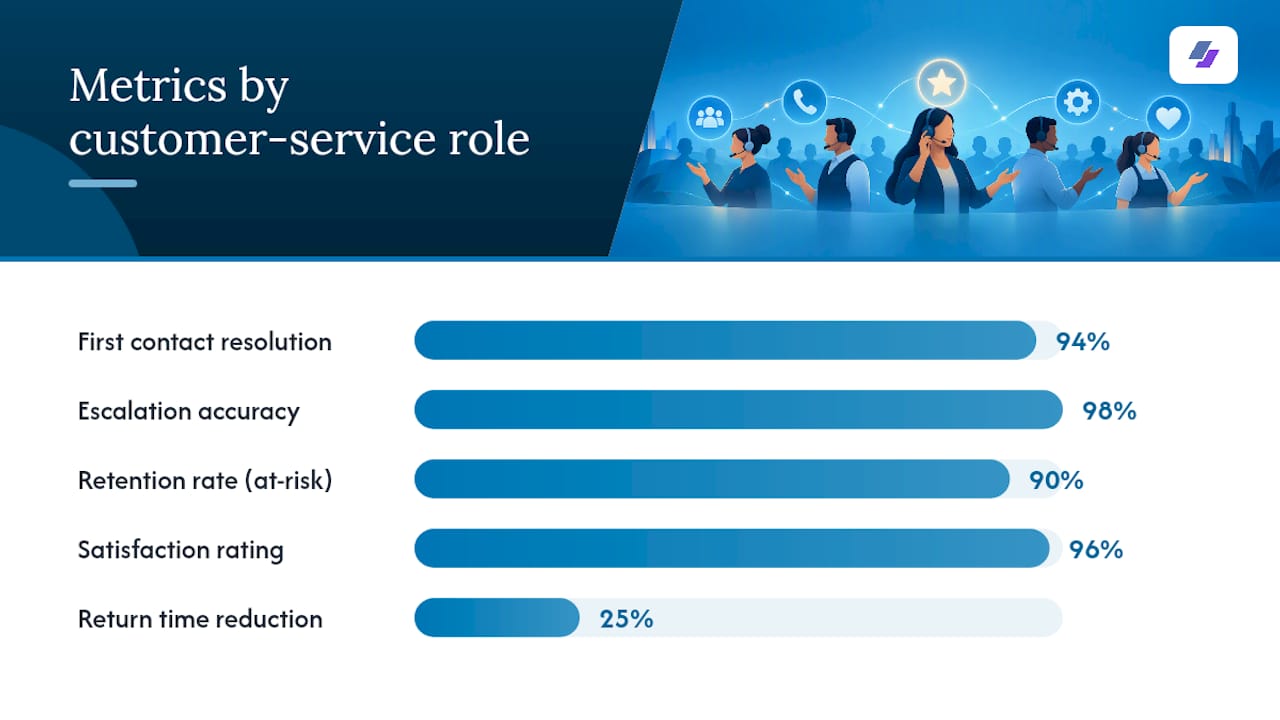
- Call center agent: “Resolved 60+ inbound calls daily, maintaining a 94% first contact resolution rate and a 4.8/5 average CSAT score.”
- Retail customer service: “Reduced return processing time by 25% by streamlining the exchange workflow across two store locations.”
- Technical support specialist: “Escalated complex hardware issues to Tier 2 support with 98% accuracy, cutting average handle time by 15%.”
- Customer success associate: “Retained 90% of at-risk accounts through proactive outreach, contributing to a 12% increase in renewal revenue.”
- Live chat support: “Managed up to 4 concurrent chat conversations while maintaining a 96% satisfaction rating across 500+ monthly interactions.”
- Bilingual support representative: “Trained 8 new hires on CRM workflows and bilingual call scripting, reducing onboarding time by one week.”
Notice the pattern: verb, task, tool or context, and a number. According to Indeed’s guidance on customer service resume skills, converting routine duties into measurable achievements is one of the most reliable ways to catch a recruiter’s attention once a resume clears the ATS. Match your metric to your role: CSAT and NPS for satisfaction-focused positions, retention and renewal rate for customer success, and resolution rate or handle time for high-volume support roles.
Pro Tip: Even if you don’t track a metric daily, most managers can pull rough numbers from monthly reports. A ballpark figure (“handled approximately 50 tickets per day”) still beats a vague statement with no number at all.
ATS and Recruiter Pitfalls That Quietly Sink Resumes
A resume can have every right keyword and still fail if the formatting works against it. Simple, clean layouts consistently parse better than creative ones. Stick to standard fonts, avoid headers and footers for contact information, skip embedded images or icons, and use a single column rather than a two-column design, since many parsers read columns in the wrong order and scramble your work history.
Acronyms deserve careful handling. Some ATS platforms search for the full term, others for the abbreviation, and you rarely know which one a given system prefers. The safest move is to list both on first use: “First Contact Resolution (FCR)” or “Customer Satisfaction Score (CSAT).” After that, you can use the acronym freely elsewhere in the document.
Keyword stuffing is the opposite failure mode, and it backfires in two ways. It reads as unnatural to a human reviewer, and some newer ATS platforms now score for context and sentence coherence, not just term frequency. A skills section packed with 40 disconnected terms looks worse than 15 well-chosen ones woven into real sentences elsewhere.
- Save your resume as a .docx or standard .pdf, never as an image-based PDF.
- Keep it to one page for under 10 years of experience, two pages max beyond that.
- Use standard headings: Summary, Skills, Experience, Education.
- Avoid tables, text boxes, and multi-column layouts.
What the Data and JobAlign’s Own Guides Confirm
The BLS Occupational Outlook Handbook describes customer service representatives as handling complaints, processing orders, and answering questions across phone, email, and chat, with communication, problem solving, and interpersonal skill named as the qualities employers value most. That’s exactly why those terms anchor the keyword categories above rather than niche tool names.
JobAlign’s own ATS resume keyword guide builds on the same logic, mapping job-description language directly into resume sections. If you’d rather see the process automated than manual, that resource and JobAlign’s resume generator are built for exactly this problem.
What Actually Matters Here (and What Doesn’t)
Most keyword advice out there treats every term as equally valuable, and that’s the biggest mistake I see repeated across career blogs. It isn’t. A generalist customer service resume gains far more from nailing “first contact resolution” and “de-escalation” than from cramming in five CRM platform names you’ve barely touched. The BLS data backs this up: the qualities employers name first are communication and problem solving, not tool fluency. Tools matter, but they’re the tiebreaker, not the headline.
The other place conventional advice falls short is density. Plenty of guides tell you to “include more keywords” without ever mentioning that some ATS platforms now weigh context and sentence coherence, not just raw term count. Stuffing ten synonyms into your skills section can actively hurt you with newer systems.
If you take one thing from this article, prioritize exact-phrase matching from the job posting over your own preferred wording, then back every claim with a number. That combination beats a longer keyword list every time.
— Johan
Let JobAlign Handle the Keyword Matching for You
Manually reworking your resume for every posting works, but it’s slow, and it’s easy to miss a phrase the ATS is actually scanning for. JobAlign syncs directly with your LinkedIn profile, then analyzes each job description to pull the exact keywords and phrasing that posting rewards, building an ATS-ready PDF resume from expert-designed templates in minutes rather than hours.
If you want to test the process before committing to anything, the free LinkedIn resume generator will build your first ATS-optimized resume at no cost. When you’re ready for unlimited tailored resumes across every application, plans start at the Solo tier for 4.80 EUR, with Starter, Pro, and Ultimate tiers available depending on how much customization you need. Generate your first tailored resume today.
Sources
BLS Occupational Outlook Handbook, Coursera and Indeed career guides, and JobAlign’s ATS keyword resource informed this article.
- Customer Service Representatives : Occupational Outlook Handbook : U.S. Bureau of Labor Statistics
- Key customer service skills to feature on your resume
- 21 important customer service skills (with resume examples) — Indeed
FAQ
What are good keywords for a customer service resume?
Strong keywords span hard skills (order processing, CRM software), soft skills (active listening, de-escalation), and metrics (CSAT, FCR). The Occupational Outlook Handbook confirms communication and problem solving rank among the top qualities employers seek, which is why those terms should anchor your list.
What is a good resume headline for customer service?
A strong headline names your target role plus one or two defining strengths, such as “Customer Service Representative | CRM & Live Chat Support | CSAT-Driven.” Keep it under 10 words and place it directly beneath your name.
What are the 5 P’s of a resume?
Definitions vary across career sites, and there’s no single standardized framework behind this phrase. Rather than force-fit an unverified acronym, focus on what’s proven to work: clear structure, relevant keywords, measurable results, and correct formatting for ATS parsing.
What are some resume buzzwords to avoid or use carefully?
Vague terms like “team player” or “hard worker” add little without context or proof. Replace them with specific, metric-backed phrasing, such as “reduced average handle time by 15%” instead of “efficient worker,” since Indeed’s guidance points out that measurable achievements consistently outperform generic descriptors with recruiters.
Can JobAlign help me find the right keywords automatically?
Yes. JobAlign analyzes each job posting and syncs with your LinkedIn profile to surface the exact keywords that posting prioritizes, then builds them into an ATS-ready resume. You can start with the free LinkedIn resume generator before deciding whether a paid plan fits your job search.