Where the Education Section Belongs on a Graduate Resume

If you graduated in the last three years, your education section goes near the top, right after your header or summary, not buried below work history. Include your degree, major, school name, location, and graduation month and year (or “expected” if you’re still finishing). Add GPA only if it clears a real threshold. And keep the formatting dead simple: single column, plain text, standard headings, because that’s what lets an applicant tracking system read your degree and coursework correctly instead of mangling them into gibberish.
That’s the whole verdict. Here’s how to execute it.
- Place Education directly under your header or summary
- List degree, major, school, location, and grad date (or “expected”)
- Add GPA only if it’s sufficiently high
- Use single-column, plain-text formatting so ATS software parses every field
Key Takeaways
Placing Education near the top with clean, single-column formatting and role-relevant keywords is what gets recent graduates past ATS filters and in front of hiring managers.
| Point | Details |
|---|---|
| Placement | Put Education directly below your header or summary until you have several years of full-time experience. |
| Core fields | List degree, major, school, location, and graduation date (or “expected”) on clearly separated lines. |
| GPA threshold | Include GPA only at 3.5/4.0 or higher, formatted as “GPA: 3.8/4.0,” and drop it after about three years of work. |
| ATS formatting | Use single-column layout, standard headings, and plain text contact info to avoid parsing failures. |
| Testing your resume | Jobalign can generate and ATS-test tailored Education sections synced from your LinkedIn profile. |
Resources to keep learning
- Resume Sections Ranked by Importance: 2026 Guide: deeper dive on section order
- Job Application Guide for Graduates: 2026 Playbook: full graduate application walkthrough
- Federal Resume Format guide: education examples for formal application tracks
Table of Contents
- The Role of the Education Section for Graduates: What Actually Belongs There
- ATS-Safe Formatting Rules That Keep Your Education Section Readable
- Should You Include Your GPA, and What’s the Cutoff?
- When to Move Education Down the Resume
- Turning Coursework and Capstone Projects Into Real Evidence
- Copyable Education Section Examples for Common Graduate Situations
- Let Jobalign Generate and Test Your Education Section for You
- Sources
The Role of the Education Section for Graduates: What Actually Belongs There
Your education section carries more evidentiary weight than any other part of your resume until you rack up a few years of on-the-job wins. Indeed’s guidance on listing education confirms recruiters expect it up front for early-career candidates, complete with degree, school, and graduation year. The order and phrasing you use signal exactly how “job-ready” you are before a hiring manager reads a single bullet point about your internship.
Here’s the sequence that reads cleanly to both a human and a parser:
- Degree and major on one line: “Bachelor of Science in Mechanical Engineering”
- School name and location on the next line: “University of Texas at Austin, Austin, TX”
- Graduation date aligned right or on its own line: “May 2026”
- Honors or GPA (if applicable) directly beneath the degree line
Double majors get an ampersand or “and” between fields (“Marketing and Finance”), while minors go in parentheses after the major. Certificates earned during school (a Google Data Analytics Certificate, a CFA Level I pass) deserve their own line under the degree, not a separate section that dilutes your resume’s focus.
If your GPA doesn’t clear the bar for including it, swap in an honor instead: “Dean’s List, Fall 2024” or “Graduated Cum Laude” does the same credibility work without the awkward math.

Pro Tip: List honors and GPA on the same line as your degree, not a separate bullet below it. ATS fields often parse by proximity, so keeping related data close together improves the odds it gets extracted as one clean record.
ATS-Safe Formatting Rules That Keep Your Education Section Readable
Most graduates lose points before a human ever sees their resume, because the parser choked on the layout. Atschecker lays out the core rule: single-column layout, standard section headings like “Education,” and contact information in plain text, not inside a header or footer where many parsers never look.
Avoid these common traps:
- Tables, text boxes, or multi-column layouts that scramble field order
- Icons or graphics next to your school name or dates
- Headers and footers holding your phone number or email
- Images standing in for text (a scanned logo, a stylized name banner)
- Inconsistent date formats (“05/2026” in one spot, “May 2026” in another)
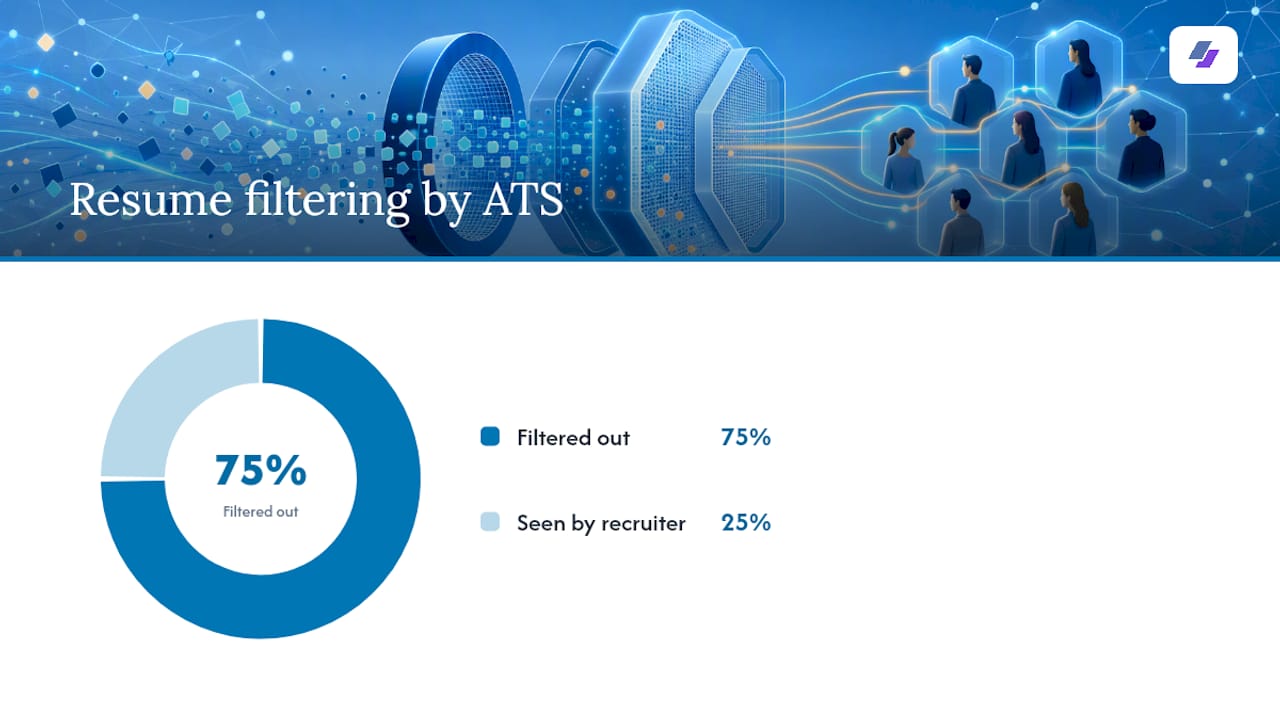
Roughly 75% of resumes get filtered out before a recruiter ever opens them, often for reasons this simple. That statistic should reframe how you think about formatting: it’s not a cosmetic choice, it’s the first gate you have to clear.
Keyword surfacing matters here too. If a job description says “data visualization” and your transcript lists “STAT 340,” rewrite it. Match the language of the posting inside your coursework and project descriptions, and the parser will actually register the overlap.
Should You Include Your GPA, and What’s the Cutoff?
Include your GPA if it’s 3.5 or higher on a 4.0 scale. Below that, CareerBuilder’s guidance on resume GPA recommends leaving it off entirely rather than drawing attention to a number that undersells you. Some career resources use a slightly lower bar around 3.4, but treat 3.5 as the safer default.
- Format it exactly as “GPA: 3.8/4.0,” never just “3.8”
- Place it on the same line as your degree or directly beneath it
- Campus recruiting, investment banking, and consulting roles often expect a GPA regardless of the general rule, since these pipelines screen on it explicitly
- Once you’ve logged about three years of full-time work, drop the GPA. Nobody hiring a mid-level analyst cares what you scored in a sophomore statistics course.
When to Move Education Down the Resume
Recent graduates should keep Education directly below the header or summary, ahead of work experience. That default holds for internships, part-time jobs, and campus leadership roles too.
Move it below your Experience section once one of two things happens: you’ve accumulated two or three years of relevant full-time work, or your job history now tells a stronger story than your degree does. At that point, Education shrinks to a few lines near the bottom.
Keep “Relevant Coursework” or a “Projects” subsection nested near Education only while you’re still light on work history. Once Experience takes the lead spot, fold standout coursework into your skills section instead, and let projects graduate into their own section if they’re carrying real weight.
Turning Coursework and Capstone Projects Into Real Evidence
Course codes mean nothing to a recruiter or a parser. “CS 301” tells nobody anything; “Database Systems (SQL, PostgreSQL)” tells them exactly what you can do. That’s the shift CVailor’s fresh-graduate CV research points to: treat academic work like a mini job history, with tools named and outcomes stated.
- Pick 3 to 6 courses that map directly to the job description, not your favorite electives
- Add the tool or skill in parentheses after each course title
- Write projects as problem, tools used, actions taken, and outcome, ideally with a number or a link attached
- If you have three or more strong projects, break them into a dedicated “Projects” section rather than crowding Education
A capstone that reduced processing time by 40% or a thesis that used a specific statistical method deserves the same specificity you’d give a real job bullet, because to an ATS scanning for keywords, it functionally is one.
Pro Tip: Run your project descriptions through whatever parsing tool you’re using and check whether the tool names survive as recognizable keywords. If “PostgreSQL” comes through as garbled text, rewrite the sentence structure around it.
Copyable Education Section Examples for Common Graduate Situations
Adapt these directly. Each one is built to survive ATS parsing while still reading well to a human.
Strong GPA, traditional degree:
- Bachelor of Business Administration in Finance
- Ohio State University, Columbus, OH
- May 2026 | GPA: 3.7/4.0
- Dean’s List, four semesters
Degree in progress:
- Bachelor of Science in Computer Science
- Georgia Institute of Technology, Atlanta, GA
- Expected Graduation: December 2026
- Relevant Coursework: Data Structures (Java), Machine Learning (Python, scikit-learn), Database Systems (SQL)
Project-heavy candidate, lighter GPA:
- Bachelor of Arts in Economics
- University of Michigan, Ann Arbor, MI
- May 2025
- Capstone Project: Built a regression model forecasting regional housing prices using Python and 10 years of county-level data, achieving 89% prediction accuracy
Each example front-loads the exact fields an ATS is scanning for, degree, school, date, then layers in coursework or project language that mirrors real job posting terms. That’s what separates a resume that parses cleanly from one that gets flagged as incomplete.
If your background doesn’t fit a traditional four-year timeline, a coding bootcamp, a gap year, a transfer between schools, list it the same way: institution, credential, and dates, without apologizing for the path. Recruiters increasingly recognize non-traditional routes as long as the fields are legible to their systems.
A quick note from Johan
After years of watching resumes get rejected for formatting nobody bothered to check, my advice is simple: build your Education section, then actually look at how a parser reads it back. Small wording changes fix most rejections.
— Johan
Let Jobalign Generate and Test Your Education Section for You
Writing the perfect Education section by hand works, but testing it against a live job description every time you apply gets tedious fast. Jobalign syncs directly with your LinkedIn profile, pulls your degree and coursework automatically, and inserts the exact keywords each job posting is scanning for, then runs the result through its own ATS check before you download anything.
Jobalign’s own resume generator reports an 87% ATS pass rate across generated resumes, a brand figure worth knowing even if you build your first draft manually using the steps above. Think of it as optional acceleration: you can absolutely hand-format your Education section using this guide, or you can let Jobalign generate several tailored versions in minutes and see which phrasing survives parsing. If you want to test how your current education fields perform against a specific job posting right now, the ATS resume guide walks through the check step by step.