Tailor Your Resume Summary Keywords in 10 Minutes to Pass ATS

Resume summary keywords are the job-specific hard skills, tools, and title language that ATS software and recruiters both scan for first. The single best move you can make: mirror the exact target job title and the top two or three skills pulled straight from the posting, right in your first three lines. Do that, and you signal relevance to a machine and a human in the same breath.
TL;DR:
- Prioritize including exact job titles and top three skills from at least 10 job postings to improve ATS ranking and recruiter visibility.
- Use clear, measurable, and role-specific summaries that name tools, experience years, and conclude with quantifiable results to increase appeal.
- Ensure each key skill appears naturally in the summary and experience bullets, avoiding keyword stuffing and maintaining human-readable flow.
- Automate initial drafts with tools like JobAlign but verify accuracy, truthfulness, and relevance before submitting.
- Limit keywords to once or twice per document, read summaries aloud to prevent list-like phrasing, and tailor each resume quickly using a structured checklist.
Table of Contents
- What Resume Summary Keywords Are and Why They Matter for ATS and Recruiters
- How to Find the Right Keywords for Your Resume Summary
- How to Use Resume Summary Keywords Without Sounding Like a Robot
- Copyable Resume Summary Templates and Keyword Bundles by Role
- Action Verbs and the What + How + Why Formula for Keyword-Rich Bullets
- How to Avoid Keyword Stuffing and Pass the Human-Read Test
- A One-Page Checklist to Update Your Summary for Any Posting
- How JobAlign Speeds Up Resume Summary Tailoring
- Balancing Automation and Human Judgment When Tailoring Summaries
- Try JobAlign for Your Next Application
- Sources
- FAQ
What Resume Summary Keywords Are and Why They Matter for ATS and Recruiters
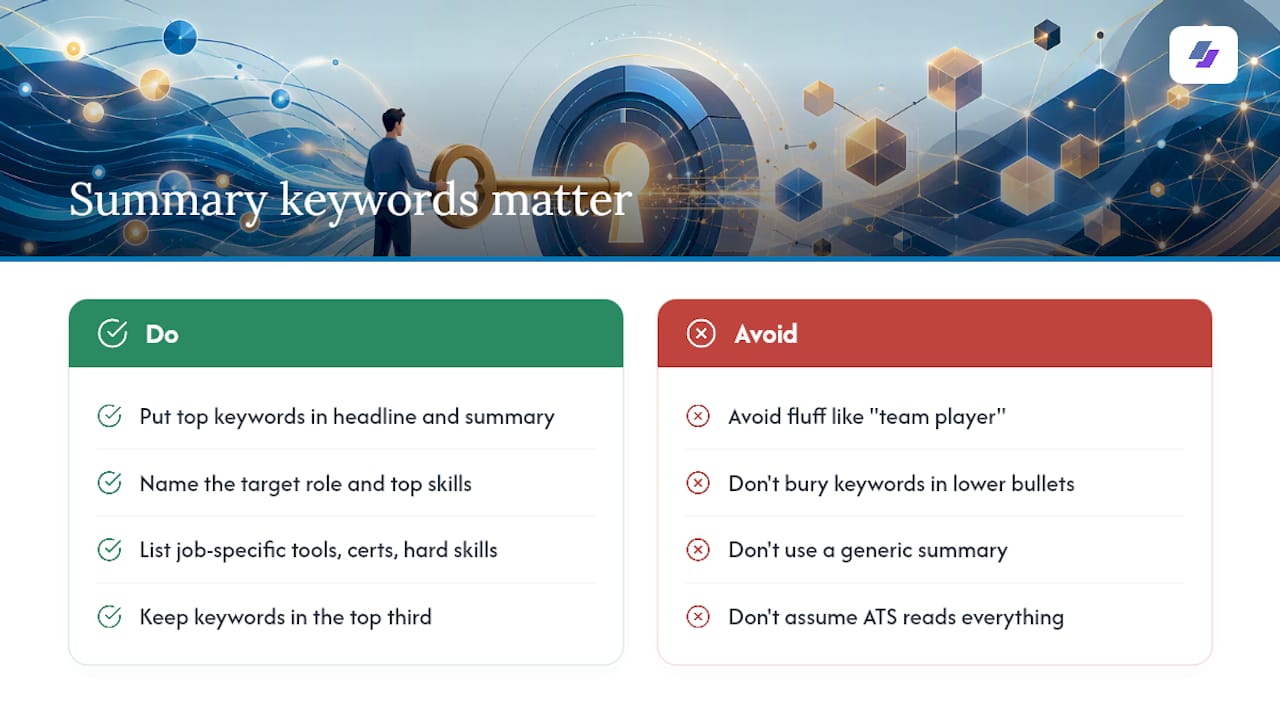
Resume summary keywords are not the same as skills, and they’re definitely not fluff. Resume keywords are job-specific words and phrases — hard skills, tools, certifications, and role terms — that both applicant tracking systems and recruiters use to decide if you’re worth a second look. “Team player” is fluff. “Salesforce administration” is a keyword. The difference matters because one gets you found in a search and the other gets ignored.
Here’s what most job seekers miss: the top third of your resume carries disproportionate weight, as explained in the course on Preparing Students for Career Success: Teaching Real-World Skills. Your headline and summary get scanned more heavily by both software and people than anything below the fold. If you bury your best keywords in a bullet point three-quarters down the page, you’re betting that a recruiter with six seconds per resume scrolls that far. They usually don’t.
The stakes are real. Industry reporting on hiring technology suggests a large share of resumes never reach human eyes because ATS filtering knocks them out first. Summaries that name the target role and its top skills tend to produce measurably better match rates than generic ones. That’s not a coincidence. ATS software parses your summary as a dense signal block, and recruiters use it as a 7 second gut check before they decide whether to keep reading.
How to Find the Right Keywords for Your Resume Summary
You don’t need software to reverse-engineer what an employer wants. You need patience and about 20 browser tabs.
- Pull 10 to 20 live job postings for the exact title you’re targeting. Use the same title every time, even if your resume history uses different labels.
- Highlight repeated terms across every posting. If “SQL” or “cross-functional stakeholder management” shows up in 14 out of 15 listings, that’s not filler. That’s a requirement.
- Sort what you find into two buckets. Exact-match terms are titles, tools, software, and certifications, things like “Tableau,” “PMP,” or “Registered Nurse.” Behavior phrases are softer patterns like “manages competing priorities” or “leads cross-functional teams.”
- Narrow your list to 8 to 15 structural keywords that appear across most postings. This method of scanning 10 to 20 job postings for one title reliably surfaces the tools and phrasing an employer actually cares about, not what you assume they care about.
- Pick your top 3. These go in your summary. The rest get distributed across your skills section and experience bullets.
Pro Tip: Don’t just copy the job title verbatim if it doesn’t match your actual experience. Use a truthful variant that’s close enough to register in a recruiter’s boolean search, since matching the posting’s title language tends to outperform generic titles in those searches.
How to Use Resume Summary Keywords Without Sounding Like a Robot
Your summary should follow a simple, repeatable structure: title | years of experience | domain, followed by your top skills and one quantified result. That’s it. Four lines, no wasted words.
An ATS-friendly resume summary states your title, years, domain, and top skills from the job description, then closes with one metric. No “I” or “me.” No objective-statement clichés from 2005.
Here’s what that looks like in practice:
- Weak: “Hardworking marketing professional seeking a challenging role where I can use my skills.”
- Strong: “Digital Marketing Manager with 6 years in B2B SaaS. Skilled in HubSpot, paid search, and lifecycle campaigns. Grew qualified pipeline by 34% in 12 months.”
Notice the second version names the exact title, the tools (“HubSpot,” “paid search”), and a number. That’s coverage, not decoration.
Coverage matters more than repetition. You should surface each priority keyword in at least two places across your resume, not just cram it once into your skills list. According to guidance on tailoring without stuffing, skills sections often carry elevated weight in ATS parsing, but repeating the same term in your summary and again in a relevant bullet reinforces the match without looking desperate. If “Python” appears in your summary, it should also show up naturally in an experience bullet where you actually used it.
Copyable Resume Summary Templates and Keyword Bundles by Role
Building a summary from scratch every time you apply is exhausting. These templates are meant to be copied, then edited to match your actual background and the posting in front of you.
Technical roles:
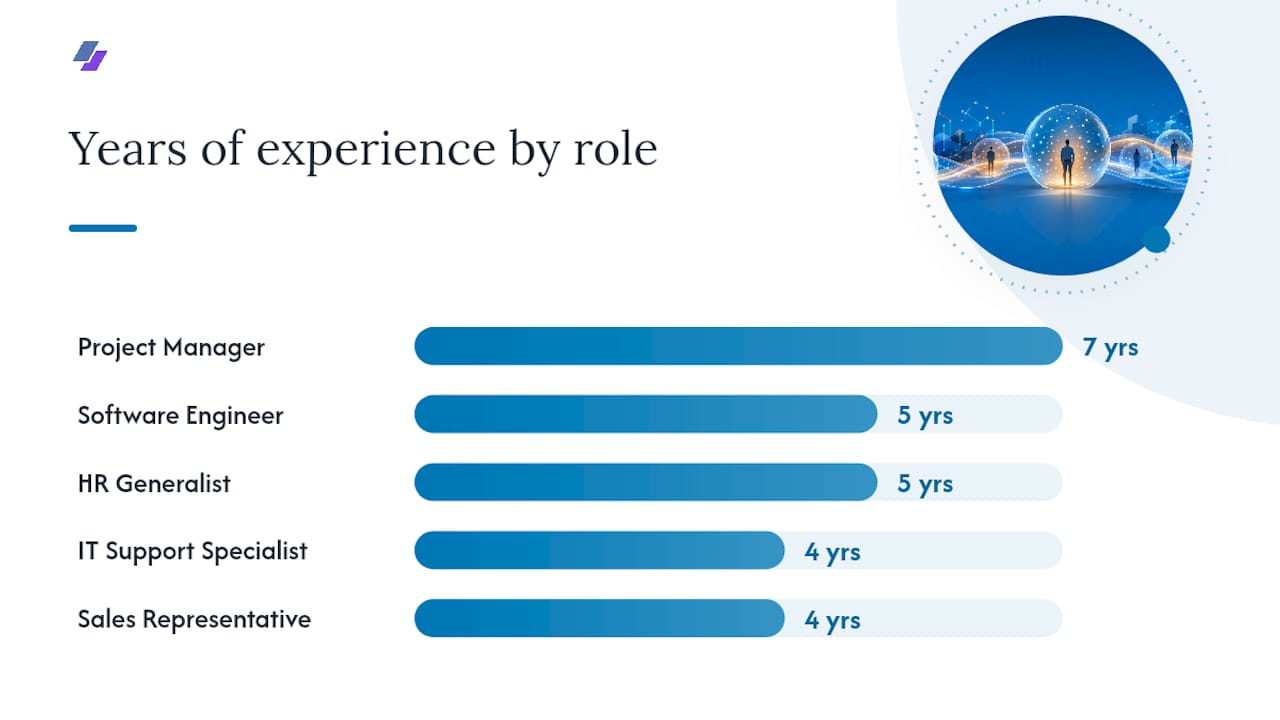
- Software Engineer: “Backend Software Engineer with 5 years building distributed systems in Python and Go. Experienced in AWS, Kubernetes, and CI/CD pipelines. Reduced API latency by 40% across three production services.” Keyword bundle: Python, Go, AWS, Kubernetes, CI/CD, microservices, REST APIs, system design.
- Data Analyst: “Data Analyst with 3 years turning raw data into decisions using SQL, Tableau, and Python. Built dashboards adopted by 5 department heads. Cut reporting time by 60%.” Keyword bundle: SQL, Tableau, Python, data visualization, ETL, dashboards, reporting automation.
- IT Support Specialist: “IT Support Specialist with 4 years resolving hardware, network, and software issues across Windows and macOS environments. Maintained 98% ticket resolution within SLA.” Keyword bundle: help desk, Active Directory, troubleshooting, ServiceNow, network administration, SLA.
Readers hunting for more technical examples can check the developer resume keyword guide for role-specific breakdowns.
Business roles:
- Project Manager: “Project Manager with 7 years leading cross-functional teams in Agile and Scrum environments. PMP certified. Delivered 12 projects on time and 15% under budget.” Keyword bundle: Agile, Scrum, PMP, stakeholder management, risk mitigation, JIRA.
- Sales Representative: “Sales Representative with 4 years exceeding quota in B2B SaaS. Skilled in Salesforce, consultative selling, and pipeline management. Closed $1.2M in new business in one fiscal year.” Keyword bundle: Salesforce, quota attainment, pipeline management, consultative selling, cold outreach.
- HR Generalist: “HR Generalist with 5 years managing onboarding, benefits administration, and employee relations for a 200 person organization. Reduced time to hire by 25%.” Keyword bundle: onboarding, benefits administration, HRIS, employee relations, compliance, recruiting.
Action Verbs and the What + How + Why Formula for Keyword-Rich Bullets
Weak summaries lean on adjectives. Strong ones lean on verbs plus proof. Words like “engineered,” “negotiated,” “automated,” “reduced,” and “scaled” carry more weight than “responsible for” ever will, because they imply an outcome instead of a duty.
The formula that ties this together is What + How + Why: state what you did, how you did it (naming the tool or method), and why it mattered (the result). A single well-built bullet using this structure can carry multiple keywords naturally without reading like a list stapled together.
Before: “Responsible for managing social media accounts.”
After: “Grew Instagram engagement 45% by launching a content calendar in Sprout Social, directly increasing inbound leads.”
That rewrite hits three keywords, “Instagram,” “content calendar,” and “Sprout Social,” while sounding like something a human actually did.
Pro Tip: Keep a running list of 10 action verbs you default to, then force yourself to swap in a fresh one every time you catch yourself typing “managed” or “helped” for the third time in one resume. For a longer list of high-impact verbs, the action verb rewrite guide breaks down dozens of before-and-after examples.
How to Avoid Keyword Stuffing and Pass the Human-Read Test
Keyword stuffing is when a summary reads like it was written for software, not for the person holding the resume. It usually shows up as the same term repeated three or four times in two sentences, or a summary that’s just a list of nouns with no verbs connecting them.
A safer rule: each priority keyword should appear once or twice across the whole document, not once per line. If you find yourself repeating “cross-functional” four times on one page, cut it to two.
Run this human-read test before you submit anything:
- Read your summary out loud. If it sounds like a list, it probably is one.
- Ask whether a stranger with no resume-writing training would find it believable.
- Check whether every keyword you used is backed by a real bullet point elsewhere on the page.
Recruiters flag a few patterns as immediate red flags: keyword lists disguised as sentences, skills with zero supporting evidence in the experience section, and summaries that use the exact same phrasing as the job posting word for word, sentence for sentence. That last one reads as copy-paste, not tailoring. Boolean recruiter searches often hunt for literal tokens like specific software names, so exact-match coverage of your real hard skills matters more than cramming in synonyms just to raise density.
A One-Page Checklist to Update Your Summary for Any Posting
Before you hit submit, run through this in the order below.
- (2 minutes) Copy the exact job title into your summary’s first line, if truthful.
- (5 minutes) Pull your top 3 keywords from your 10 to 20 posting scan and slot them into lines two and three.
- (2 minutes) Add one quantified result to close the summary.
- (3 minutes) Save the file with a role-specific name, something like “LastName_ProjectManager_CompanyX.pdf,” never a generic “Resume_Final.pdf.”
- (3 minutes) Run an ATS scan or manually cross-check that each summary keyword also appears once more in your skills or experience section.
Ten minutes, start to finish, once you’ve done the keyword research once.
How JobAlign Speeds Up Resume Summary Tailoring
Manually rebuilding a role-versioned summary for every application is the part most job seekers quit on by application number six. JobAlign’s approach syncs directly with a user’s LinkedIn profile, then analyzes the target job description to extract and match relevant experience and skills against it, according to the company.
The gap between a generic summary and a tailored one usually isn’t creativity. It’s time. Most job seekers know what a strong summary looks like; they just can’t rebuild one from scratch for every single posting they apply to.
JobAlign states its keyword-matching process contributes to an internally reported 87% ATS optimization success rate, a figure the company attributes to its own usage data rather than an independent audit. Whatever tool generates your first draft, verify three things afterward: that the job title variant is truthful, that your top keywords actually appear twice across the document, and that the quantified result in your summary is one you can defend in an interview.
Balancing Automation and Human Judgment When Tailoring Summaries
Automation is a time-saver, not a replacement for judgment. A tool can pull the right tokens out of a job posting faster than you can read it twice, but only you know whether “led a team of 12” is accurate or aspirational.
The rule I’d give any job seeker: let automation build the first draft, then read it out loud before you send it anywhere. If a line makes you wince, it’ll make a recruiter wince too. Honesty and specificity beat density every time.
— Johan
Try JobAlign for Your Next Application
Rewriting your summary by hand for every posting is the exact bottleneck this whole guide is trying to help you skip. JobAlign builds on the workflow above automatically: it syncs with your LinkedIn profile, pulls the target job description, and generates a tailored, ATS-optimized resume with the right keywords already placed in your summary, skills, and experience sections, according to the company. Users can generate multiple tailored resumes for different roles, and also receive a personalized cover letter with each one.
If you want to see it work before committing to anything, try the free LinkedIn resume generator first. When you’re ready for unlimited tailored versions, the Solo plan starts at 4.80 EUR one time, with Starter, Pro, and Ultimate tiers available if you’re applying at higher volume.
Sources
- How To Use Resume Keywords and Phrases (With Example) | Indeed
- Resume Keywords and ATS Optimization in 2026 - JobStrack
- ATS Keywords: How to Match the Job Post Without Sounding Fake - ResumeSolving
- Atschecker
FAQ
What’s a good summary for resume examples?
A strong resume summary states your title, years of experience, and domain, lists your top 3 skills pulled from the job description, and closes with one measurable result, all in three to four lines. The technical and business role examples above follow this exact structure.
What are the 5 P’s of a resume?
There’s no single, universally agreed-on “5 P’s” framework in professional resume writing, so treat any version you see with caution. What consistently works instead is naming your position (title), proof (metrics), proficiency (hard skills), pattern (keywords matched to the posting), and precision (no filler).
What is the 7 second rule in resume?
Recruiters often decide whether to keep reading a resume within about seven seconds of a first scan, which is why your top third, your headline and summary, carries the heaviest weight. If your title and top skills aren’t visible in that window, the rest of the page may never get read.
What is a red flag on a resume?
Common red flags include keyword lists with no supporting bullet evidence, phrasing copied word for word from the job posting, and skills claimed in the summary but never mentioned again in your experience section. Recruiters read these as signs of stuffing rather than genuine qualification.
How do resume keywords differ from skills?
Keywords are the specific terms, tools, titles, and phrases an employer searches for, while skills are the broader capabilities you’re claiming. A skill like “project management” becomes a keyword when it matches the exact language, such as “Agile project management,” used in the job posting itself.